Agent Harness vs MCP: How the AI Agent Stack Fits Together
An agent harness runs the loop; MCP is the standard plug it uses to reach tools and data. This explainer maps all seven layers of the AI agent stack and traces one real request through each.

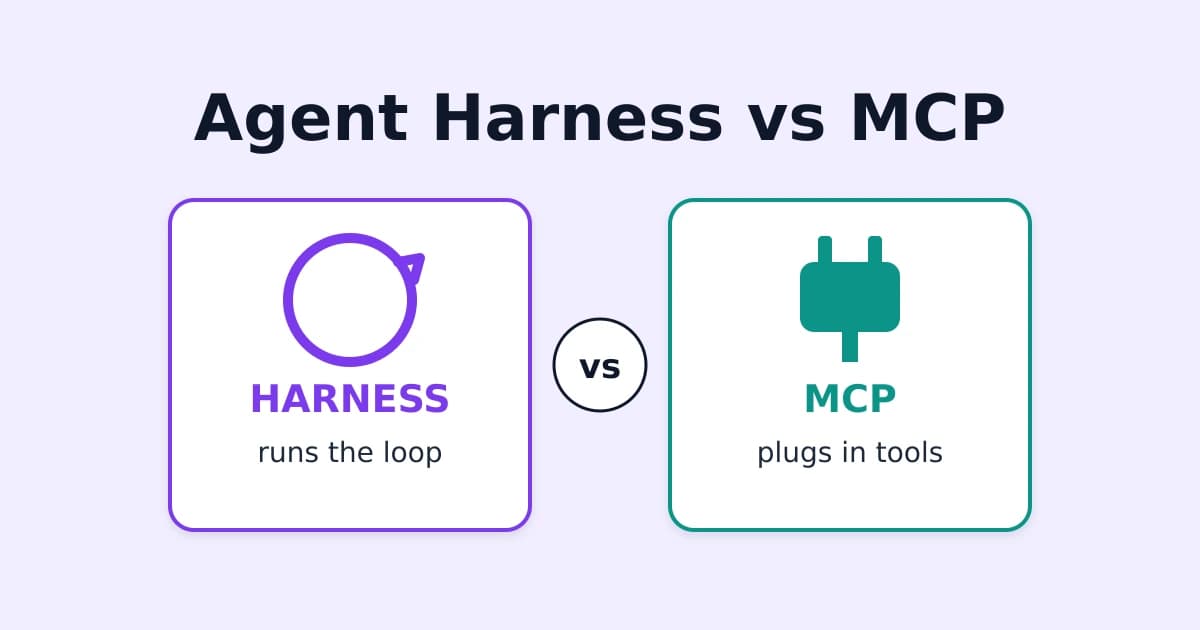
The agent harness vs MCP question has a short answer: they are different layers, not rivals. The Model Context Protocol (MCP) is an open standard for how an AI application connects to tools and data. An agent harness is the program that runs the agent loop and decides when to use those connections. You almost always need both, plus a model, skills, memory and, at scale, a gateway.
This explainer maps the seven layers of the AI agent stack, traces one request through all of them, and ends with a build plan and a security table. If you are new to agents, start with our primer on how AI agents work and come back.
What each layer of the AI agent stack does (and what it is not)
One mental model covers most agent systems: the model thinks, the harness runs the loop, tools act, MCP is the plug standard for tools and data, skills package know-how, memory carries context, and the gateway controls traffic, cost and security.
Anthropic's engineering team describes the starting point as the "augmented LLM": a model given retrieval, tools and memory, which can write its own search queries, choose tools and decide what to keep, according to its essay Building Effective Agents. The same essay separates workflows, where code follows predefined paths, from agents, where the model directs its own process and tool use. The layers below are what turn that augmented model into a working agent.
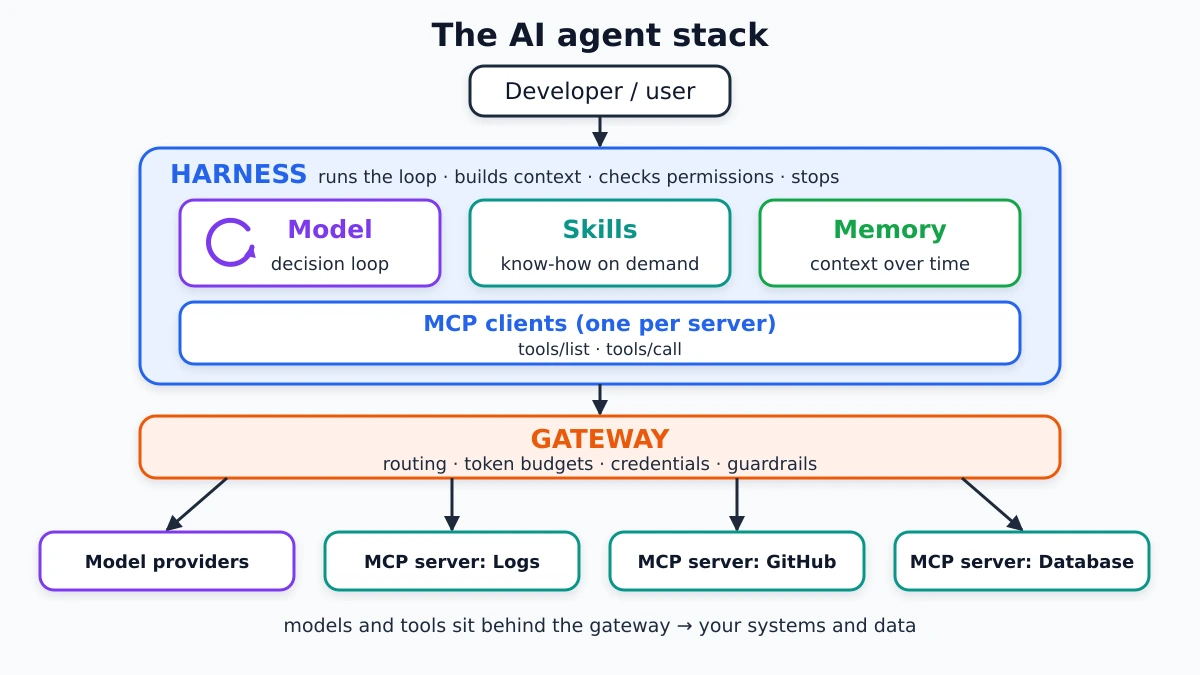
Model. The large language model reads the context and decides the next step, which may be an answer or a tool call. It is not the agent. It does not run tools, keep state between API calls or enforce permissions.
Harness. The runtime around the model. It builds the prompt, calls the model, carries out tool calls, feeds results back, checks permissions and stops the loop. A harness is not a model and not a protocol.
Tools. Functions with a name, a description and an input schema, such as "search logs" or "create pull request". A tool is not a skill; it does something in another system.
MCP. A wire protocol that standardizes how an application discovers and calls tools, reads data and fetches prompt templates from servers. MCP is not an agent, not a model and not an agent framework.
Skills. Packaged instructions, scripts and reference files that teach the agent how to do a task, loaded only when relevant. A skill is not a tool and cannot reach a system by itself.
Memory. Whatever carries context forward: the running conversation, notes saved between sessions, or a search index. Memory is not training; the model's weights do not change.
Gateway. A proxy between agents and model or tool backends that handles routing, token budgets, credentials and guardrails. A gateway is not a harness; it never decides what the agent should do next.
How does MCP connect an agent to tools and data?
The MCP specification defines three participants that exchange JSON-RPC 2.0 messages. A host is the AI application. A client is a connector inside the host. A server is a program that provides context and capabilities. According to the MCP architecture guide, the host creates one client per server, and each client keeps a dedicated connection. Its example: VS Code acts as a host and opens a separate client for the Sentry server and for a local filesystem server.
Servers can offer three primitives:
Tools: functions the model can execute, such as file operations, API calls or database queries.
Resources: data that gives context, such as file contents or database records.
Prompts: reusable templates, such as a system prompt or few-shot examples.
A client discovers tools with tools/list and runs one with tools/call. Two transports are standard. With stdio, the client launches the server as a local subprocess. With Streamable HTTP, each message is an HTTP POST to one endpoint, which suits remote servers. The current revision, dated 2026-07-28, makes the protocol stateless, so every request carries its own version and capabilities. It also deprecates sampling, the feature that let servers ask the client's model for completions.
The architecture guide is explicit about scope: MCP covers context exchange only and does not dictate how applications use LLMs or manage the context they receive. That sentence is the whole agent harness vs MCP distinction in one line.
Is MCP the same as function calling?
No. Function calling, also called tool use, is how one model API lets the model request a function call. In Anthropic's tool-use docs, you define a tool with name, description and input_schema. Claude replies with stop_reason: "tool_use", your code runs the function, and you return a tool_result. OpenAI's guide describes the same five-step loop with a function_call output and a call_id.
MCP sits one level out. The harness collects tool definitions from MCP servers, passes them to the model through whichever function-calling API it uses, then forwards the model's call to the right server. Function calling is the model-to-harness link; MCP is the harness-to-system link.
That also settles the tools vs MCP boundary. A tool is the capability itself, and it can exist without MCP: you can declare it directly in the API request and run it in your own code. MCP is one standard way to package tools in separate servers so any compatible host can discover and call them.
Where A2A fits
The Agent2Agent (A2A) protocol, governed under the Linux Foundation, handles a different link again. Its project site puts it plainly: MCP connects an agent to tools, APIs and data, while A2A connects it to other agents, and the site recommends using both. A2A lets agents coordinate without sharing their internal memory, tools or logic.
Agent harness vs MCP, and skills vs MCP tools
These are the two mixups developers search for most. Future AGI, a vendor of agent evaluation tools, frames "harness vs MCP" as a category mismatch, like comparing a web server to HTTP, in a July 2026 post. The MCP docs back that reading: the spec says MCP itself cannot enforce security principles at the protocol level, so those controls belong to the application, which is the harness.
Agent harness vs MCP at a glance
| Question | Agent harness | MCP |
|---|---|---|
| What is it? | A runtime program | An open protocol specification |
| Runs the agent loop? | Yes: calls the model, runs tools, decides when to stop | No |
| Manages context and memory? | Yes | No; it only delivers context |
| Enforces permissions? | Yes, through consent prompts and policies | Defines consent principles; cannot enforce them |
| In MCP terms it is… | The host (with its clients) | The rules between client and server |
| Can you swap it? | Yes, keep your MCP servers | Yes, keep your harness and switch servers |
Skills vs MCP tools at a glance
Anthropic's Agent Skills docs describe a skill as a folder with a SKILL.md file whose YAML front matter has a name and a description, plus optional scripts and templates. Skills load in stages. At startup only the name and description sit in context, at about 100 tokens per skill. The body loads when the skill is triggered, at under 5k tokens. Bundled files cost nothing until they are read.
| Question | Skill | MCP tool |
|---|---|---|
| What it carries | Know-how: steps, conventions, scripts | A capability: one callable function |
| Where it lives | Files in the agent's environment | Inside an MCP server, local or remote |
| When it enters context | Metadata always; body only when triggered | Its definition when the harness lists tools |
| Reaches external systems? | Only through tools or scripts it tells the agent to run | Yes, that is its job |
| Typical example | "How our team triages a production incident" | search_logs, create_pull_request |
The two work together: a triage skill can tell the agent which log tool to call first and what to check before opening a PR.
One request traced end to end (illustrative workflow)
A developer asks a coding agent: "Find why checkout API errors spiked last night and open a fix PR." The setup below is illustrative. It shows the order in which layers act, not any specific product. For the loop itself in more depth, see how coding agents work: loop, permissions and feedback.
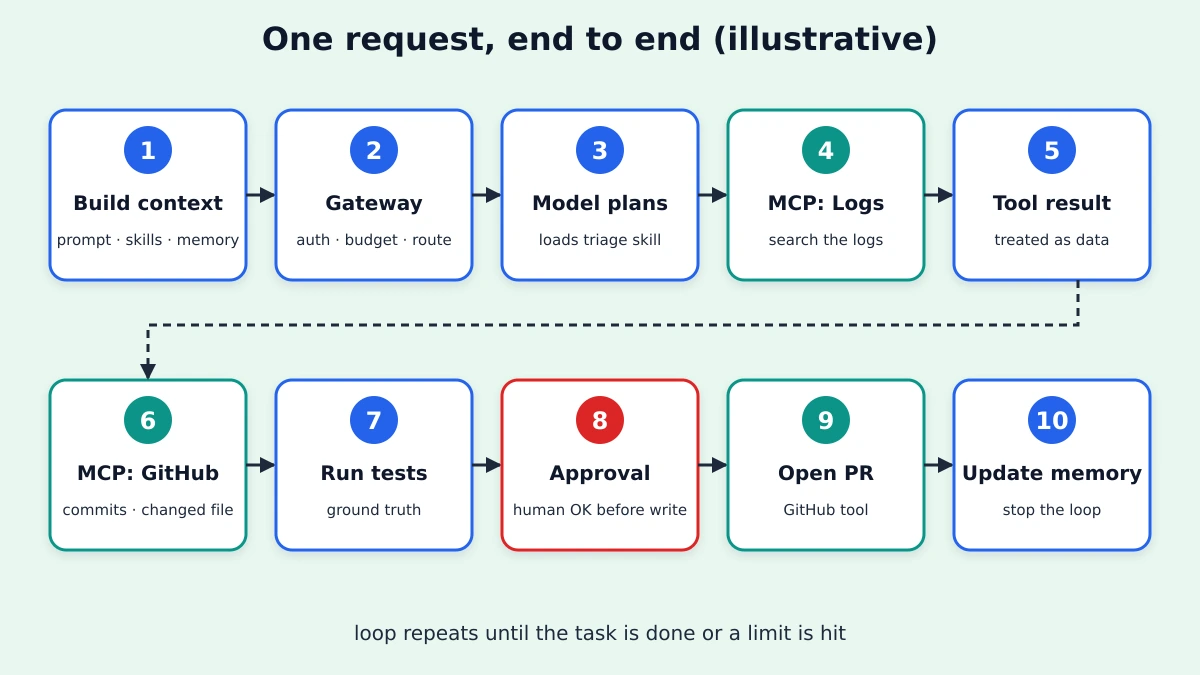
The harness builds the context. It combines the system prompt, the names and descriptions of installed skills, saved project notes from memory, and the tool list it got by calling
tools/liston a logs MCP server and a GitHub MCP server.The request passes through the gateway. The agent authenticates only to the gateway, which holds the model provider's keys. The gateway checks the team's tokens-per-minute budget and routes the call to the configured model.
The model plans. It matches the request to an "incident triage" skill by its description. The harness loads that skill's
SKILL.mdbody into context, and the model now knows the team's triage steps.The model calls a tool. It asks for a log search on the checkout service for last night's window. The harness routes this to the logs server as a
tools/callrequest. Over Streamable HTTP, the request carriesMcp-Method: tools/calland anMcp-Nameheader with the tool name, so the gateway can route it without parsing the body.The result returns into context. The server replies with content, and the harness appends it as a tool result. The harness treats this text as data, because log lines can contain anything, including instructions planted by an attacker.
The loop runs again. The model sees errors starting after a deploy and calls GitHub tools to list recent commits and read the changed file. Each call is one more trip around the same loop.
The agent checks its own work. The model writes a fix and the harness runs the test suite. Anthropic's essay calls this getting "ground truth" from the environment at each step.
A permission check stops before the write. Creating a branch and opening a PR changes a shared system, so the harness pauses for human approval. The MCP spec says hosts must get explicit user consent before invoking any tool; harnesses usually turn that into a policy such as "reads allowed, writes need approval".
The PR is opened. After approval, the harness calls the GitHub server's pull-request tool and returns the link.
Memory is updated and the loop stops. The harness saves a short root-cause note for future sessions and ends the run because the task is complete. The gateway records the session's total token use against its budget.
Notice who did what: the model made every decision, the harness did every action, and MCP carried every tool call in one standard format.
A second example: a support agent with refund approval (illustrative)
An e-commerce team builds a support agent. An MCP server in front of the orders database exposes read-only tools such as "get order status", plus the refund policy as a resource. Refunds sit in a separate server with its own narrow permission scope.
A customer asks where their order is. The agent calls the read-only tool and answers. The customer then asks for a refund. The agent checks the policy resource and prepares the refund call, but the harness requires a human agent's approval for any money movement. MCP's elicitation feature also lets a server ask the user for more information or confirmation of an action, according to the architecture guide.
The design choice matters more than the protocol here, which is the agent harness vs MCP split again: MCP carries the calls, the harness decides which ones need a human. Splitting read and write tools across servers with different scopes means a leaked read token cannot issue refunds.
Agent stack layers compared: owner, example and common mistake
| Layer | What it does | Example | Who owns it | Common mistake |
|---|---|---|---|---|
| Model | Reasons and picks the next step or tool call | Claude, GPT, Gemini, a self-hosted Llama on vLLM | Model provider, or your ML team if self-hosted | Expecting it to remember past sessions or enforce rules |
| Harness | Runs the loop, builds context, runs tools, checks permissions, stops | Claude Code, VS Code, an app built on an agent SDK | The team building the agent | No iteration cap and no approval step for writes |
| Tools | Do one action in another system | search_logs, get_order | Owner of the system the tool touches | Vague descriptions; one tool that does too much |
| MCP | Standard way to discover and call tools, resources and prompts | Filesystem server (local), Sentry server (remote) | Open spec; each server's owner | Calling MCP an agent; installing unvetted servers |
| Skills | Package know-how that loads on demand | A SKILL.md for incident triage | Team that owns the process | Using a skill where a tool is needed; trusting unknown skills |
| Memory | Carries context across turns and sessions | Conversation history, a project notes file, a vector index | The harness or app team | Stuffing everything into context; saving secrets |
| Gateway | Routes traffic, enforces token budgets, holds credentials, applies guardrails | Agent Router (formerly Envoy AI Gateway) | Platform or DevOps team | Every agent holding raw provider keys; no per-session cap |
On the gateway row: Google Cloud engineers describe Envoy, the open-source proxy, as a data plane for agent traffic in a post published on 19 November 2026. They say it can route by model name, fall back to another model pool on a 429 error, enforce per-minute and per-day token limits, and throttle agent sessions that exceed their budget. The project formerly called Envoy AI Gateway now runs as Agent Router, an Agentic AI Foundation project.
How to build a minimal agent stack
A small, safe first stack takes six steps. Keep the agent harness vs MCP split in mind while building: steps 1, 5 and 6 are harness and platform decisions, and step 2 is the only MCP step. None of them needs a gateway on day one, but plan where one will go.
Pick a harness. Use an existing MCP host (a coding agent, an IDE agent mode, a desktop app) or an agent SDK if you are building your own product. Check that it supports approval prompts and an iteration limit.
Add one or two MCP servers. Start with read-only access. The official quickstart connects the reference filesystem server to Claude Desktop with the config below.
Write one skill. Pick a task your team repeats. Anthropic's docs require a
nameof at most 64 characters (lowercase letters, numbers and hyphens) and adescriptionof at most 1,024 characters that says both what the skill does and when to use it.Decide on memory. Choose what persists between sessions (a notes file is often enough) and what must never be stored, such as tokens and customer data.
Add guardrails. Set a maximum number of loop iterations, require approval for writes, and log every tool call. Have a tested way to stop a run; our guide to an AI agent kill switch covers the options.
Add a gateway when you share the stack. Once several agents or teams use the same model accounts, centralize keys, budgets and routing there.
When you don't need MCP (or an agent) yet
Not every project needs the full stack. Anthropic's essay advises finding the simplest solution possible and adding complexity only when needed, which may mean no agent at all. It notes that agents trade latency and cost for better task performance, and that for many applications a single well-built LLM call with retrieval and examples is usually enough.
The same logic applies to MCP. A small single-purpose app with one or two tools can declare them directly through function calling and skip running servers. MCP starts to pay off when several apps or teams share the same tools, when a tool is maintained by someone other than the agent team, or when you want to switch hosts without rewriting integrations. Anthropic also suggests starting with model APIs directly rather than a framework, because extra abstraction can hide the underlying prompts.
This is the filesystem server entry from the MCP docs' local server guide, for macOS. On macOS the file is ~/Library/Application Support/Claude/claude_desktop_config.json; replace username with your own.
{
  "mcpServers": {
    "filesystem": {
      "command": "npx",
      "args": [
        "-y",
        "@modelcontextprotocol/server-filesystem",
        "/Users/username/Desktop",
        "/Users/username/Downloads"
      ]
    }
  }
}
"filesystem" is a display name, npx -y downloads and runs the server package, and the last two arguments are the only folders the server may touch. The guide warns that the server runs with your user account's permissions, so list only folders you are comfortable letting the agent change. On a shared VPS or a Docker host, the Streamable HTTP spec says a local server should bind only to 127.0.0.1 and must validate the Origin header to block DNS rebinding.
Which layer fixes which security and cost risk?
Most agent failures come from a missing control in the harness, the server or the gateway, not from the model. The table maps common risks to the layer that should own the fix, using the MCP security best practices, the Skills docs and Google Cloud's gateway post.
| Risk | How it happens | Layer that fixes it | What to do |
|---|---|---|---|
| Prompt injection through tool results | Fetched pages, logs or tickets contain instructions the model follows | Harness, plus gateway guardrails | Treat tool output as data; require approval for writes; Google describes sending tool calls to injection and data-leak detectors through Envoy |
| Untrusted tool descriptions | A server describes a tool as harmless when it is not | Harness (host) | The MCP spec says to treat tool annotations as untrusted unless the server is trusted |
| Malicious local server | A config's startup command runs arbitrary code with your privileges | Harness, plus your install policy | The MCP guidance says one-click setups must show the full command and get consent; sandbox servers where possible |
| Over-broad permissions | A token with wildcard scopes such as files:* or db:* leaks | MCP server and auth server | Start with minimal scopes and request more only when a privileged tool is first used |
| Token passthrough | A server forwards a client's token to a downstream API | MCP server | The spec says servers must not accept tokens that were not issued for them |
| Untrusted skills | A skill's scripts make unexpected network calls or file access | You, before install | Anthropic's docs advise skills only from trusted sources, audited like software |
| Token runaway | An agent loops, re-reading the same files or retrying the same call | Harness and gateway | Cap iterations in the harness; cap tokens per session or agent ID at the gateway |
| Credential sprawl | Every agent stores its own provider keys | Gateway | Agents authenticate to the gateway only; keys stay there and rotate in one place |
One newer control is worth knowing. Because gateways may route on the Mcp-Method and Mcp-Name headers while the server acts on the body, the 2026-07-28 spec requires servers to reject any mismatch with HTTP 400 and error code -32020 (HeaderMismatch). That closes a gap where a tampered header could route one call while another ran.
My take on the agent harness vs MCP debate
My read is that most confusion here comes from naming, not technology. Teams say "we use MCP" when they mean "we have an agent," and then look to the protocol for loop control, memory and permissions it was never designed to provide. Those problems belong to the harness, and the work of making them reliable is what we call harness engineering.
The practical change I would push for is ownership: give each layer in the table above a named owner, so an incident review starts with the right team.
The bottom line on agent harness vs MCP
Do not choose between them. Pick a harness you can control (approvals, iteration caps, logs), connect your systems to it through MCP servers with the narrowest scopes that work, and write skills for the tasks your team repeats. Add a gateway as soon as more than one team or agent shares model accounts. If you can name which of the seven layers owns a given failure, you understand the stack well enough to build on it and to answer the interview question.
Frequently asked questions
What is MCP, in one line for an interview?
MCP (Model Context Protocol) is an open standard that defines how an AI application, the host, connects through clients to servers that expose tools, resources and prompts, using JSON-RPC 2.0 over stdio or Streamable HTTP. The official docs compare it to a USB-C port for AI applications.
What is an agent harness?
It is the runtime around a model that runs the agent loop: it assembles the prompt, sends it to the model, executes the tool calls the model requests, returns results, enforces permissions and stops on completion or a limit. In MCP terms, the harness is the host application.
Is the agent harness vs MCP question a real choice?
No. MCP standardizes the connection to tools and data, and the harness decides when and how to use it, so most production agents use both. The MCP spec itself says it cannot enforce security at the protocol level, which leaves those controls to the harness.
What is the difference between a skill and an MCP tool?
A skill packages instructions, scripts and reference files that teach an agent how to do a task, and it loads only when relevant. An MCP tool is a callable function inside a server that acts on an external system. A skill often tells the agent which tools to call and in what order.
How is MCP different from A2A?
MCP connects an agent to tools, APIs and data, while the Agent2Agent (A2A) protocol connects an agent to other agents, according to the A2A project site, which recommends using both. A2A is governed under the Linux Foundation.
Does MCP replace function calling?
No. Function calling is how a model API such as Anthropic's or OpenAI's lets the model request a tool call from your code. MCP sits behind that: the harness gathers tool definitions from MCP servers, offers them through function calling, and forwards each call to the right server.
Concepts in this article
- Artificial intelligence
- Computer systems that perform tasks that normally need human intelligence.
- Model Context Protocol (MCP)
- An open protocol for connecting AI applications to tools and data sources.
- AI agents
- Systems where a model plans and takes actions with tools in a loop toward a goal.
- Agent harness
- The code around a model that manages state, tools, context, permissions and feedback.
- Coding agents
- AI agents that read, write and run code in a repository.
- HTTP
- The request–response protocol of the web: methods, status codes and headers.
- Stacks
- Last-in, first-out storage, used for brackets, undo and depth-first search.
- Tool calling
- Letting a model request a function call (search, code, an API) and use the result.
How we research, write and check articles