LLM vs SLM: How to Choose the Right AI Model for Your Product
LLM vs SLM, explained for developers building AI products: what each term means, when a small model is enough, the GPU memory and cost math, and a routing pattern that uses both.

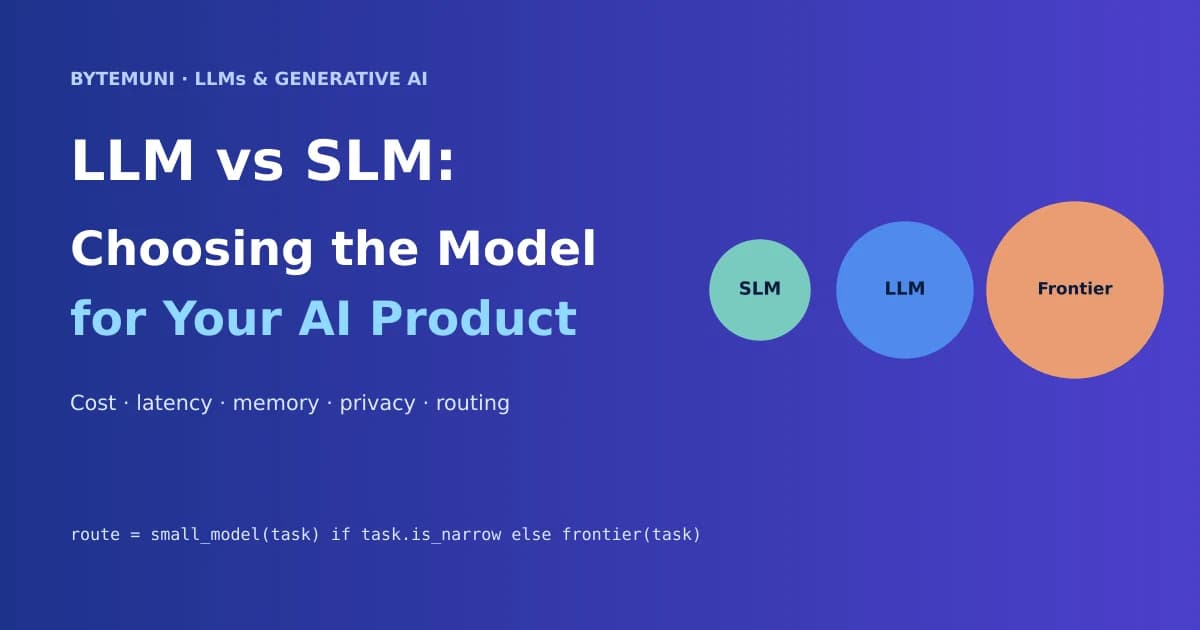
LLM vs SLM comes down to the task, not the model's fame. Use a small language model (SLM) for narrow, repeated, measurable work like classification and extraction. Use a large or frontier LLM for open-ended reasoning, messy input and multi-step tool use. Most real AI products end up using both, with a router deciding which model handles each request.
That's the short answer. The longer one is where teams actually lose money: picking a model before they've defined the job, comparing parameter counts that don't mean what they think, and self-hosting when a hosted small model would have cost a quarter as much.
This guide walks through how I'd make the call as a developer building an AI feature in late 2026: what the terms mean, the memory and cost math you can do on a napkin, a routing pattern you can ship, and a checklist to run before you commit.
Run each task in your product through these four questions. Different features of the same app often land on different models.
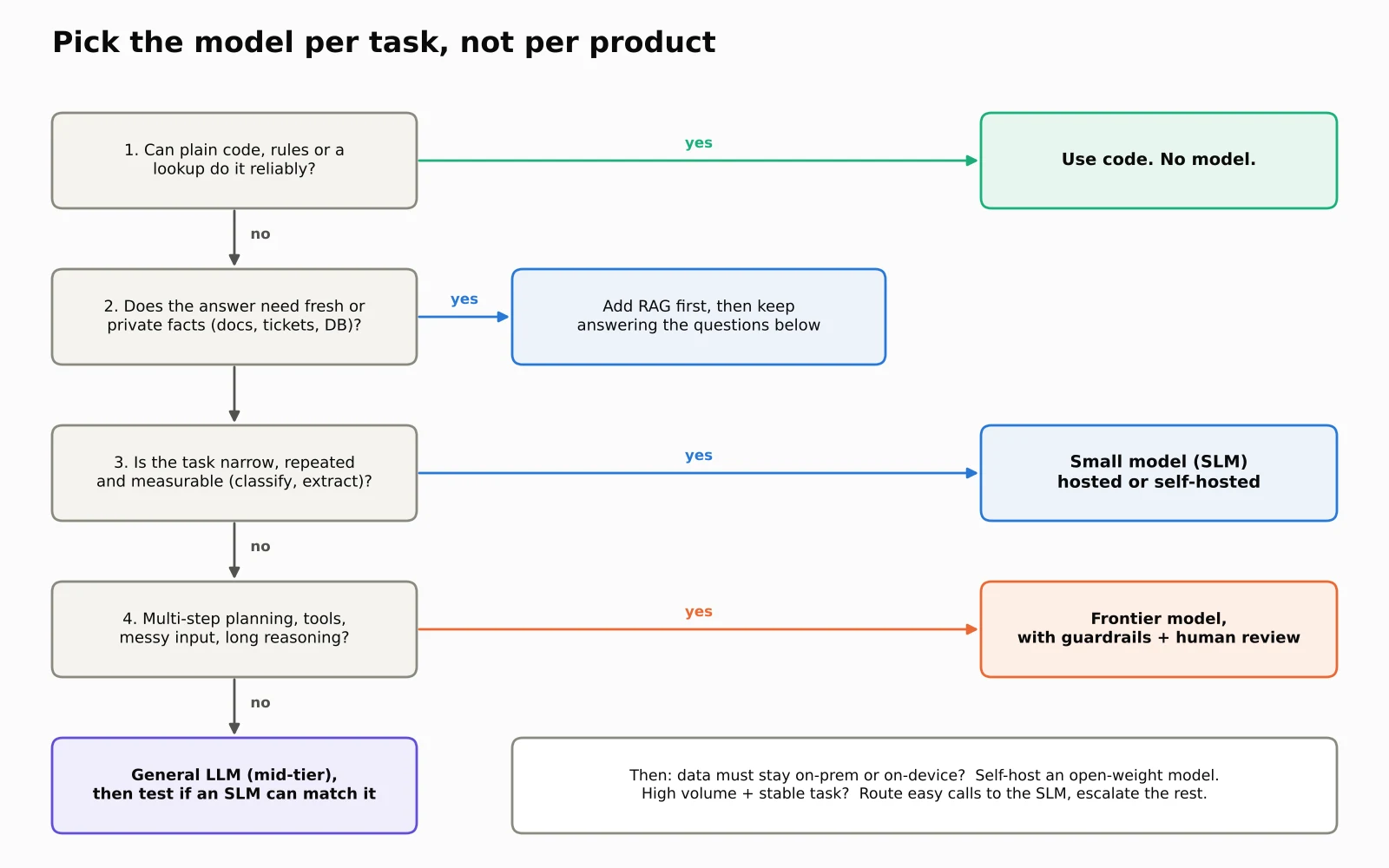
What LLM, SLM and frontier model actually mean
All three are language models built on the same idea: predict the next token from context. The labels describe how big they are and how we use them, not three different technologies.
LLM (large language model) is the umbrella term. In everyday use it means a general-purpose model with tens of billions of parameters or more, broad knowledge across domains, and the ability to hold a long, nuanced conversation. Parameters are the learned weights; more of them usually buys more knowledge and better reasoning, at the price of more memory and compute per request.
SLM (small language model) has no official cutoff. Most people mean roughly under 10 billion parameters. I prefer the definition from NVIDIA's 2025 position paper, Small Language Models are the Future of Agentic AI: a model that can run on a common consumer device with latency low enough to serve one user's requests. That definition ages better than a parameter number, because "small" keeps getting more capable.
Frontier model is the most capable tier available at any given moment: the flagship models from the big labs, with the strongest reasoning, long tool-using workflows and multimodal input. Frontier models are LLMs; the label just says "best available right now".
A useful mental model: SLMs are specialists, general LLMs are generalists, frontier models are the senior engineers you call for the hard incidents. You wouldn't page your most senior engineer to rename a variable.
Start with the job, not the model
Before comparing a single benchmark, write the task down in a form you can test. "Understand our support tickets" can't be evaluated. This can:
Read an incoming ticket and return one of
billing,technical,accountorotheras JSON. If the ticket mentions a refund over ₹50,000, also setneeds_review: true. Respond in under 300 ms.
Now you know the input, output format, failure rule and latency budget. With those, model choice becomes an experiment instead of an opinion.
For each AI feature, capture five things:
Input and output. What arrives, and what exact shape must come back?
What happens next. Does the output just display, or does it change a record, send money or call an API?
Data boundary. Can this data leave your servers? Your country? The device?
Latency and volume. How fast, and how many requests a day at peak?
Cost of a wrong answer. A mislabeled ticket is cheap. A wrong bank account number is not.
And ask one uncomfortable question first: does this need a model at all? If a regex, a lookup table or a SQL query can do it reliably, use that. It's faster, free to run and never hallucinates. Plenty of "AI features" are really a parser plus one model call for the fuzzy part.
LLM vs SLM: side-by-side comparison
Small language model (SLM)General LLMFrontier modelTypical size~1B–10B parametersTens of billionsLargest available; often undisclosedBest atNarrow, repeated tasks: classify, extract, route, short summariesVaried language tasks, nuanced answers, broad knowledgeMulti-step reasoning, agents with tools, hard edge casesWhere it runsLaptop, phone, single GPU, or cheap hosted APICloud GPUs or hosted APIMostly vendor APILatencyLowestMediumHighest, especially with reasoningCost per requestLowestMediumHighestData controlEasy to keep on-prem or on-devicePossible with open weightsUsually leaves your infrastructureMain riskFails on inputs outside its laneCost and latency at scaleCost, vendor lock-in, data residency
The pattern to notice: SLMs win on economics and control, frontier models win on capability, and general LLMs sit between. The right answer depends on which column your task's constraints push you toward.
When an SLM is the right choice
In the LLM vs SLM decision, an SLM is usually enough when the task is narrow, repeated and measurable. Typical fits:
Ticket, email or document classification and routing
Extracting fields from invoices, contracts or forms into JSON
Short summaries of a single document
Intent detection in front of a bigger system
PII detection or redaction before data goes anywhere else
On-device features: offline assistants, keyboard suggestions, voice commands
There's good evidence this covers a lot of real traffic. The NVIDIA paper above estimated that specialized SLMs could reliably handle about 60% of LLM queries in the MetaGPT agent framework, about 40% in Open Operator and about 70% in Cradle. It also put the serving cost of a 7B model at 10–30x cheaper than a 70–175B model, measured in latency, energy and compute. Treat those as the authors' estimates, not a guarantee for your workload, but the direction is clear: much of what agents do is repetitive plumbing.
The model options are strong now. A few current open-weight families worth testing:
Google Gemma 4 (released April 2, 2026, Apache 2.0): edge-focused E2B and E4B models aimed at phones and boards like the Raspberry Pi and Jetson Orin Nano, plus a 26B mixture-of-experts model with about 3.8B active parameters and a 31B dense model.
IBM Granite 4.0 (October 2025, Apache 2.0): hybrid models that mix Mamba-2 and transformer layers 9:1. IBM claims over 70% less RAM for long inputs and many concurrent sessions compared with conventional transformers. Sizes include a 3B dense model and a 7B mixture-of-experts with about 1B active.
Microsoft Phi-4-mini: a 3.8B dense model with a 128K context window.
Licensing differs by family and sometimes by release, so read the exact model card before you ship. Also note the big privacy win: an SLM that runs on your own server or the user's device means sensitive text never hits an external API. For finance, healthcare or anything under strict data rules, that alone can decide the question. ByteMuni's piece on why regulated AI needs accountable owners before rollout covers the governance side of that.
When you need a large or frontier LLM
Reach for a bigger model when the input is unpredictable or the work has many steps. Examples:
Customer support that crosses systems. A billing complaint tied to a config change and three old tickets. The model has to connect facts from several sources and handle phrasing it has never seen.
Agents that plan and act. Investigating a 2 a.m. production alert means reading logs, forming a hypothesis, calling APIs and adjusting. Frontier models are much better at holding a long chain of reasoning together.
Code generation and review across a real codebase.
Mixed input: screenshots, PDFs with tables, audio.
Your first prototype. Start with a strong model to establish what "good" looks like. If a smaller model later matches it on your test set, switch. If only the big model handles your edge cases, you now have evidence for the spend.
A frontier model with tool access is also a frontier model with permissions. Keep humans in the loop for anything that changes production or moves money, and scope what the agent can touch. ByteMuni's write-up on AI agents as insider threats explains why separating a model's reasoning from its permissions matters.
The memory math most teams get wrong
If you plan to self-host, do this calculation before you rent a GPU. Model weights take roughly parameters × bytes per parameter:
Model sizeFP16 (2 bytes)INT8 (1 byte)4-bit (0.5 byte)3B6 GB3 GB1.5 GB8B16 GB8 GB4 GB14B28 GB14 GB7 GB32B64 GB32 GB16 GB70B140 GB70 GB35 GB
That's only the weights. The part people forget is the KV cache: the attention state the model keeps for every token in every active conversation. For a Llama-3.1-8B-style model (32 layers, 8 key-value heads, head dimension 128), each token costs:
2 (K and V) × 32 layers × 8 KV heads × 128 dims × 2 bytes (FP16)
= 131,072 bytes ≈ 128 KiB per token
So one user with an 8K-token context needs about 1 GiB of cache. Thirty-two users at 8K each need about 32 GiB, twice the size of the FP16 weights. One user with a full 128K context needs about 16 GiB.
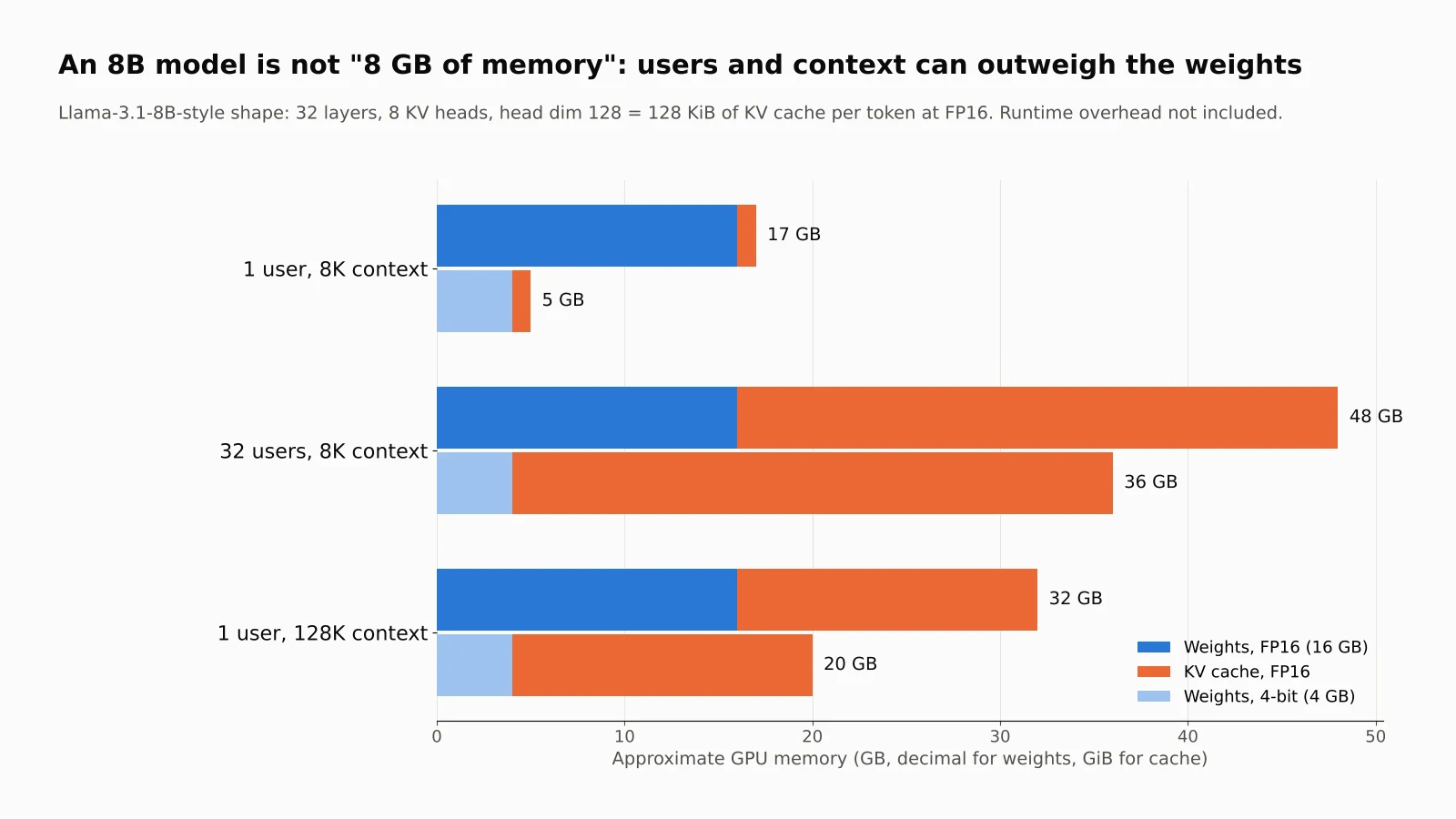
Quantizing weights to 4-bit saves 12 GB. Serving 32 concurrent users adds 32 GB of KV cache. Size your GPU for the traffic, not the download.
Three traps hide in model names:
Active vs total parameters. A mixture-of-experts model that activates 3B parameters per token may still store 30B+ in memory. NVIDIA's Nemotron 3 Nano, for example, reports 31.6B total and about 3.2B active parameters. Compute scales with active parameters; memory scales with total.
Context window vs usable context. A 128K window tells you the limit, not the memory you'll pay to use it or how well the model actually uses position 120,000.
Quantization isn't free. 4-bit weights can cost accuracy on exact numbers, IDs and rare terms, which are often the fields you care most about. Re-run your test set on the exact quantized file you'll deploy.
Architecture matters too. Grouped-query attention and hybrid designs like Granite's Mamba layers shrink the cache, which is why IBM's memory savings claim specifically targets long inputs and concurrent batches.
What it costs: API, self-hosted and routed
Cost is where the LLM vs SLM gap is easiest to see. Here's a worked example with round, illustrative numbers. Swap in your own.
Workload: 1 million requests a month, each with 1,500 input tokens and 300 output tokens.
Frontier API at $3 per million input tokens and $15 per million output: $9,000/month
Small-model API at $0.15 input and $0.60 output: $405/month
Routed, 80% to the small model and 20% to the frontier model: $2,124/month
Self-hosted SLM on two GPUs at an assumed $1/hour each, always on: $1,460/month, plus the engineering time to run it
Those prices sit inside the current market ranges. BenchLM's October 26, 2026 pricing table lists flagship models from the major labs at roughly $2–$5 per million input tokens and $10–$30 per million output, and small, fast tiers from a few cents to under $1 per million input tokens. Prices change monthly, so check before you budget.
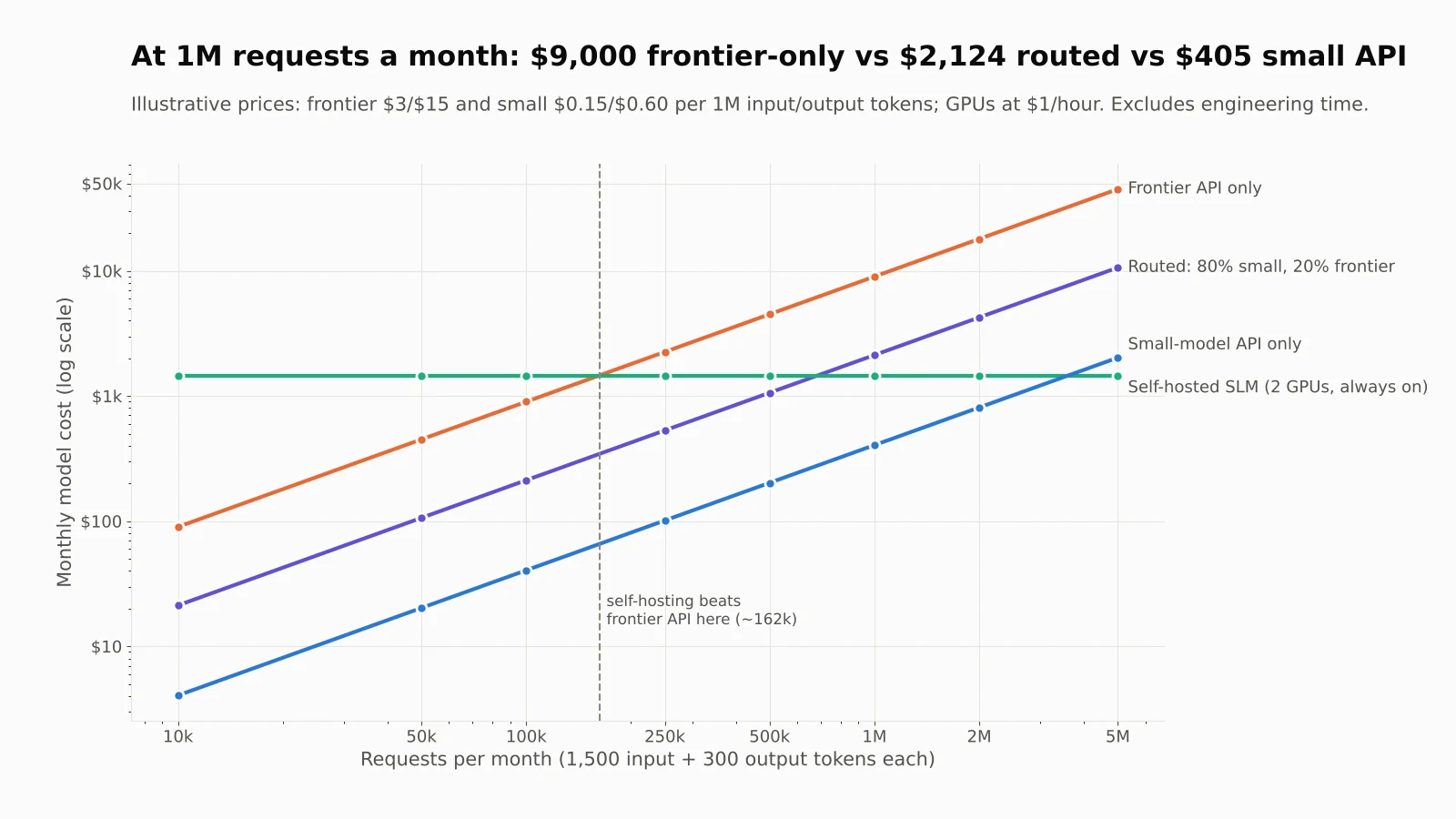
Self-hosting beats a frontier API above about 162k requests a month, but a hosted small model stays cheaper than self-hosting until about 3.6 million.
The finding that surprised me when I ran these numbers: self-hosting isn't automatically the cheap option. Against the frontier API, two always-on GPUs break even at about 162,000 requests a month. Against a hosted small model, the same GPUs don't break even until about 3.6 million requests a month, and that's before you pay anyone to patch, monitor and scale them. Self-host when data control, latency or very high volume demands it, not because "open source is free". If inference cost is your main worry, ByteMuni's look at DeepSeek's open-source DeepInfer tool covers one way teams are attacking it.
Two more costs belong in the real comparison: retries (a cheap model that needs three attempts isn't cheap) and human review time. A model that saves a cent per call but adds a minute of checking costs far more than it saves.
Ship both: a simple routing pattern
The best answer to LLM vs SLM is often "both". You rarely have to pick one model for the whole product. Route each request to the cheapest model that can handle it, and escalate when it can't. Research backs this up: the RouteLLM team at LMSYS reported cost reductions of over 85% on MT Bench, 45% on MMLU and 35% on GSM8K versus sending everything to GPT-4, while keeping 95% of GPT-4's quality.
A learned router is the advanced version. You can start with a rule that escalates when the small model fails a strict output contract:
from dataclasses import dataclass
import json

ALLOWED = {"billing", "technical", "account", "other"}

@dataclass
class Result:
    label: str
    model: str
    escalated: bool

def parse_label(raw: str) -> str | None:
    """Accept only a strict JSON answer with a known label."""
    try:
        data = json.loads(raw)
    except json.JSONDecodeError:
        return None
    label = data.get("label") if isinstance(data, dict) else None
    return label if label in ALLOWED else None

def classify_ticket(text: str, call_small, call_large) -> Result:
    # 1. Cheap path first: the small model gets the easy majority.
    label = parse_label(call_small(text))
    if label and label != "other":
        return Result(label, "small", escalated=False)

    # 2. Escalate only when the small model fails the contract
    #    (bad JSON, unknown label) or punts with "other".
    label = parse_label(call_large(text))
    if label:
        return Result(label, "large", escalated=True)

    # 3. Both failed: hand it to a person instead of guessing.
    return Result("needs_review", "none", escalated=True)
call_small and call_large are whatever client functions you use, a local model server or a vendor SDK. Two details make this production-friendly:
Validation is the router. Invalid JSON or an unknown label is a cheap, reliable signal that the small model is out of its depth.
Log
escalated. Your escalation rate is the single best metric for this setup. If it creeps from 15% to 40%, your traffic has changed and the small model needs retraining or a new prompt.
One caution: escalation must respect your data rules. If a document isn't allowed to leave your servers, the fallback can't be a vendor API, however convenient.
RAG, fine-tuning or a bigger model?
When a model gives bad answers, the fix depends on why:
It doesn't know the facts (your docs, prices, policies, a customer's history). Use RAG: retrieve the right documents at request time and put them in the prompt. Don't fine-tune facts into weights; they'll be stale the next time a policy changes.
It knows enough but behaves inconsistently (wrong JSON shape, wrong tone, fuzzy category boundaries). Try a tighter prompt and output schema first. If the same mistake keeps repeating, fine-tune, usually with LoRA, which trains small adapter matrices instead of the full model. This is where SLMs shine: fine-tuning a 3B model is cheap and fast.
It can't reason through the task even with the right facts and clear instructions. That's a capability gap. Move up a model tier.
The NVIDIA paper describes a practical path from LLM to SLM that fits this: log your production LLM calls, cluster them into recurring task types, pick candidate SLMs per cluster, fine-tune on 10k–100k curated examples, and keep iterating. In other words, launch on a big model, let real traffic show you which tasks are repetitive, then move those to small models.
A 7-step checklist before you pick a model
Use this list for every feature where the LLM vs SLM question comes up.
Write the task spec: input, output schema, latency target, failure rule, data boundary.
Check if code can do it without a model.
Build an eval set of 50–200 real examples, including the ugly ones: typos, mixed languages, missing fields, adversarial input. Define pass/fail before you test anything.
Run a strong baseline (a frontier or general LLM) to learn what good looks like.
Run two or three SLMs against the same set, including the quantized version you'd actually deploy.
Do the cost and memory math for your real volume and concurrency, including retries and review time.
Decide per task, log everything, re-run the eval whenever the model, prompt or quantization changes.
Keep the eval set in your repo, next to the code. It's the asset that lets you switch models in an afternoon when a better or cheaper one ships, which, at the current pace, is every few months.
The bottom line
LLM vs SLM isn't a one-time architecture decision. It's a per-task choice you should expect to revisit. Small models handle more of the work than most teams assume, frontier models still earn their cost on hard reasoning and agent work, and routing lets you have both. Define the job, measure on your own data, and let the numbers pick the model.
If you're experimenting with frontier agents, ByteMuni's breakdown of Claude Duet, Anthropic's proactive agent app shows what that tier looks like in a shipping product.
Sources
Small Language Models are the Future of Agentic AI — NVIDIA Research, arXiv
RouteLLM: An Open-Source Framework for Cost-Effective LLM Routing — LMSYS
IBM Granite 4.0: hyper-efficient, high performance hybrid models — IBM
Google's Gemma 4 is now available with Apache 2.0 licensing — The Decoder
Small language models: how to choose a model that fits the job — Ajith Vallath Prabhakar
SLMs or LLMs? A Guide to Selecting the Best Language Model — Medium
How to choose the right AI model — Interexy
Frequently asked questions
What is the difference between an LLM and an SLM?
Both are language models built the same way. An LLM usually has tens of billions of parameters or more and handles broad, open-ended tasks. An SLM is roughly under 10 billion parameters, runs on a single GPU, laptop or phone, and is best at narrow, repeated tasks such as classification, extraction and routing.
How many parameters does a small language model have?
There's no official cutoff, but most models under about 10 billion parameters are called SLMs. NVIDIA's researchers define an SLM by what it can do instead: run on a common consumer device fast enough to serve one user. For mixture-of-experts models, check total parameters as well as active ones, because memory depends on the total.
Is an SLM cheaper than an LLM?
Per request, almost always. NVIDIA's 2025 paper estimates serving a 7B model is 10–30x cheaper than a 70–175B model. But self-hosting adds fixed GPU and engineering costs, so at low volume a hosted small-model API is often cheaper than running your own server.
Can one AI product use both an LLM and an SLM?
Yes, and most production systems should. Send each request to a small model first and escalate to a larger model only when the small one fails a strict output check or the task is too complex. Track the escalation rate to know when to retrain or change prompts.
Should I fine-tune a model or use RAG?
Use RAG when the model is missing facts such as your documents, prices or policies, because those change and can be retrieved at request time. Fine-tune when the model has the knowledge but repeats the same behavior mistake, such as wrong JSON format or inconsistent labels.
How much GPU memory do I need to run an 8B model?
About 16 GB for the weights at FP16, 8 GB at INT8 and 4 GB at 4-bit. Add KV cache for context and users: roughly 128 KiB per token for a Llama-3.1-8B-style model, so 1 GiB per user at 8K context. Plus runtime overhead.
How this article was made: researched and edited by Deepak Kumar, drafted with help from AI tools.