Pillow Vulnerability: How One Crafted Image Can Run Code on Your Python Server
Pillow 13.0.0 fixes critical bugs where a single crafted image can crash or take over a Python server. Here’s which code is at risk and how to fix it.

If your Python app does anything with images, such as profile pictures, thumbnails, PDF previews or a machine-learning pipeline, it almost certainly runs on Pillow. That's why this week's Pillow vulnerability news matters. Pillow 13.0.0, released on October 16, fixes a batch of serious security bugs, including several where a single crafted image file could crash your server or run an attacker's commands on it. Some only need your code to call Image.open() on an upload.
OX Security, whose report brought wider attention to the flaws, estimates Pillow is downloaded about 436 million times a month. Most of those installs aren't something a developer chose on purpose. They arrive quietly as a dependency of Django, matplotlib, torchvision, transformers, document tools and dozens of other packages. So even if you've never written from PIL import Image, it's worth checking.
Here's what each Pillow vulnerability actually does, which code patterns are at risk, a catch on Python 3.10 that can leave you unpatched without noticing, and what to do if you can't upgrade today.
The short version
Upgrade to Pillow 13.0.0 or later. It fixes everything below. Every earlier version is affected by at least one of these bugs.
Pillow 13 requires Python 3.11 or newer. On Python 3.10,
pip install -U pillowquietly stops at an older, vulnerable 12.x release.The two worst bugs can be triggered just by opening or reading the frames of a crafted image, with no further user action.
Rebuild Docker images, wheels and Lambda layers. An old Pillow baked into an image stays there until you rebuild.
None of these flaws is known to be exploited in the wild yet, but proof-of-concept code exists for some.
What is the Pillow vulnerability, and how can an image run code?
Pillow looks like a simple Python library, but its heavy lifting happens in C code that decodes raw image bytes into pixels. Image formats are complicated. There are dozens of them, many with decades-old quirks, compression schemes and multi-frame layouts. C code that parses complicated input from strangers is exactly where memory bugs live.
When that code writes past the end of a memory buffer (an out-of-bounds write), the best case is a crash. The worst case is that an attacker shapes the overflowing data carefully enough to take control of the process and run commands as your application user. That's why a "bad JPEG" can be a security problem, not just a display glitch.
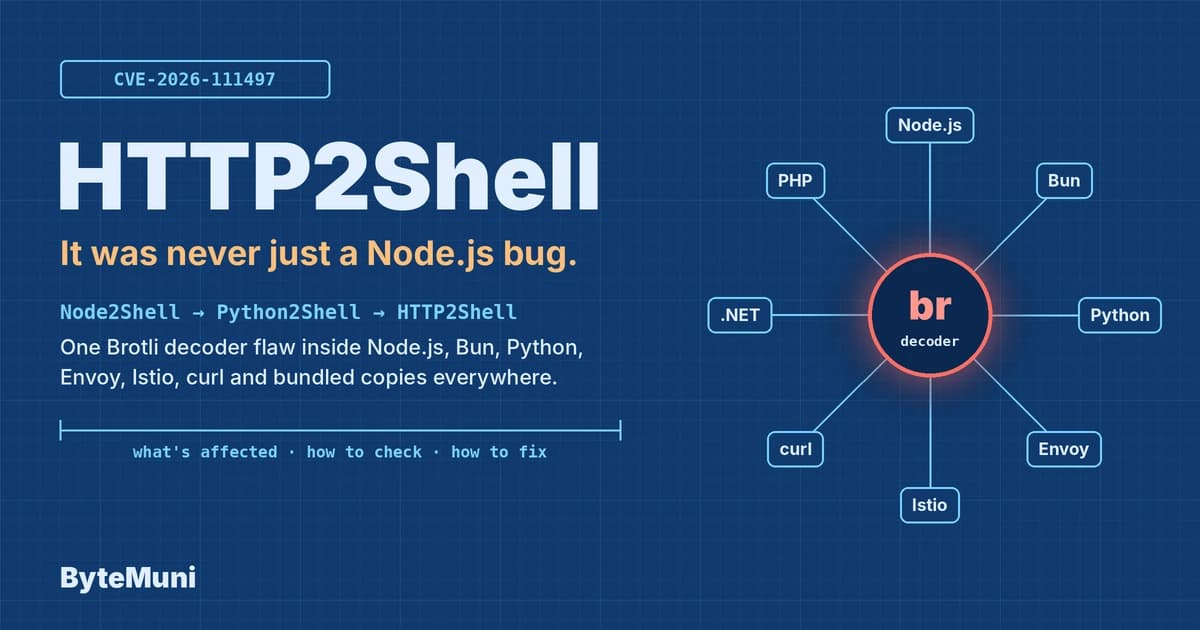
We saw the same pattern this week in another ecosystem with the Node.js Brotli decoder bug. Different language, same lesson: native code that decodes untrusted data is part of your attack surface, even when your own code is pure Python or JavaScript.
The Pillow vulnerability list, in plain English
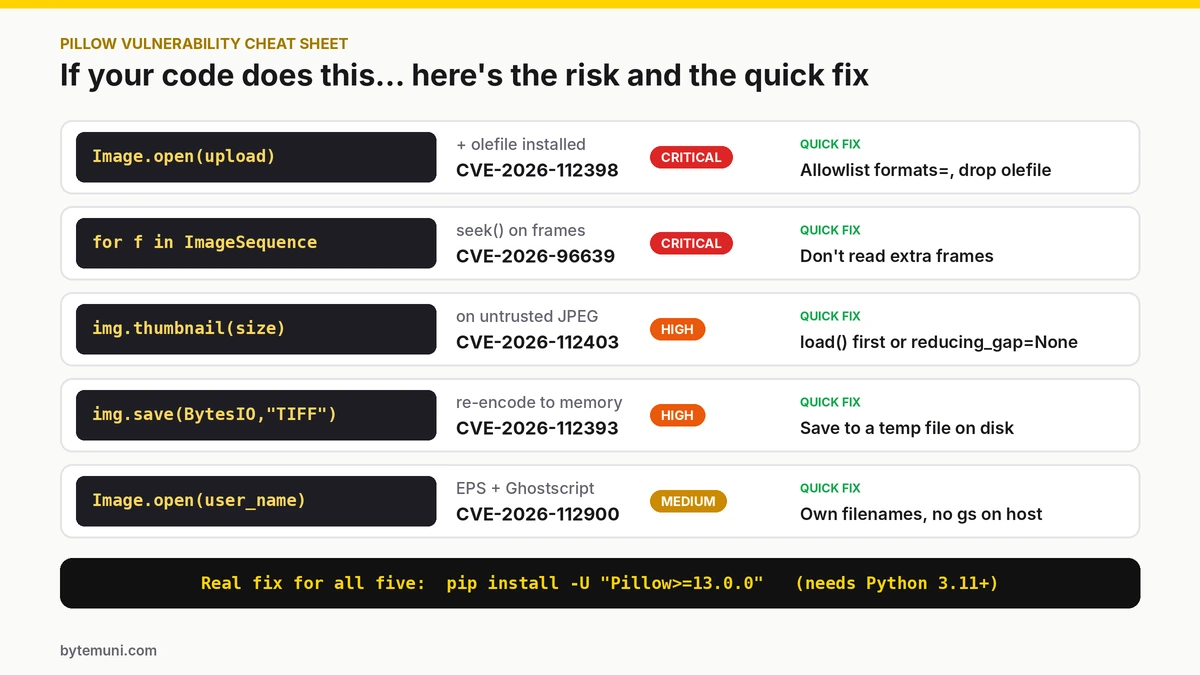
Which of your Pillow calls can reach which bug, and the quick fix for each.
Pillow 13.0.0 is a big security release. Depending on which source you count, it closes around 40 advisories. These five are the ones worth understanding, because each maps to a common way developers use Pillow.
1. CVE-2026-112398: FlashPix images that run code on open (Critical)
This is the scariest Pillow vulnerability in the batch. A heap overflow in how Pillow decodes JPEG data inside FlashPix (FPX) files can lead to code execution from a single call to Image.open() on a crafted file. The advisory describes it as "reachable with no user interaction."
The catch is that it only works if the optional olefile package is installed, because Pillow needs it to read FPX. But here's the part that surprises people: Pillow decides a file's format by looking at its contents, not its extension. Renaming an upload to avatar.png doesn't help. If the bytes say FlashPix and olefile is present, Pillow will treat it as FlashPix.
Affected: Pillow 12.3.0 and older
Severity: Critical in Pillow's own rating; GitHub scores it 9.2 (CVSS 4.0)
2. CVE-2026-96639: multi-frame images that reuse stale memory (Critical)
Some image formats hold several frames, such as PSD layers, MPO stereo photos from cameras, and DCX or MIC files. The bug is in how Pillow moves between frames. According to the NVD description, if the first frame uses a "narrow" color mode like grayscale and a later frame of the same size switches to a wider mode like RGB or CMYK, Pillow can keep the old, smaller memory buffer and decode the bigger frame into it. The wider pixels spill past the end of the buffer.
The result is out-of-bounds writes and crashes. Through the MPO path, the reporter demonstrated command execution in specific Python and Pillow runtime setups. GitHub scores it 9.8 Critical.
The sneaky detail: MPO files look like JPEGs, and Pillow's JPEG opener can hand you an MPO image. So code that loops over frames of an "ordinary JPEG" upload can reach this bug.
Affected: Pillow 11.0.0 up to (not including) 13.0.0
Triggered by: reading later frames with
seek()orImageSequence.Iteratoron a crafted PSD, MPO, DCX or MIC file
3. CVE-2026-112403: thumbnails of crafted JPEGs (High)
Making a thumbnail is about the most common thing anyone does with Pillow. This bug overflows a buffer when a program calls thumbnail() or draft() on a crafted lossless JPEG and scales it to half size or smaller. The advisory reports a crash, not code execution.
There's an interesting detail in the credits. According to the advisory, the bug was "found by Anthropic using Claude to study the security of open-source software, validated manually by Ada Logics." AI is now finding real bugs in widely used libraries, which is good for defenders as long as maintainers can keep up with the fixes.
Affected: Pillow 12.3.0 and older
Note: a format allowlist won't block this one, because the malicious file is a valid JPEG
4. CVE-2026-112393: saving TIFFs to memory (High)
This bug has been in Pillow since 2013. It overflows a buffer when you save a compressed TIFF to an in-memory buffer such as io.BytesIO, which is exactly what a web service does when it re-encodes an upload and sends it straight back in the response. Saving to a real file on disk is not affected.
The reporters crashed the process with it, and turned it into code execution only by combining it with a second, separate bug that leaked memory addresses. According to CISA's analysts, a public proof of concept exists.
Affected: Pillow 2.0.0 to 12.3.0
5. CVE-2026-112900: EPS files and an attacker-chosen filename (Medium)
This one is different, because the danger is in the file's name, not its contents. To open EPS (Encapsulated PostScript) images, Pillow runs a separate program called Ghostscript and passes it the filename without checking it first. A cleverly chosen filename can be read by Ghostscript as instructions, pointing it at a second file containing commands to run. As the advisory puts it, "The flaw is triggered by the filename, not by anything in the PostScript document." Pillow's default -dSAFER Ghostscript mode doesn't stop it.
Pillow's maintainers rate it moderate, because the attacker must control the filename and Ghostscript (gs) must be installed on the server. GitHub's CVE record scores it 9.2.
Affected: Pillow 2.6.0 to 12.3.0
Realistic target: upload handlers that keep or build the stored filename from user input
Am I affected by the Pillow vulnerability? A quick self-check
Run through these questions for each Python service:
Do we process images from users or third parties? Uploads, avatars, scraped images, email attachments, documents and dataset files all count.
Which Pillow version is installed? Anything below 13.0.0 is affected by at least one of these bugs.
Is
olefileinstalled? If yes, the FlashPix code-execution path is open.Do we read multiple frames? Look for
seek(),ImageSequenceorn_framesin your code.Do we make thumbnails? Look for
thumbnail()ordraft().Do we save TIFFs to
BytesIO?Is Ghostscript installed on servers that handle uploads, and do we ever use the user's original filename?
Use these commands to check versions and see what pulled Pillow in:
# Which Pillow is actually installed in this environment?
python -c "import PIL; print(PIL.__version__)"

# Is olefile present?
pip show olefile

# What depends on Pillow? (pip install pipdeptree first)
pipdeptree --reverse --packages pillow

# Scan the whole environment for known vulnerabilities
pip install pip-audit
pip-audit
Run these inside the environment your app actually uses: the virtualenv, the Docker container or the CI image, not just your laptop.
How to fix the Pillow vulnerability
Step 1: Upgrade, and make the version explicit
pip install -U "Pillow>=13.0.0"Then pin it so a future install can't quietly go backwards. In requirements.txt:
Pillow>=13.0.0In pyproject.toml, add "Pillow>=13.0.0" to your dependencies. With Poetry, run poetry add "pillow@^13.0.0". With uv, run uv add "pillow>=13.0.0". If you use a lock file, regenerate it and commit the change.
Step 2: Watch out for the Python 3.10 trap
This is the easiest way to think you've fixed the Pillow vulnerability when you haven't. Pillow 13 drops Python 3.10 support. On Python 3.10, pip respects that and simply installs the newest Pillow that still supports 3.10. That's a vulnerable 12.x release, and pip shows no error:
# On Python 3.10 this "succeeds" but leaves you on 12.x:
pip install -U pillow

# This fails loudly instead, which is what you want:
pip install -U "Pillow>=13.0.0"
If you're still on Python 3.10, the real fix is moving to Python 3.11 or newer. If you're planning that upgrade, it's worth looking at what's coming in Python 3.15 too.
Step 3: Rebuild everything that bundles Pillow
Docker images, AWS Lambda layers, pre-built wheels and CI caches all keep whatever Pillow was there when they were built. Rebuild with fresh base images (docker build --pull) and redeploy. Our Docker rollout checks were written for PHP, but the same steps apply: rebuild, redeploy, then confirm the running container actually has the new version.
Step 4: Check your ML and data stacks
Machine-learning projects often pin dependency versions tightly. After upgrading, run your test suite. If a library you depend on caps Pillow below 13, look for an update to that library rather than holding Pillow back.
Can't upgrade today? Hardening that actually helps
Upgrading is the only complete fix for this Pillow vulnerability batch. But Pillow's own guidance and the advisories point to steps that close specific paths. Several are worth keeping even after you upgrade.
Only open the formats you actually accept
Image.open() takes a formats argument. Use it to refuse everything you don't need. This blocks the FlashPix, PSD, DCX, MIC and EPS paths outright:
from PIL import Image

ALLOWED_FORMATS = ["JPEG", "PNG", "WEBP", "GIF"]

def open_upload(fp):
    img = Image.open(fp, formats=ALLOWED_FORMATS)
    img.load()  # decode now, inside your error handling
    return img
Remember that the JPEG opener can still return a multi-frame MPO image. So on untrusted uploads, don't read extra frames with seek() or ImageSequence unless you truly need to.
Remove what you don't use
olefile: if
pip show olefileshows nothing else requires it, uninstall it. This closes the FlashPix code-execution path.Ghostscript: keep the
gsprogram off any server that processes untrusted uploads, unless you genuinely need EPS support.
Never trust a user's filename
Generate your own name for every stored upload, for example with uuid.uuid4().hex plus an extension you choose. This is good practice anyway, and it closes the EPS filename trick.
Be careful with thumbnails and TIFF output
For untrusted JPEGs, the advisories suggest calling
load()beforethumbnail(), or passingreducing_gap=None, which avoids the risky draft-mode shortcut.When re-encoding user images to TIFF, save to a temporary file on disk instead of
io.BytesIO.
Contain the damage if something slips through
Run image processing in a separate worker with as few permissions as possible. That means no access to production secrets, no cloud admin role, and memory and CPU limits so a crafted file can't take the main app down with it. That way, even a successful exploit lands somewhere boring.
The bigger picture
No Pillow vulnerability in this batch is known to be under attack right now, and the maintainers fixed them quickly. That's the good news. The less comfortable news is that this is the third time this month a widely used decoder or runtime has turned out to have memory bugs that untrusted input can reach: PHP2Shell, the Node.js Brotli bug, and now Pillow. AI-assisted research is finding these bugs faster, and attackers are working faster too.
The practical takeaway is simple. Treat every library that decodes files from strangers as security-critical code, keep it updated, only accept the formats you need, and isolate the code that handles them. Pillow 13.0.0 is a good moment to make those habits stick.
Sources: The Hacker News · NVD: CVE-2026-96639 · GitLab advisory: CVE-2026-96639 · Pillow 13.0.0 release · Convika: Pillow 13.0.0 CVE breakdown
Frequently asked questions
Which Pillow versions are vulnerable?
All versions before 13.0.0 are affected by at least one of the flaws. The exact range depends on the CVE; CVE-2026-96639, for example, affects 11.0.0 up to 13.0.0.
What is CVE-2026-96639?
It’s a critical Pillow bug where multi-frame images (PSD, MPO, DCX, MIC) can make Pillow write past a memory buffer. That causes crashes, and in some setups it can lead to command execution.
Can just opening an image be dangerous?
Yes. CVE-2026-112398 can run code from a single Image.open() call on a crafted FlashPix file if the olefile package is installed.
Why didn’t pip upgrade me to Pillow 13?
Pillow 13 requires Python 3.11 or newer. On Python 3.10, pip installs the latest 12.x release instead, which is still vulnerable.
I don’t use Pillow directly. Am I affected?
You might be, because Django, matplotlib, torchvision and many other packages install it. Run pipdeptree --reverse --packages pillow to check.
Are these Pillow flaws being exploited?
None were known to be exploited as of October 24, 2026, but proof-of-concept code exists for some of them.