Between Alerts: How Living Off the Land Attacks Hide Inside Normal Activity
Attackers don’t need to be invisible, only normal-looking. Living off the land attacks use PowerShell, RDP, SMB and valid logins to move quietly between alerts. Here’s what they do step by step, why detection misses it, and practical ways to catch them.

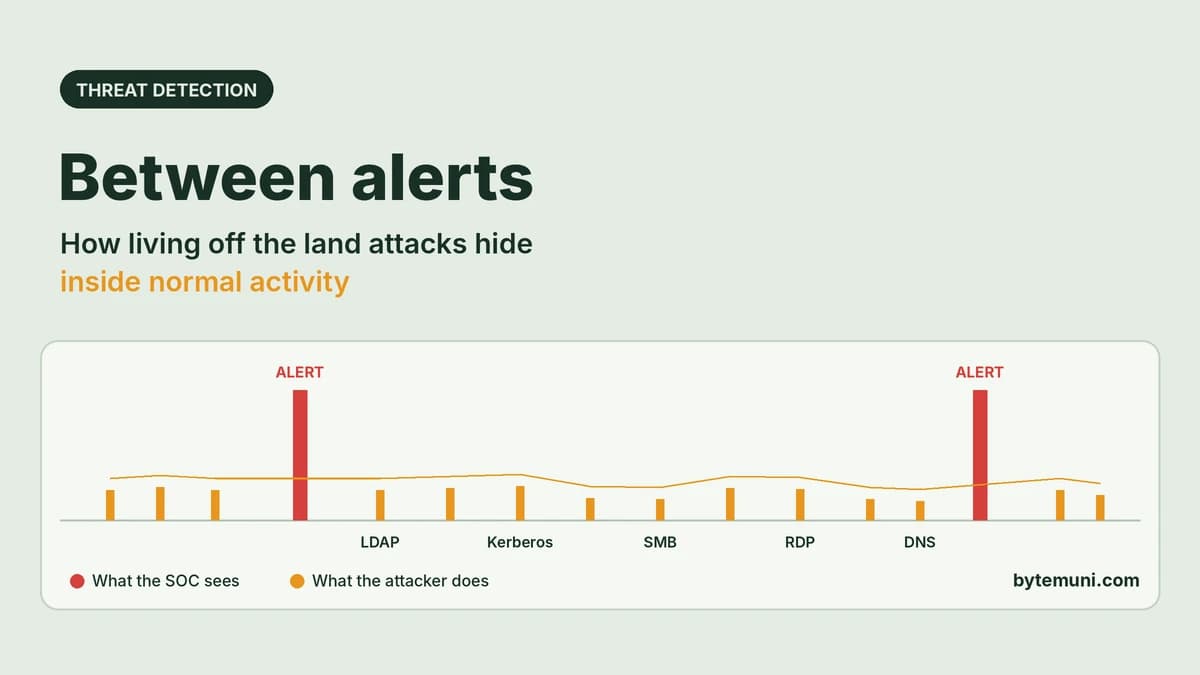
Living off the land attacks use tools and accounts your organisation already trusts, such as PowerShell, RDP, SMB, LDAP and valid logins, so each step looks like normal admin work. Attackers move slowly in the gaps between alerts. By the time one alert fires, it's often the middle of the story, not the start. Catching them means connecting quiet events into one timeline.
Most security teams judge their safety by what alerts and reports tell them. Attackers know this. They don't need to beat every control; they only need to stay below the threshold of each one. This guide explains what attackers actually do between alerts, why ordinary detection misses it, and practical steps (including Windows event IDs, a tested beaconing script and a hardening checklist) to catch them earlier.
What does "between alerts" mean in cybersecurity?
A security operations centre (SOC) can't investigate every DNS query, login or file share connection. Tools are tuned to fire only on things that look clearly bad: a known malware hash, a burst of failed logins, a suspicious process. Everything below that line becomes background noise.
That background is where living off the land attacks thrive and patient attackers work. A sponsored analysis published by The Hacker News on October 26, 2026 describes the pattern well: when an alert finally surfaces, "it doesn't necessarily mark the start of a compromise. It may, in fact, be one event in a much longer sequence." An analyst who only investigates the alert misses how the intrusion got there and what else it touched.
Bug bounty platform Intigriti makes a related point about external exposure: teams often assume that "no reports" means "safe," but it can just as easily mean you're "blind in the wrong places."
How long do attackers stay hidden before detection?
Longer than most people expect, and the fast stages are getting faster at the same time. Recent industry data:
Mandiant M-Trends 2026: the global median dwell time (how long attackers are inside before detection) rose to 14 days in 2025, up from 11. For cyber espionage and North Korean IT-worker incidents, the median was 122 days.
Mandiant M-Trends 2026: the median time between initial access and hand-off to a second threat group collapsed from more than 8 hours in 2022 to just 22 seconds in 2025.
CrowdStrike 2026 Global Threat Report: the fastest recorded eCrime "breakout" (moving from the first compromised machine to others) was 27 seconds, and attacks by AI-enabled adversaries rose 89%.
Mandiant M-Trends 2026: organisations detected intrusions themselves in 52% of cases in 2025, up from 43%, so nearly half were still first spotted by someone else.
So there are two speeds at once. Getting in and spreading can happen in seconds. Staying in, quietly, can last weeks or months. Both depend on not triggering the alarms you rely on.
What are living off the land attacks?
Living off the land (LOTL) means using what's already on the system instead of bringing in malware. In February 2024, CISA, NSA, FBI and partner agencies from Australia, Canada, the UK and New Zealand published joint guidance on it, noting that these techniques make it "difficult for IT administrators to distinguish malicious activity from legitimate behavior."
Common examples:
Built-in tools: PowerShell, WMI,
cmd.exe,certutil,ntdsutil, scheduled tasks.Admin protocols: RDP, SMB, WinRM, SSH, LDAP.
Legitimate software: remote-management tools, cloud storage and sync clients.
Valid accounts: stolen or reused credentials, session tokens and API keys (MITRE ATT&CK T1078).
Valid credentials are the most important piece. When an attacker logs in with a real account, from an expected location, during business hours, a rule-based tool sees a successful, allowed login. Nothing is "blocked," so nothing looks wrong. The Gheist campaign we covered recently is a perfect example: stolen GitHub tokens used to read CI/CD secrets through GitHub's own API, with no malware and no attacker server.
What do attackers actually do between alerts?
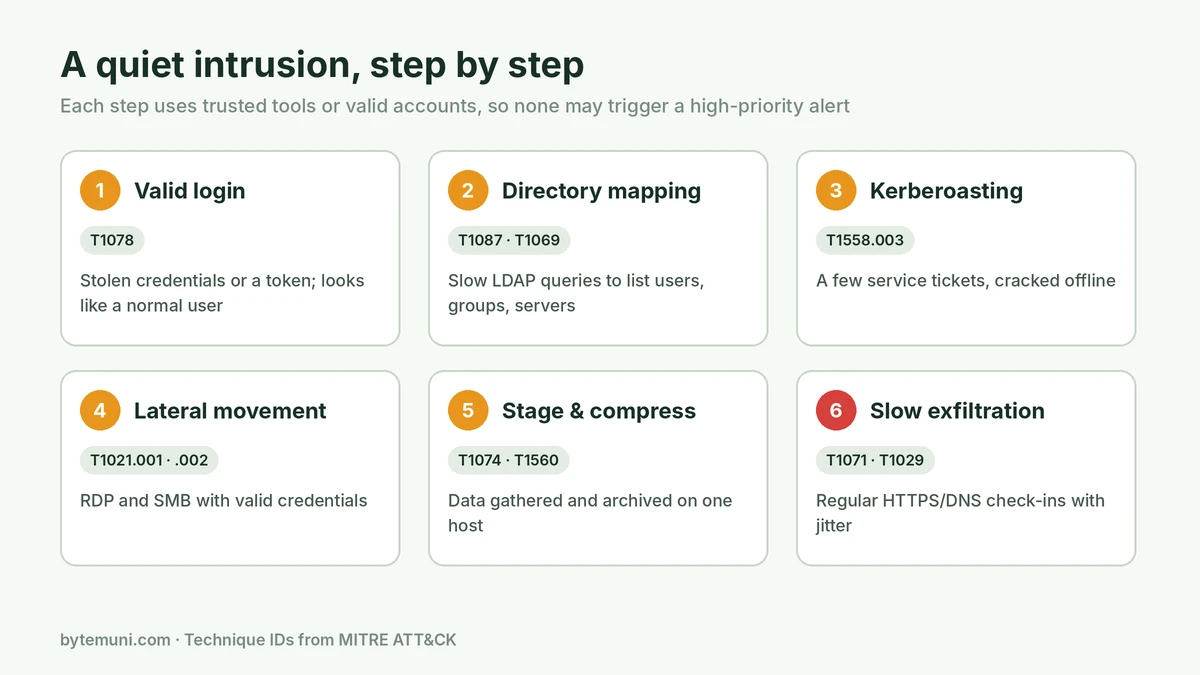
Here's how living off the land attacks typically unfold, step by step, with the MITRE ATT&CK technique each step maps to. None of these steps is guaranteed to raise a high-priority alert on its own.
1. Log in with a valid account
Access often starts with credentials from phishing, an infostealer or a previous breach, or by exploiting an internet-facing system. Mandiant found exploits were the top initial infection vector for the sixth year in a row (32% of intrusions in 2025), with voice phishing second at 11%. Once inside, attackers prefer real accounts (T1078 Valid Accounts).
2. Map the network slowly
Instead of a loud port scan, the attacker uses the compromised account to query the domain controller over LDAP at a modest pace, listing users, groups and computers (T1087 Account Discovery, T1069 Permission Groups Discovery, T1018 Remote System Discovery). Any domain user can read much of Active Directory by default, so this looks like normal directory traffic.
3. Harvest credentials quietly
With Kerberoasting (T1558.003), the attacker requests a handful of Kerberos service tickets for accounts that have service principal names (SPNs). Part of each ticket is encrypted with the service account's password hash, so it can be cracked offline, completely outside your monitoring. Weak service-account passwords fall quickly.
4. Move laterally using admin protocols
Valid credentials open SMB and RDP, the same services administrators use daily (T1021.002 SMB/Admin Shares, T1021.001 Remote Desktop Protocol). Remote execution through PowerShell or WMI follows. Each hop is a successful, authenticated connection. We saw how dangerous trusted lateral paths can be in the Tailscale SSH vulnerability research, where one foothold could reach root on other servers.
5. Stage and compress data
Files are collected on one internal machine and compressed or archived (T1074 Data Staged, T1560 Archive Collected Data), often with built-in tools.
6. Exfiltrate slowly, disguised as normal traffic
The staging machine connects out over HTTPS or DNS at regular intervals, with slight random variation ("jitter") so it resembles routine traffic (T1071 Application Layer Protocol, T1029 Scheduled Transfer, T1048 Exfiltration Over Alternative Protocol).
Each step borrows something the business already depends on. That's the whole strategy.
Why do security tools miss living off the land attacks?
Static thresholds: five LDAP queries an hour, or four service-ticket requests, stay under any sensible threshold. Lower the threshold and analysts drown in false positives.
Known-bad matching: signatures and hash lists catch known malware. LOTL uses signed, legitimate binaries.
Events judged one at a time: a host talking to a new system once is unremarkable. The same host querying the directory, authenticating to a peer, opening an SMB session, then connecting to a new external destination tells a very different story, but only if someone connects the events.
Siloed tools: endpoint, identity, network and cloud tools each see one slice. The attack lives in the relationships between slices.
Missing or short-lived logs: many environments don't log process command lines, PowerShell script blocks or internal network flows, or they don't keep them long enough to look back weeks.
Unknown assets: forgotten subdomains, M&A leftovers, exposed admin panels and shadow environments aren't in the inventory, so they aren't monitored at all.
Identity is the hardest part. A login can be valid and still be wrong. The better question isn't "Was this allowed?" but "Does this make sense for this account, at this time, from this device, using this method?"
How can you detect living off the land attacks?
You can't alert on everything, and living off the land attacks are built to exploit that. The answer is better context: log the right things, keep them long enough, compare behaviour against normal, and connect events into sequences. The CISA joint guidance makes the same core recommendations: detailed centralised logging, behavioural baselines, and automation such as user and entity behaviour analytics (UEBA).
Turn on the logs that matter
On Windows, these event sources give the most visibility into the steps above:
4624 / 4625: successful and failed logons. Watch logon type 3 (network) and 10 (RemoteInteractive, i.e. RDP).
4769: Kerberos service ticket requested. Requests using RC4 encryption (ticket encryption type
0x17) in an environment that normally uses AES are a classic Kerberoasting sign.4688: process creation. Enable "include command line in process creation events" so you can see what was actually run.
4104: PowerShell script block logging, which records the code PowerShell executes.
5140 / 5145: network share access.
1102: the security audit log was cleared, which is almost always worth investigating.
Free tools such as Microsoft Sysmon add richer process and network detail, and Zeek (open source) produces protocol-aware network logs such as DNS, SMB, Kerberos and connection records. Send everything to a central, tamper-resistant location: attackers who reach admin rights often try to delete local logs.
Baseline normal, then look for "valid but unusual"
Build a picture of what's normal per user, per service account and per server. Then look for:
a user account suddenly querying large parts of the directory;
one account requesting service tickets for many different services in a short window;
a workstation opening SMB or RDP sessions to peers it has never talked to (workstation-to-workstation traffic is rare in most networks);
an admin tool run by an account that has never used it;
a service account logging in interactively;
a new external destination receiving steady, regular traffic.
If access is plausible but unusual for that identity, treat it as something to verify, not proof that it's legitimate.
Find beaconing with simple statistics
Malware and remote tools often "check in" at regular intervals. Even with jitter, the gaps between connections are far more regular than human browsing. This short Python script reads a CSV of connections (ts,src,dst, which you can export from firewall logs or Zeek's conn.log) and flags suspiciously regular pairs:
import csv, sys, statistics
from collections import defaultdict

# Input CSV columns: ts (unix seconds), src, dst
MIN_CONNECTIONS = 10   # ignore pairs with too few connections
MAX_JITTER = 0.15      # stdev / mean of gaps; lower = more regular

times = defaultdict(list)
with open(sys.argv[1], newline="") as f:
    for row in csv.DictReader(f):
        times[(row["src"], row["dst"])].append(float(row["ts"]))

for (src, dst), ts in times.items():
    if len(ts) < MIN_CONNECTIONS:
        continue
    ts.sort()
    gaps = [b - a for a, b in zip(ts, ts[1:])]
    mean = statistics.mean(gaps)
    jitter = statistics.pstdev(gaps) / mean if mean else 0
    if jitter <= MAX_JITTER:
        print(f"{src} -> {dst}: {len(ts)} connections, "
              f"every ~{mean:.0f}s, jitter {jitter:.2f}")
Run it with python3 beacon.py connections.csv. Expect some legitimate hits, such as update checks, monitoring agents and NTP. Allowlist those, and investigate the rest. Open-source tools such as RITA do this at scale on Zeek data.
Set traps attackers will trip
Deception works well against quiet attackers because legitimate users never touch the bait:
A honey service account with an SPN that nothing uses. Any service ticket request for it (event 4769) means someone is Kerberoasting.
Canary tokens: fake credentials, API keys or documents placed where an attacker would look. Any use is a high-confidence alert.
A decoy file share with an enticing name that should never be opened.
Investigate the timeline, not just the alert
When an alert fires, widen the window. If a workstation triggers an endpoint alert at 2:14 p.m., ask:
Did it query unusual domains earlier that day?
Did it authenticate to other systems or open SMB sessions to peers?
Did those systems talk to more hosts?
Did it later open an encrypted session to a new external destination?
This is where AI-assisted SOC tools genuinely help: they can pull related events across hosts, users and time into one view in minutes. But they're only as good as the evidence you've kept, which is why retention and network telemetry matter.
How do you make living off the land attacks harder?
Detection buys time. These controls make living off the land attacks harder and shrink what a quiet attacker can reach in the first place:
Least privilege: remove standing admin rights. Use just-in-time access for privileged tasks, so a stolen account can't reach everything.
Phishing-resistant MFA (FIDO2 passkeys or security keys), especially for admins, VPN and email.
Service accounts: use long, random passwords or Group Managed Service Accounts (gMSA), and enforce AES for Kerberos where possible, to blunt Kerberoasting.
Segmentation: block workstation-to-workstation SMB and RDP, and restrict admin protocols to dedicated admin hosts.
Application control: restrict which built-in tools standard users can run, and use PowerShell Constrained Language Mode where practical.
Egress control: limit which systems can reach the internet, and send DNS through resolvers you monitor.
Know your attack surface: continuously discover internet-facing assets, including forgotten subdomains and exposed admin panels. Bug bounty and external attack surface management programmes help find what attackers find.
Rotate and retire credentials quickly, including tokens and API keys, so stolen access doesn't stay valid.
Machine identities (service accounts, API keys and tokens) deserve the same attention as people. Our guide to AI agents and insider threats covers how to monitor non-human identities that act with real privileges.
What should a SOC measure?
Alert counts don't tell you whether you can catch living off the land attacks or other quiet intrusions. Better questions:
How far back can you reconstruct a host's activity? 7 days, 30, 90?
Which of the event sources above are actually collected from every server and workstation?
How long does it take to spot a suspicious-but-valid session?
How many accounts can reach sensitive systems without extra verification?
When you run a purple-team exercise using LOTL techniques, which steps did you detect?
Testing yourself against real attacker behaviour, mapped to MITRE ATT&CK, is the most honest way to find the gaps. These are also common topics in cybersecurity interview questions for SOC and detection-engineering roles.
The bottom line
Attackers don't need to be invisible. They only need to look normal, one step at a time, for long enough. Living off the land attacks succeed when defenders judge events in isolation. Collect the right telemetry, keep it, baseline normal behaviour, and connect quiet events into timelines. Then the spaces between alerts stop being a hiding place.
Sources: The Hacker News (sponsored by Corelight), Between Alerts · Intigriti, Why security teams miss what attackers see · NHI Mgmt Group · Mandiant M-Trends 2026 · CrowdStrike 2026 Global Threat Report · CISA et al., Identifying and Mitigating Living Off the Land Techniques · MITRE ATT&CK
Frequently asked questions
What are living off the land attacks?
Attacks that use tools and accounts already in your environment, such as PowerShell, WMI, RDP, SMB and valid credentials, instead of custom malware, so activity looks legitimate.
Why don’t security alerts catch them?
Each step is small, allowed and spread out over time. Rules based on thresholds or known-bad signatures miss events that only look suspicious when connected.
How long do attackers stay undetected?
Mandiant’s M-Trends 2026 reports a global median dwell time of 14 days in 2025, and 122 days for cyber espionage cases.
What is Kerberoasting and how do I detect it?
Requesting Kerberos service tickets to crack service-account passwords offline. Watch event 4769 for RC4 (0x17) ticket requests and use a honey SPN account.
What is beaconing?
Malware or remote tools checking in with an external server at regular intervals. Very regular connection gaps, even with some jitter, are a useful warning sign.
What’s the most effective defence?
Combine good telemetry and behavioural baselines with least privilege, phishing-resistant MFA and network segmentation, so even valid-looking access has limited reach.
How this article was made: researched and edited by Deepak Kumar, drafted with help from AI tools.