Magento Malware Hides in CMS Blocks: 953 Online Stores Infected With a Scanner-Evading Loader
A long-running campaign has hidden a JavaScript loader in the CMS blocks of 953 online stores, mostly Magento. It fingerprints visitors so scanners see a clean page while shoppers can be served malicious code. Here’s how it works and how to check and clean your store.

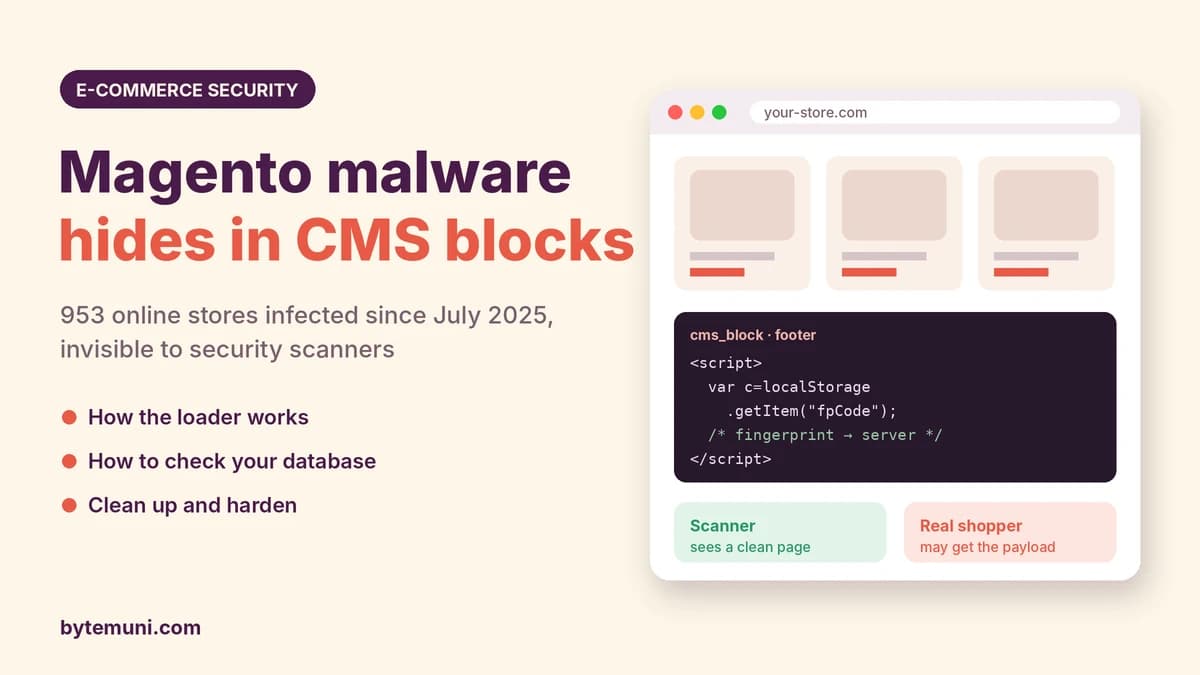
A Magento malware campaign tracked by Sansec has infected 953 online stores since July 2025 by hiding a JavaScript loader inside Magento CMS blocks. The loader asks the attacker's server what to run in shoppers' browsers, but checks first whether the visitor is a real person or a security scanner, so scanners see nothing. Its newest domain is deepveindrilling.com.
Dutch e-commerce security firm Sansec published its research on October 24, 2026. The campaign has used five different domains in 15 months, and it keeps coming back to the same stores: 60 of the 83 shops loading the newest domain were already infected by an earlier version. Most were originally breached through known Magento vulnerabilities such as PolyShell and SessionReaper.
If you run a Magento or Adobe Commerce store, this guide explains how the Magento malware works, how to check your database in a few minutes, and how to clean up properly. Deleting the script alone does not remove the attacker's access.
What is the deepveindrilling.com Magento malware?
deepveindrilling.com is a JavaScript loader domain. It sits behind Cloudflare, its homepage returns a 404 error, and it only answers script requests that come from visitors of infected stores. Sansec found it in the CMS blocks of 83 stores, nearly all on Magento, after the domain was registered on October 6, 2026. The first stores loaded it the next evening.
It's the fifth domain in a campaign Sansec has followed since July 2025. Across all five domains, the operator has infected 953 stores, moving to a new address every few months.
The important part: the loader is not a skimmer by itself. It's a remote control. Whatever the attacker's server decides to send, the shopper's browser runs it, on the store's own pages, with the store's own trust.
What are Magento CMS blocks, and why hide malware there?
In Magento, CMS blocks are reusable chunks of content, such as a header banner, footer text or promotional message, that the store inserts into its pages. They live in the database, in a table called cms_block, and store admins edit them from the backend.
That makes them an ideal hiding spot:
They're in the database, not in files. Many file-integrity checks and code reviews never look there.
They render on storefront pages, so a script placed in a block runs for every visitor who sees that block.
They look like normal content to anyone browsing the admin panel quickly.
Sansec's eComscan scanner found the loader in cms_block on 148 server installs during the campaign, and never in Magento's configuration table or in theme files.
How does the Magento CMS block loader work?
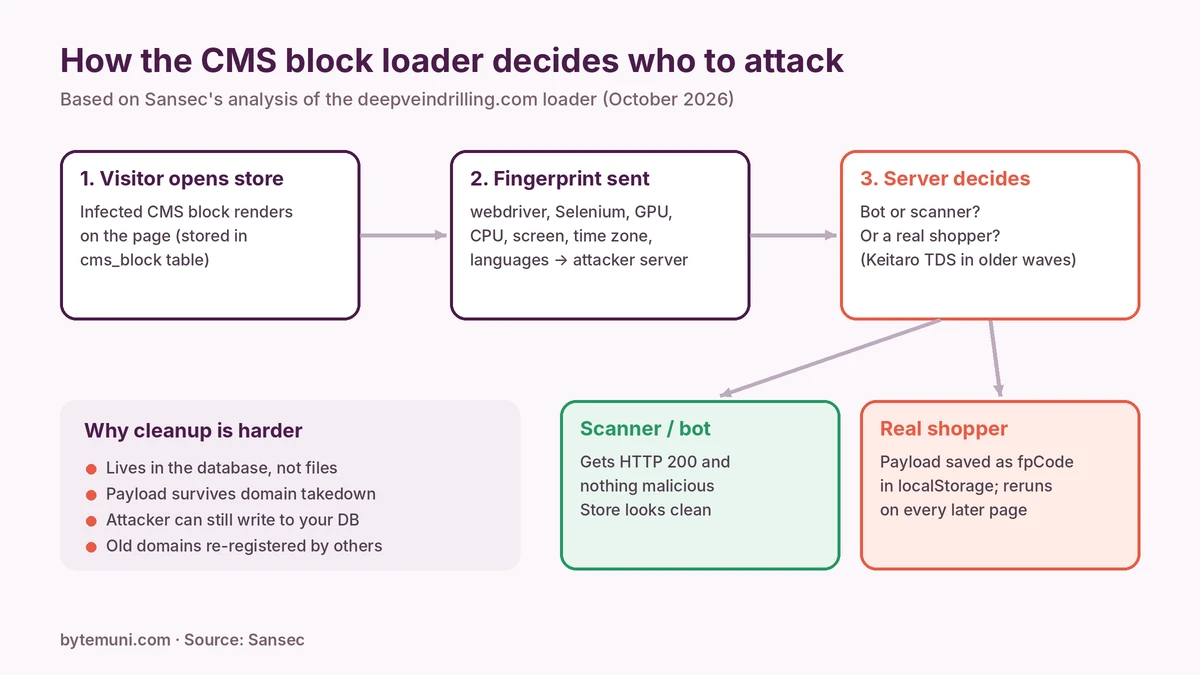
Sansec documented two versions of this Magento malware loader in October 2026.
Version 1 (October 7): a payload that survives the domain going down
The first version added two scripts to the CMS block. One loaded code from deepveindrilling.com. The other did something clever:
It reads a value called
fpCodefrom the visitor's localStorage (data the browser keeps for each website).If it's there, it puts that code into the
onclickattribute of an invisible element, "clicks" it, and removes it. The browser runs the code as an event handler, without usingeval(), which some security tools watch for.
The attacker's server sets fpCode. Once a shopper has received the payload once, it runs again on every later page view, even if the attacker's domain is offline or blocked. Sansec notes that the earlier March version deleted its stored payload after one run; this one keeps it.
Version 2 (October 23): fingerprinting to hide from scanners
On October 23, the operator rewrote the blocks again. The new inline loader collects a browser fingerprint and sends it to the attacker's server. According to Sansec, the fingerprint checks for:
automation signs:
navigator.webdriver, Selenium globals and ChromeDriver'scdc_properties, which are typical of security scanners and bots;hardware details: GPU name (via WebGL), CPU cores and memory;
environment details: screen size, time zone, languages and browser client hints.
The server then decides what to send. When the scanning service urlscan.io loaded an infected store with an automated Chrome browser, it received a normal response and nothing malicious was added to the page. That's the whole point: security scanners see a clean store while real shoppers may not.
What does the final payload do?
Sansec hasn't captured the October payload yet. But earlier stages give a strong hint. In December 2025, a logged-in customer of an infected store was served a script that loaded pages from crypto-insider.top and leqdger.click. The latter is a misspelling of the crypto hardware-wallet brand Ledger, a classic sign of crypto-wallet phishing or theft. Because the loader can run any script, the payload could just as easily be a card skimmer, a fake login prompt or a redirect.
What is Keitaro, and how did earlier versions filter visitors?
Before October, the second script used Keitaro, a commercial advertising tracker that's widely abused as a traffic distribution system (TDS). It sent the visitor's referrer, page title and query string to the attacker's Keitaro server, which decided per visitor whether to return a payload, a redirect or nothing.
When Sansec requested the additionalver.com script as a Windows desktop visitor on October 24, it got back QWE=123;, a harmless-looking statement, plus a cookie that marked the visitor for 24 hours. The new deepveindrilling.com loader drops Keitaro entirely and builds the bot filtering into the loader itself.
Which domains has this Magento malware campaign used?
According to Sansec, the five main loader domains, in order:
manulfie.click: first seen July 9, 2025, on 863 stores
neswnsssn.click: first seen December 12, 2025, on 494 stores
lanhd6549tdhse.top: first seen March 30, 2026, on 355 stores
additionalver.com: first seen June 8, 2026, on 246 stores
deepveindrilling.com: first seen October 7, 2026, on 83 stores
Two more domains, hdfdsi84j3h.top and c85grt98sd.com, ran on a few stores. Many stores appear under several domains because the operator keeps reinfecting them.
There's an extra twist. manulfie.click and neswnsssn.click expired and were re-registered in May 2026, and now point to a domain-parking service. Sansec still found those old loaders on 9 and 6 stores respectively between August and October. So those shoppers' browsers now send data to, and run any script from, whoever owns the domains today. An old, forgotten infection can become a new one when its domain changes hands.
How were the Magento stores hacked?
Sansec links the earlier waves of this Magento malware mainly to two Magento flaws.
PolyShell (CVE-2026-48356)
PolyShell is an unrestricted file upload flaw in Magento Open Source and Adobe Commerce. Sansec reported that Magento's REST API accepted file uploads for cart item custom options, which attackers abused to plant webshells disguised as images. Adobe rated it critical (CVSS 9.6) and fixed it in security bulletin APSB26-73 on July 14, 2026.
Adobe's bulletin says it was "not aware of any exploits in the wild." Sansec's data tells a different story. It recorded mass exploitation starting March 19, 2026, and on March 30 this campaign's operator injected the loader into 471 stores in a single hour after uploading webshells through PolyShell.
SessionReaper (CVE-2025-54236)
SessionReaper is a critical flaw (CVSS 9.1) that Adobe fixed in APSB25-88 in September 2025. Sansec describes it as a bug that "may hand full control of a store to unauthenticated attackers," and it was actively exploited from October 2025.
The numbers
Across the campaign, Sansec found the loader on 169 Magento 2 installs missing at least one core patch. 102 of them (60%) also had files uploaded through PolyShell or SessionReaper. For comparison, on 3,024 similar stores infected with a different skimmer, that rate was 32%.
Patched stores aren't automatically safe
Two of Sansec's examples are worth noting:
A store on Magento 2.4.7-p1 had PolyShell webshells disguised as PNG images in
pub/media/custom_options/quote/, next to the loader in a CMS block. It still lacked APSB26-73.A store on Magento 2.4.7-p10, with no missing core patches, still got the new loader on October 23, one hour after a clean scan. Sansec had earlier found a rogue admin account and a GSocket backdoor on it.
The lesson: patching closes the door for new attackers, but if someone already got in, their backdoors and admin accounts stay. That's why most October infections needed no new vulnerability: 60 of the 83 stores were already compromised.
How do you check if your Magento store is infected?
Sansec published practical checks for this Magento malware. The domains are often base64-encoded, so search for code patterns rather than domain names.
1. Search CMS blocks and pages
SELECT block_id, identifier, update_time FROM cms_block
WHERE content LIKE '%fpCode%' OR content LIKE '%se_referrer%'
   OR content LIKE '%localStorage.getItem%';

SELECT page_id, identifier, update_time FROM cms_page
WHERE content LIKE '%fpCode%' OR content LIKE '%se_referrer%'
   OR content LIKE '%localStorage.getItem%';
Add your table prefix if your store uses one. The update_time column shows when the attacker last wrote to the block, which is useful for your timeline. A legitimate block could occasionally use localStorage, so review any matches rather than deleting blindly.
2. Look for uploaded webshells and backdoors
find pub/media/custom_options/ pub/media/customer_address/ -type f ! -name '.htaccess'
find . -name 'accesson.php' -type f
Files in those upload folders that aren't real customer uploads, especially "images" containing PHP code, are a strong sign of PolyShell or SessionReaper abuse. accesson.php is a backdoor filename Sansec tied to the PolyShell wave.
3. Check admin accounts
SELECT user_id, username, email, created, logdate, is_active
FROM admin_user ORDER BY created DESC;
Any admin account you don't recognise, or that was created recently without a reason, should be treated as the attacker's.
4. Look for unfamiliar processes
One store had a GSocket backdoor, a tool attackers use for persistent remote shell access. Check running processes and cron jobs for anything you don't recognise.
5. Check your Content Security Policy reports
If you collect CSP reports, look for scripts loaded from any of the domains in the indicators below. Sansec's own CSP monitoring received about 52,000 reports of browsers loading additionalver.com alone.
How do you clean up properly?
Sansec's warning is blunt: if your store loads any of these domains, the attacker can write to your database, and deleting the script doesn't remove that access. A full cleanup means:
Remove the malicious code from every affected
cms_blockandcms_pageentry.Find and remove the way in: webshells, backdoor files, rogue admin users, unknown cron jobs and processes.
Patch Magento: install APSB26-73 (PolyShell) and APSB25-88 (SessionReaper), or upgrade to a current supported release.
Change every credential: database password, all admin passwords, and API integration keys. Assume they were exposed.
Re-scan after cleanup and keep monitoring. This operator reinfects old victims.
If you take card payments, also consider your obligations under PCI DSS and your payment provider's rules for suspected compromises.
How do you protect a Magento store long term?
Patch quickly. Both PolyShell and SessionReaper were exploited at scale within days or weeks of becoming known. Subscribe to Adobe's security bulletins.
Never execute PHP from upload folders. Make sure your web server can't run scripts from
pub/media. For example, in nginx:location ~* ^/(pub/)?media/.*\.(php|phtml|phar)$ { deny all; }Protect the admin panel. Use a non-default admin URL, two-factor authentication (enabled by default in Magento 2.4), strong unique passwords, and an IP allowlist where possible.
Use a strict Content Security Policy. Magento includes a CSP module. A restrictive policy, especially on checkout pages, blocks scripts from unapproved domains and its reports reveal injections early.
Monitor the database, not just files. Alert on changes to
cms_block,cms_page,core_config_dataandadmin_user.Use a web application firewall or virtual patching to block known exploit attempts while you schedule upgrades.
Scan from the server side. Since this loader hides from external scanners, internal scans of the database and files are essential.
The same "hide from the scanner, show the real user" idea runs through many modern attacks, as we covered in our article on how attackers hide between alerts.
What can online shoppers do?
Shoppers can't see this Magento malware; it runs on the real store's real website. Practical protection:
Use virtual or single-use cards, or wallet payments such as Apple Pay and Google Pay, which don't expose your card number to the page.
Be suspicious of unexpected pop-ups asking you to connect a crypto wallet, re-enter card details or "verify" your account on a shopping site.
Turn on transaction alerts with your bank, and check statements regularly.
Magento malware indicators of compromise
From Sansec's report:
Loader URLs:
https://deepveindrilling.com/?s=d35c5031,https://deepveindrilling.com/?s=49b7ca5f&fp=Keitaro URLs:
additionalver.com/Mb2z8J,lanhd6549tdhse.top/KZtBscgb,neswnsssn.click/PKgJDPfF,manulfie.click/GKTD8cBz,hdfdsi84j3h.top/sFnnPFHm,c85grt98sd.com/1kYrdHPayload URLs:
leqdger.click/ssl/,crypto-insider.top/ssl/Keitaro decoy response:
QWE=123;localStorage keys:
fpCode,136c1e07507f4a97,136c1e07507f4a98Database location:
cms_block.contentBackdoor filename (PolyShell wave):
accesson.php
The bottom line
This Magento malware campaign shows how modern web attacks stay alive: hide in the database instead of files, show security scanners a clean page, store the payload in the shopper's own browser, and keep coming back to stores that were never fully cleaned. For store owners, the fix isn't just deleting a script. Patch PolyShell and SessionReaper, remove backdoors and rogue admins, rotate every credential, and monitor your CMS content as closely as your code.
For more of this week's security news, see our cybersecurity weekly recap.
Sources: Sansec: deepveindrilling.com Magento CMS block loader hits 953 stores · The Hacker News · Adobe security bulletin APSB26-73 · Sansec: Mass PolyShell attack wave hits 471 stores in one hour · BleepingComputer on PolyShell · Sansec: SessionReaper
Frequently asked questions
What is the deepveindrilling.com Magento malware?
A JavaScript loader hidden in Magento CMS blocks that asks the attacker’s server what code to run in shoppers’ browsers. It’s the fifth domain in a campaign that has hit 953 stores.
Why don’t security scanners detect it?
The loader sends a browser fingerprint first. Automated browsers and scanners get a normal, clean response, while real shoppers can receive the malicious payload.
How can I check if my Magento store is infected?
Search the cms_block and cms_page tables for fpCode, se_referrer or localStorage.getItem. Check upload folders for webshells and admin_user for unknown accounts.
Is removing the script enough?
No. The attacker can still write to your database. Remove webshells, backdoors and rogue admins, patch Magento, and change all database, admin and API passwords.
Which Magento patches protect against this campaign?
Install APSB26-73 for PolyShell (CVE-2026-48356) and APSB25-88 for SessionReaper (CVE-2025-54236), or upgrade to a current supported release.
How can shoppers protect themselves?
Use virtual cards or wallet payments, be wary of unexpected crypto-wallet or card prompts on store sites, and turn on bank transaction alerts.
How this article was made: researched and edited by Deepak Kumar, drafted with help from AI tools.