AI System Design Explained: How ChatGPT-Style Apps Are Built, from Students to Experts (2026 Guide)
AI system design is the craft of building everything around an AI model so the product is fast, affordable, reliable and safe. This guide follows one request through a real AI system, covering gateways, guardrails, caching, routing, RAG, agents, MCP, inference, KV cache, continuous batching, evaluation and cost. It includes real calculations, a batching simulation, a worked cost estimate for 2 million students and an interview framework.

It's 9 p.m. in India, two weeks before board exams. Across the country, a few hundred thousand students open the same AI tutor app and type questions like "Explain Le Chatelier's principle with an example." Each of them expects the answer to start appearing within a second, to be correct, to come from the right syllabus, and to never show anything unsafe. The company behind the app, meanwhile, needs the whole thing to not cost more than it earns.
Making all of that work at once is AI system design.
In a regular web app, the hard part is usually the database or the traffic. In an AI app, there's a new, strange component in the middle: a large language model that is slow, expensive, runs on scarce GPUs, sometimes makes things up, and can be tricked by a cleverly written sentence. AI system design is the craft of building everything around that model so the product is fast, affordable, reliable and safe.
This guide explains AI system design from the ground up, in plain English, for students, analysts, developers and experienced engineers alike. We'll follow a single request through a real AI system, explain each building block (inference servers, the KV cache, batching, caching, RAG, agents, MCP, guardrails, evaluation), and back everything up with numbers. We calculated real KV cache sizes for Llama models, simulated why "continuous batching" quadruples throughput, and worked through a full cost estimate for a large Indian ed-tech app. At the end, there's a step-by-step framework for AI system design interviews.
In one line: AI system design is the discipline of putting models, GPUs, inference servers, caches, retrieval, agents, gateways, guardrails and evaluations together into one system that is fast, cheap, reliable and safe.
What is AI system design?
AI system design is the process of planning the architecture of a product that uses AI models, deciding how data flows in, how the model is served, how results are checked and returned, and how the system scales, recovers from failure and stays within budget.
There are really two flavours, and it helps to know which one you're dealing with:
| Predictive AI systems | Generative and agentic AI systems | |
|---|---|---|
| What the model does | Scores, ranks or classifies (fraud score, product ranking, spam filter) | Generates text, code, images or actions; may call tools on its own |
| Typical model | Gradient-boosted trees, two-tower networks, smaller neural nets | Large language models (LLMs), multimodal models |
| Latency target | Often tens of milliseconds | Time to first token under about a second, then streaming |
| Biggest cost | Feature pipelines and training | GPU inference, paid per token |
| Key building blocks | Feature store, training pipeline, model registry | Inference server, KV cache, RAG, agents, guardrails, evals |
This guide focuses mostly on the second kind, because that's where most of the new design questions are in 2026, but we'll cover the classic ML pieces too.
How is it different from regular system design?
Everything you know from regular system design (load balancers, caches, queues, databases, replication) still applies. AI adds a few twists:
Requests are wildly unequal. One request might generate 20 tokens in half a second; another might generate 2,000 tokens over a minute. Round-robin load balancing stops working well.
Output is generated one token at a time, so we measure "time to first token" and "tokens per second," not just response time.
Cost is per token, so every design decision has a direct rupee or dollar price.
The hardware is scarce. GPUs are expensive, and their memory, not their speed, is often the real limit.
Answers are probabilistic. The same question can produce different answers, and some will be wrong. Testing becomes "evaluation," a continuous process rather than a one-time check.
There's a new attack surface. A sentence hidden in a web page or a PDF can instruct the model to misbehave (prompt injection).
The big picture: one request's journey
Before looking at any single component, it helps to see the whole path. Here's what happens when a student asks the AI tutor a question:
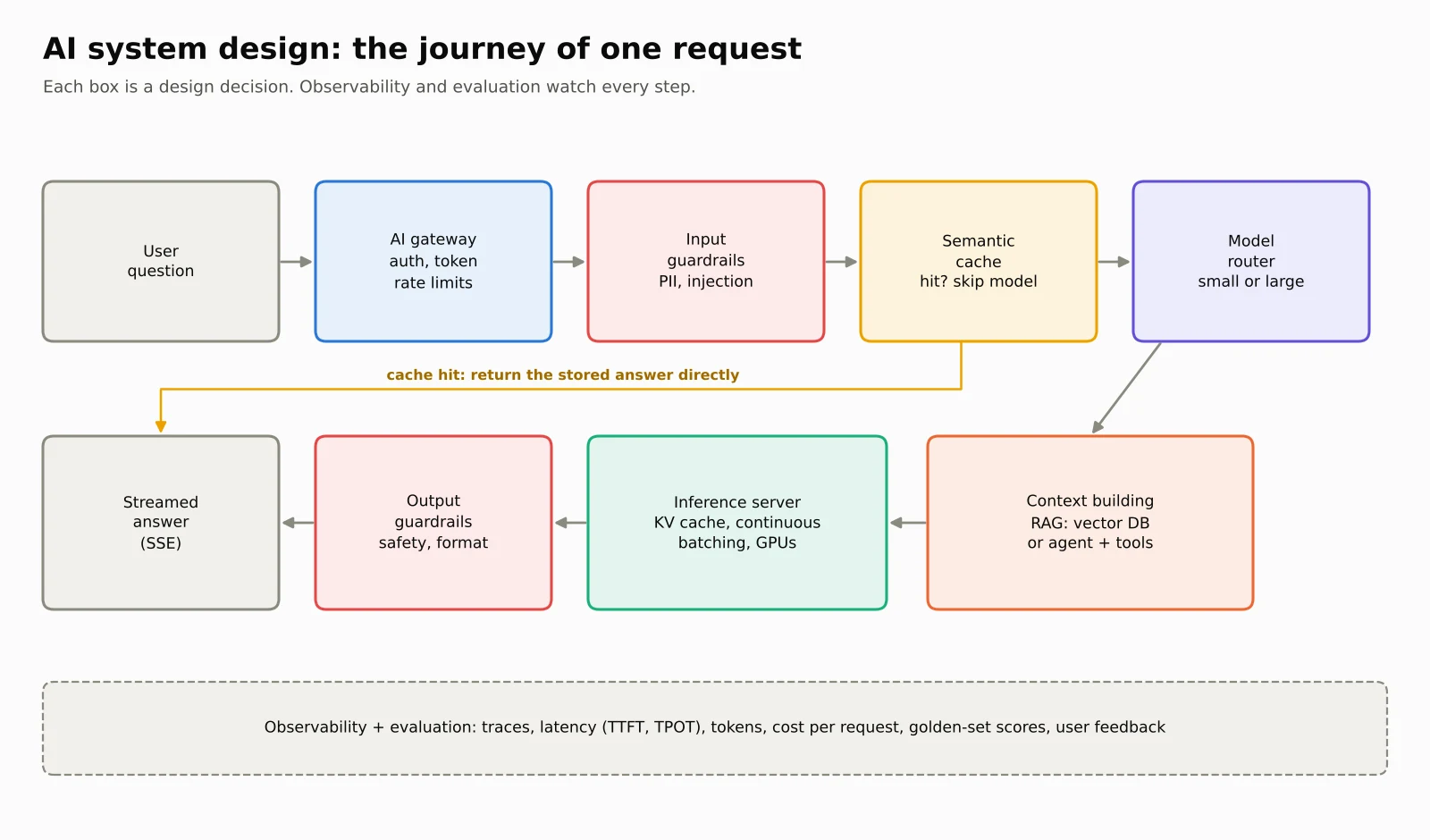
AI gateway. The request arrives at a single entry point that checks who the user is, applies rate limits (in tokens, not just requests), and logs the call.
Input guardrails. The text is checked for things that shouldn't reach the model: personal data that should be masked, abuse, or obvious prompt-injection attempts.
Cache check. If an almost identical question was answered recently, the system can return the stored answer and skip the model entirely.
Routing. A router decides which model should handle this request: a small, cheap model for easy questions, or a large one for hard ones.
Context building. The system fetches relevant material (the right chapter of the syllabus, from a vector database) and assembles the prompt. For agentic tasks, an agent loop may call tools several times here.
Inference. The inference server runs the model on a GPU, sharing the GPU efficiently among many users at once.
Output guardrails. The answer is checked before the user sees it: is it safe, is it in the right format, does it leak private data?
Streaming. Tokens are streamed to the user as they're generated, so the answer starts appearing almost immediately.
Observability and evaluation. Every step is traced, with latency, tokens and cost recorded, and a sample of answers is scored for quality.
The rest of this guide zooms into each of these boxes.
The engine room: how an LLM serves a request
The four numbers that matter
| Metric | What it means | Why users or finance teams care |
|---|---|---|
| TTFT (time to first token) | Time from sending the prompt to seeing the first word | Feels like "responsiveness." Under about a second feels instant |
| TPOT (time per output token), or tokens per second | How fast the rest of the answer streams | 20 ms per token is 50 tokens per second, faster than anyone reads |
| Throughput | Total tokens per second the server produces across all users | Decides how many GPUs you need |
| Cost per request | Input tokens × input price + output tokens × output price | Decides whether the business survives |
These pull against each other. Packing more users onto a GPU raises throughput and lowers cost, but each user's answer may stream a little slower. A lot of AI system design is choosing where to sit on that trade-off.
Prefill and decode: reading versus writing
Every LLM request runs in two phases:
Prefill is the model reading your whole prompt. All the prompt tokens are processed together, in parallel, which keeps the GPU's maths units busy. It's compute-bound, and its length decides TTFT.
Decode is the model writing the answer, one token at a time. Each step does very little maths but must read the model's entire weights from GPU memory again. It's memory-bandwidth-bound, and it decides how fast the answer streams.
An everyday analogy: prefill is a student reading the whole question paper in one go; decode is writing the answer word by word, glancing back at notes for each word.
This split explains a lot. It's why output tokens are usually priced several times higher than input tokens. It's why a very long prompt makes the first word slow. And it's why so many optimisations target decode.
The KV cache: the GPU's notebook
While generating each new token, the model needs information about every earlier token, specifically each token's Key and Value vectors from the attention layers. Recomputing them at every step would be enormously wasteful, so the server stores them in GPU memory. This store is the KV cache.
The KV cache makes generation fast, but it's also the hidden reason AI serving is expensive: it lives in scarce GPU memory and grows with every token of every conversation. The size per token is:
KV cache per token = 2 (Key and Value) × layers × KV heads × head size × bytes per number
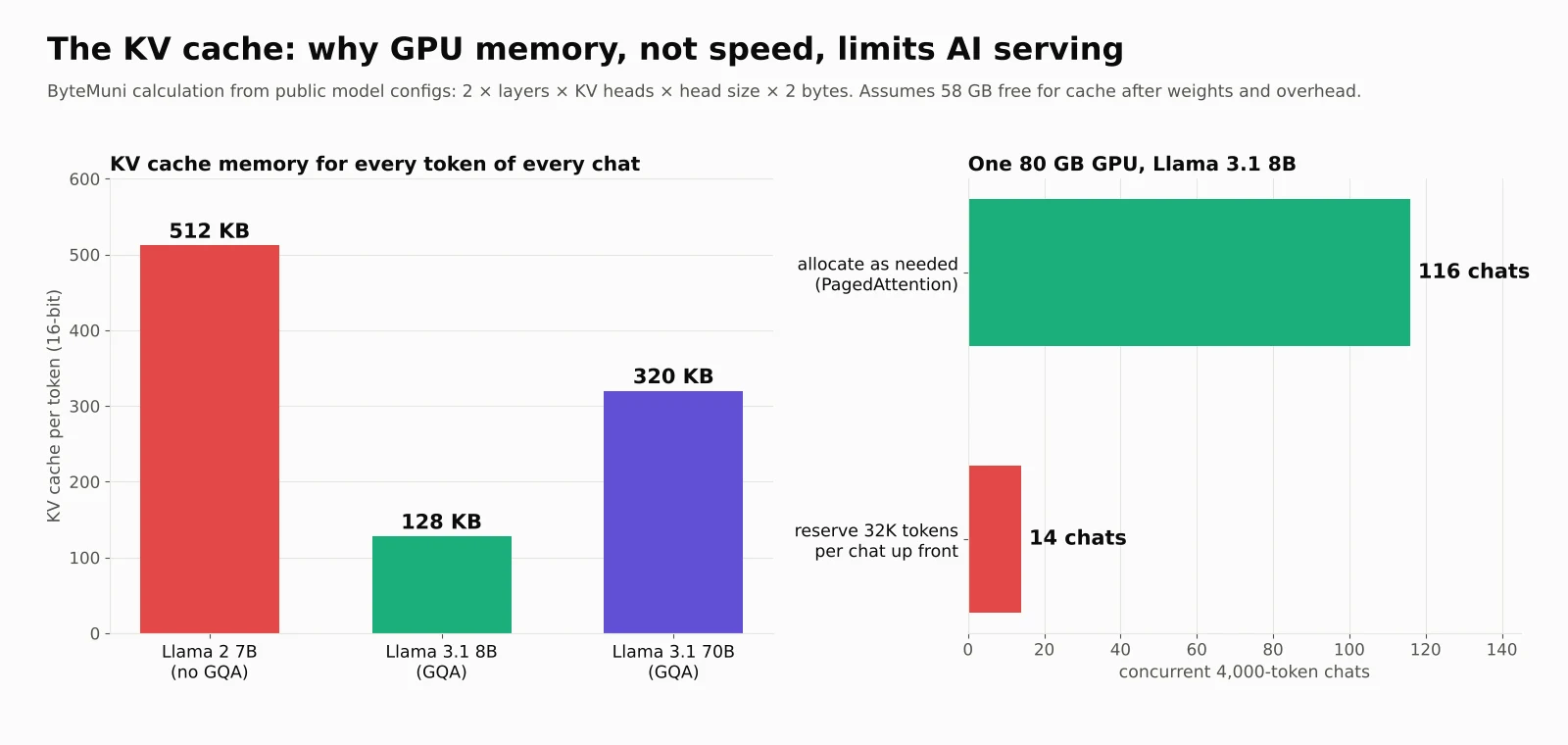
We calculated it for three real, public model architectures (16-bit numbers):
| Model | KV cache per token | One 4,000-token chat | One 128,000-token document | Model weights |
|---|---|---|---|---|
| Llama 2 7B (no grouped-query attention) | 512 KB | 2.0 GB | 64 GB | 13 GB |
| Llama 3.1 8B (grouped-query attention) | 128 KB | 0.5 GB | 16 GB | 16 GB |
| Llama 3.1 70B (grouped-query attention) | 320 KB | 1.25 GB | 40 GB | 141 GB |
Two lessons jump out:
Long context is expensive. A single 128,000-token document on Llama 2 7B would need 64 GB of KV cache, more than five times the model itself.
Architecture choices matter. Llama 3.1 8B is a slightly bigger model than Llama 2 7B but needs four times less KV cache per token, because it uses grouped-query attention (GQA), where several attention heads share the same Keys and Values. That single design choice lets a server handle four times as many conversations.
PagedAttention: don't reserve what you won't use
Early serving systems reserved a big block of GPU memory for each request up front, sized for the longest possible answer, because nobody knows in advance how long an answer will be. Most of that memory sat empty.
The vLLM team found that existing systems wasted 60% to 80% of KV cache memory through this kind of over-reservation and fragmentation. Their fix, PagedAttention, borrows an idea from operating systems: hand out memory in small pages only as a conversation actually grows. Waste fell to under 4%, vLLM reported up to 24 times higher throughput than Hugging Face Transformers, and LMSYS said switching its Chatbot Arena serving to vLLM cut the number of GPUs it needed by 50%.
Our own calculation shows why. On one 80 GB GPU running Llama 3.1 8B, about 58 GB is left for the KV cache after the weights and working memory (our assumption for overhead). If the server allocates memory as needed, it fits 116 simultaneous 4,000-token chats. If it reserves room for 32,000 tokens per chat "just in case," it fits only 14. Same GPU, eight times fewer users.
Continuous batching: never let a GPU seat sit empty
Because decode is limited by memory reads rather than maths, a GPU can generate the next token for 32 users almost as fast as for one. So servers batch many requests together.
The naive way, static batching, groups 32 requests and runs them until all of them finish. The problem: if one student asks for a long essay, the 31 short answers finish early, and their slots sit idle until the essay is done.
Continuous batching (also called iteration-level scheduling, introduced by the Orca paper at OSDI 2022) fixes this by refilling empty slots at every single step: the moment one answer finishes, a waiting request takes its place. Orca reported a 36.9 times throughput improvement over NVIDIA FasterTransformer at the same latency on a GPT-3 175B model, and today vLLM, SGLang, TensorRT-LLM and other servers all do it.
We simulated this ourselves with 2,000 requests whose answer lengths vary as they do in real chat traffic (median 195 tokens, a few up to 2,000), 32 batch slots and a fixed time per decode step:
| Static batching | Continuous batching | |
|---|---|---|
| Time to finish all 2,000 requests | 1,704 seconds | 424 seconds |
| Throughput | 311 tokens per second | 1,251 tokens per second |
| Batch slots actually busy | 24% | 98% |
| Median time until a request finishes | 926 seconds | 212 seconds |
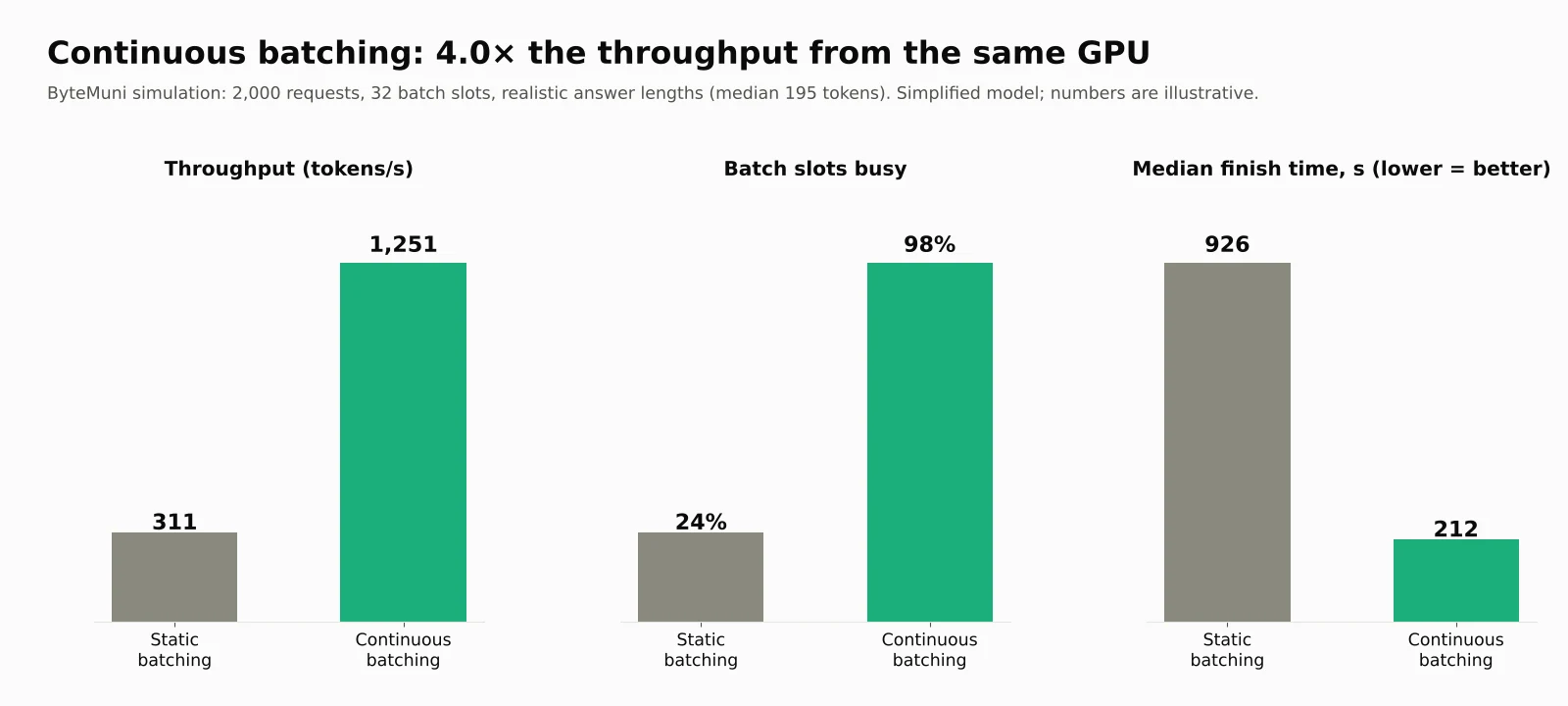
Four times the throughput from the same GPU, purely by scheduling better. (Our simulation is simplified: real servers also juggle prefill, memory limits and arriving traffic, so treat the exact numbers as illustrative. Orca's much larger figure came from a different baseline and workload.)
Other inference optimisations worth knowing
Quantization: store weights (and sometimes the KV cache) in 8-bit or 4-bit numbers instead of 16-bit. Less memory, faster decode, small quality cost.
Speculative decoding: a small "draft" model guesses several tokens ahead, and the big model checks them in one step. When guesses are right, you get several tokens for the price of one.
Chunked prefill: split a very long prompt's prefill into pieces so it doesn't freeze other users' streaming answers.
Prefill-decode disaggregation: at large scale, run prefill and decode on separate GPU pools so each can be tuned and scaled independently.
Choosing an inference engine: vLLM and SGLang are popular open-source choices; TensorRT-LLM targets NVIDIA hardware; Ollama and llama.cpp are popular for laptops and edge devices.
Scaling: more users, more GPUs
Fitting big models: parallelism
A 70-billion-parameter model needs about 141 GB just for its weights in 16-bit, more than one 80 GB GPU holds. So the model is split:
Tensor parallelism splits each layer's maths across GPUs in the same machine. They must talk constantly, so they need a very fast link (such as NVLink).
Pipeline parallelism gives different layers to different GPUs, like an assembly line. It tolerates slower links but adds some idle time.
Load balancing for LLMs
Round-robin and "least connections" assume requests are roughly equal. LLM requests aren't. Better strategies include:
Least outstanding tokens: send the next request to the server with the fewest tokens still to generate.
Prefix-aware routing: if many requests share the same long system prompt, send them to the same server, where that prefix's KV cache is already warm.
Sticky sessions: keep one user's conversation on the same server so its history stays cached.
Autoscaling on the right signal
CPU usage tells you little about a GPU server. Scale on queue depth, tokens in flight, KV cache utilisation or TTFT. And remember that a new GPU server can take minutes to start and load a large model, so keep some headroom for spikes like a results-day rush.
Caching: the cheapest token is the one you never generate
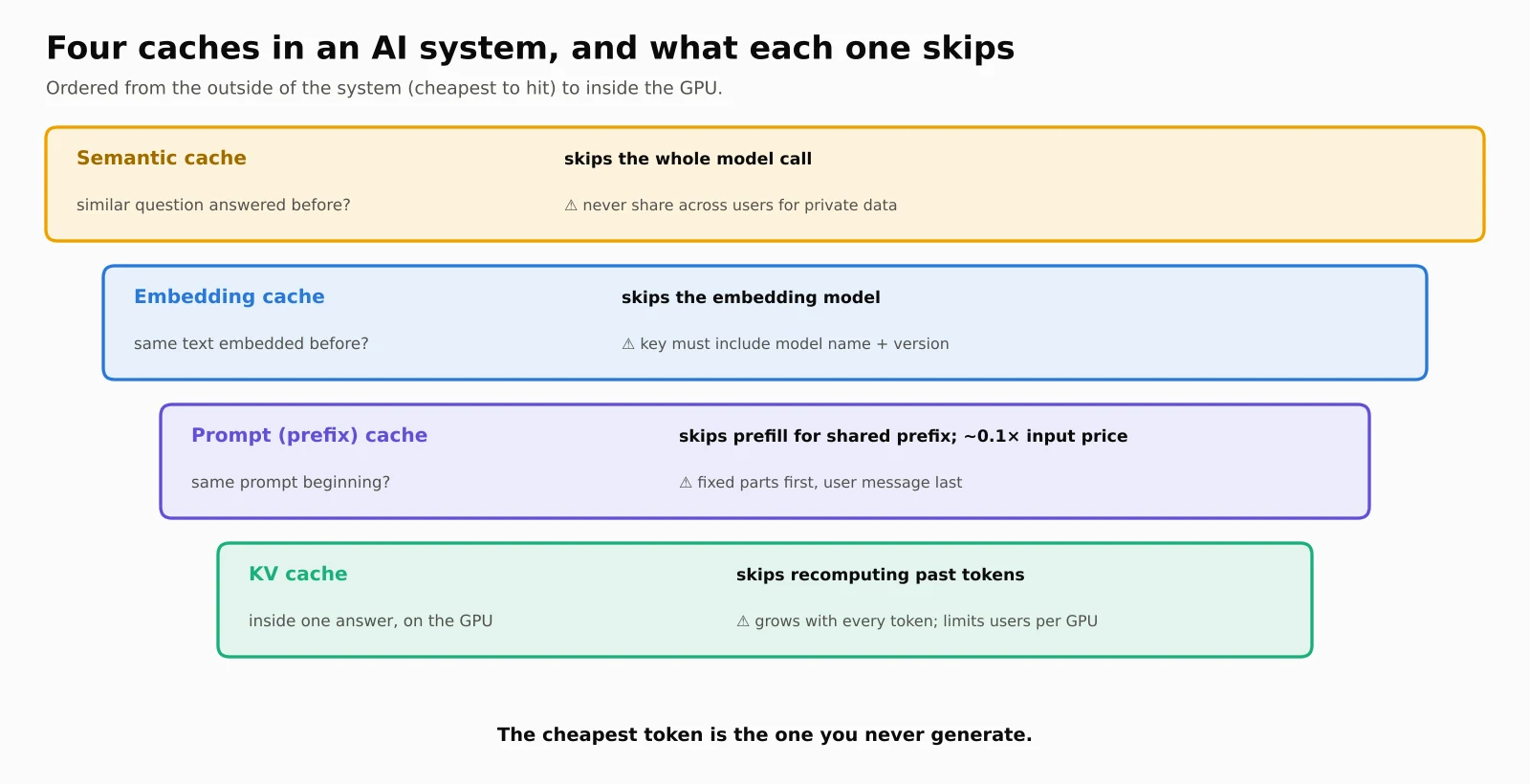
AI systems use several caches at different points, and they're easy to confuse:
| Cache | What it stores | What it saves | Watch out for |
|---|---|---|---|
| KV cache | Keys and Values of tokens in an active request | Recomputation inside one answer | GPU memory |
| Prompt (prefix) cache | KV cache of a shared prompt beginning (system prompt, tool list, long document) | Prefill time and input cost across requests | Only works if the start of the prompt is exactly the same |
| Semantic cache | Past questions (as embeddings) and their answers | The entire model call for similar questions | Wrong answers if the similarity threshold is too loose; never share across users for private data |
| Embedding cache | Embeddings of texts already processed | Calls to the embedding model | Include the embedding model's name and version in the cache key |
Prompt caching in practice: put everything that never changes (instructions, tool definitions, reference documents) at the start of the prompt and the user's message at the end. Providers then bill the cached part at a steep discount. For example, Anthropic's pricing page lists a cache read at 0.1 times the base input price for most Claude models, while writing a five-minute cache entry costs 1.25 times.
Semantic caching in practice: "What's the capital of France?" and "Tell me France's capital city" mean the same thing, so the second can reuse the first's answer. But "capital of France" and "capital of Germany" are also very similar sentences. The similarity threshold needs testing on real questions, and personal questions ("What's my attendance?") must never be answered from someone else's cache entry.
Model routing and fallbacks
Not every question needs the biggest model. "What is the SI unit of force?" can be answered by a small, cheap, fast model; "Prove that √2 is irrational and explain each step" may deserve a larger one.
A model router classifies each request (with rules, a small classifier or a cheap LLM) and sends it to the right model. Done well, it's one of the biggest cost levers in AI system design, as our worked example below shows.
Routers also give you resilience. If the main model provider is slow or down, the router can fall back to a backup model or provider, ideally with a timeout so users aren't left staring at a spinner. For more on why small models can handle a surprising share of the work, see ByteMuni's guide to fine-tuning a small language model.
RAG: giving the model the right knowledge
An LLM only knows what it learned in training, which has a cut-off date and doesn't include your private documents. Retrieval-augmented generation (RAG) fixes this by fetching relevant text at question time and putting it in the prompt.
A production RAG pipeline has two halves:
Indexing (offline): parse documents (PDFs, slides, web pages, including tables) → split them into chunks → turn each chunk into an embedding → store them in a vector database, with metadata such as class, subject and date.
Retrieval (online): turn the question into an embedding → search for the closest chunks → often combine with keyword search (hybrid search), because embeddings can miss exact terms like "Section 80C" or an error code → re-rank the top results with a more precise model → put the best few chunks into the prompt → answer with citations.
Two research findings shape how much you retrieve:
"Lost in the middle": a 2023 study by Liu and colleagues found that models use information at the beginning and end of a long context much better than information buried in the middle.
"Context rot": Chroma's July 2025 study of 18 models found that "performance grows increasingly unreliable as input length grows," even on simple tasks.
So more context isn't automatically better. Retrieve fewer, better chunks, and put the most important ones where the model will notice them. That practice, deciding exactly what goes into the model's limited context window, is now called context engineering. ByteMuni's comparison of RAG, CAG and KAG covers alternatives to plain RAG, and our generative AI with LangChain guide shows how to build one.
AI agents: when the model takes actions
An AI agent is an LLM that can decide to call tools (search, run code, query a database, send an email) in a loop until a goal is reached. It's the difference between a tutor that explains a topic and one that also checks your timetable, books a doubt-clearing session and emails you the notes.
Start with workflows, not agents
Anthropic's widely cited engineering post Building effective agents (December 2024) draws a useful line:
Workflows are "systems where LLMs and tools are orchestrated through predefined code paths."
Agents are systems where "LLMs dynamically direct their own processes and tool usage."
It recommends "finding the simplest solution possible, and only increasing complexity when needed," and describes five common workflow patterns: prompt chaining (step 1's output feeds step 2), routing, parallelisation, orchestrator-workers (a lead model splits a task among helpers) and evaluator-optimiser (one model drafts, another critiques). For most products, a predictable workflow beats a fully autonomous agent.
The building blocks of an agent system
Tool calling and structured output: the model returns a structured request ("call
get_timetablewithclass=12"); your code runs it and returns the result. Validate every tool call's arguments, like any untrusted input.Memory: short-term memory is the current conversation; long-term memory (preferences, past interactions) is stored outside the model, often in a database or vector store, and recalled when relevant.
MCP (Model Context Protocol): an open standard for connecting AI applications to tools and data sources, so one connector works with many AI apps. Anthropic introduced MCP in late 2024, and in December 2025 donated it to the newly formed Agentic AI Foundation under the Linux Foundation, co-founded with Block and OpenAI. Anthropic said there were over 10,000 active public MCP servers at the time.
A2A (Agent2Agent): a protocol for agents from different vendors to talk to each other. MCP connects an agent to tools; A2A connects agents to other agents.
Multi-agent systems: several specialised agents (researcher, writer, checker) coordinated by an orchestrator. Powerful, but harder to debug and more expensive, so use them only when a single agent clearly isn't enough.
Designing agents safely
Agents fail in new ways: infinite loops, runaway costs, wrong tool calls, and being hijacked by instructions hidden in a web page or document they read. Good agent design includes step and cost limits, timeouts, least-privilege tool permissions, human approval for risky actions (payments, emails, deletions) and full logging of every step. ByteMuni's explainer on how AI agents work and our coverage of AI agents as insider threats go deeper.
Streaming, queues and rate limits
Streaming: send tokens as they're generated, usually with Server-Sent Events (SSE) for one-way text streaming, or WebSockets for two-way, real-time apps such as voice.
Async jobs: long tasks (summarising a 300-page PDF, a research agent running for minutes) shouldn't hold an HTTP connection open. Put them on a message queue, return a job ID, and notify the user when done.
Rate limiting in tokens: limit tokens per minute (TPM) as well as requests per minute (RPM), because one request can be a thousand times bigger than another. Many teams also cap concurrent requests and daily spend per user or customer.
AI gateway: a single layer in front of all models that handles authentication, rate limits, routing, retries, fallbacks, cost tracking and logging. It stops every team from reinventing these.
Guardrails, security and privacy
Input guardrails check what goes in: mask personal data (names, phone numbers, Aadhaar-style IDs), block abusive content and catch obvious injection attempts. Output guardrails check what comes out: harmful content, leaked secrets or personal data, and valid format (for example, JSON that matches a schema).
Prompt injection is the defining security problem of AI systems. Text inside a document, email or web page can say "ignore your instructions and…", and the model may comply. There's no complete fix yet, so design in layers: treat all retrieved and tool content as untrusted data, give the model only the permissions it truly needs, require human confirmation for sensitive actions, and red-team your system regularly.
Privacy and compliance: log carefully (prompts often contain personal data), choose where data is processed (data residency), check providers' data-use and retention terms, and follow local law. For Indian products, that includes the Digital Personal Data Protection Act, 2023. Keep audit logs of who asked what and what the system did.
Observability and evaluation: knowing it actually works
Traditional monitoring asks, "Is it up and fast?" AI monitoring also has to ask, "Is it right?"
Observability: trace every request end to end, recording latency at each step, TTFT, tokens in and out, cost, model and prompt version, retrieved documents and tool calls. Without this, you can't debug a bad answer.
Evaluation:
Build a golden set: a few hundred real questions with known good answers, including tricky ones. Run it before every prompt, model or retrieval change, like unit tests.
Use LLM-as-a-judge to score answers at scale (for correctness, faithfulness to retrieved sources or tone), but check the judge against human ratings first, because judges have biases of their own.
For RAG, measure retrieval separately: did the right chunk come back at all?
For agents, judge the whole trajectory: did it pick the right tools, in a sensible order, within budget?
Online, track user feedback, escalations to humans and A/B test results.
Treat prompts like code: version them, review changes and roll them out gradually.
Worked example: designing an AI exam tutor for 2 million students
Let's put it all together with a back-of-the-envelope estimate, the kind of reasoning interviewers want to see. Every number here is an assumption; the method is what matters.
Requirements: 2 million daily active students; each asks 6 questions a day; answers must start in under a second, stream smoothly, come from the official syllabus and be safe for school students.
Step 1: Estimate the load.
Requests per day       = 2,000,000 students × 6 questions          = 12 million
Input per request      = 1,500 (system prompt) + 2,000 (syllabus chunks) + 100 (question) = 3,600 tokens
Output per request     = 300 tokens
Daily input tokens     = 12 million × 3,600                         = 43.2 billion
Daily output tokens    = 12 million × 300                           = 3.6 billion
Evening peak           = 25% of daily traffic in 2 hours
Peak requests per sec  = 12 million × 0.25 / 7,200 seconds          ≈ 417
Peak output tokens/sec = 417 × 300                                  = 125,000
That peak, about 125,000 output tokens per second, is what you size GPUs or API rate limits for, not the daily average.
Step 2: Estimate the cost, and cut it. Using hypothetical prices of $3 per million input tokens and $15 per million output tokens for a large model, and $0.30 and $1.20 for a small one:
| Design decision | Estimated monthly cost |
|---|---|
| Send everything to the large model | $5.51 million |
| + prompt caching (the 1,500-token system prompt billed at 10%) | $4.05 million |
| + model router sends 70% of easy questions to the small model | $1.48 million |
| + semantic cache answers 15% of repeated questions | $1.25 million |
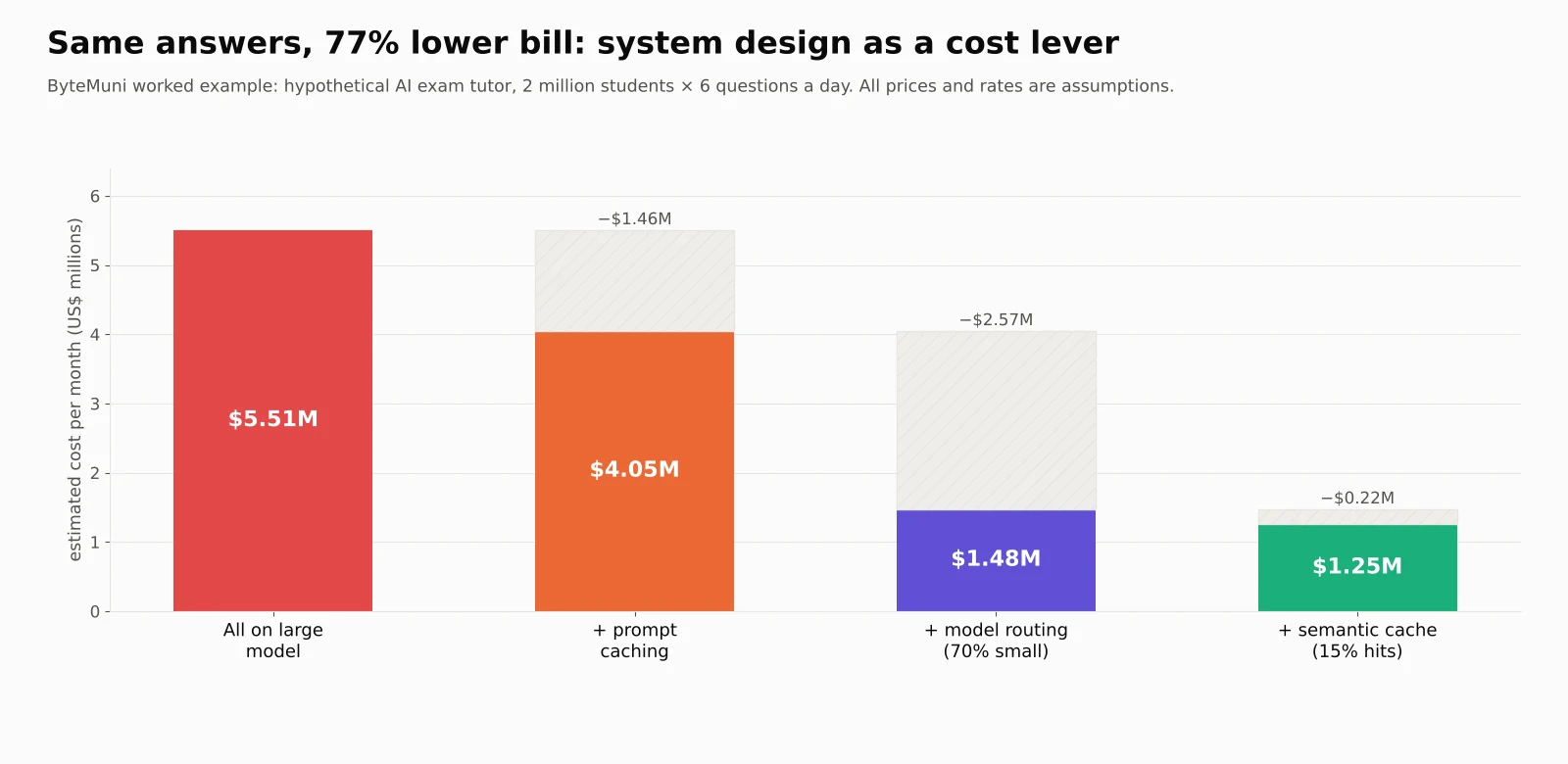
A 77% reduction, without changing a single answer the large model gives, purely through system design. (Real savings depend on your traffic, prices and how many questions the small model can genuinely handle well, which is exactly what your evaluation set should check.)
Step 3: The architecture.
Gateway: authentication, per-student token limits, logging.
Guardrails: age-appropriate content filters on input and output; personal data masked.
Semantic cache: only for general syllabus questions, never for personal ones.
Router: a small classifier sends simple factual questions to the small model and multi-step problems to the large one, with fallback to a second provider.
RAG: NCERT and board syllabus content, chunked by topic, tagged by class and subject, with hybrid search and re-ranking; answers cite the chapter.
Inference: if self-hosting, vLLM or SGLang with continuous batching, prefix caching for the shared system prompt and autoscaling on queue depth before the evening peak.
Async path: "Make me a revision plan for the next 14 days" runs as a background job.
Evaluation: a golden set of 500 questions per subject, checked by teachers, run before every change.
Classic ML system design still matters
Not every AI system is a chatbot. Recommendation feeds, fraud detection and search ranking are still mostly predictive systems, and interviews still ask about them. The key ideas:
Feature store: one place that computes features (such as "orders in the last 7 days") and serves the same values for training and for live predictions. Without it, you get training-serving skew: the model sees one thing in training and another in production.
Offline vs online: heavy computation (training, batch features, embeddings) runs offline; the live path only does fast lookups and inference.
Two-stage recommendation: a fast retrieval stage (for example, a two-tower model with vector search) picks a thousand candidates, then a heavier ranking model orders the top few.
Model registry and safe rollout: version every model, deploy with shadow (run silently alongside), canary (a small share of users) or A/B tests, and keep one-click rollback.
Monitoring for drift: watch whether input data or prediction quality shifts over time, and retrain when it does.
The trade-offs at the heart of AI system design
| Trade-off | One side | Other side |
|---|---|---|
| Quality vs cost | Larger model, better answers | Smaller model, cheaper and faster |
| Latency vs throughput | Small batches, snappier streaming | Big batches, cheaper per token |
| Context vs accuracy | More retrieved text, more coverage | Less, better-chosen text; less "context rot" |
| Freshness vs speed | Fresh retrieval and generation each time | Caching, which risks stale answers |
| Autonomy vs control | Agents that can do more | Workflows that are predictable and safer |
| Build vs buy | Self-hosting: control, privacy, cost at scale | APIs: speed to market, no GPU operations |
There's rarely a "correct" answer. A good design states the requirement that matters most and makes the trade-off explicit.
How to answer an AI system design interview question
A simple, repeatable framework:
Clarify requirements. Who are the users? What exactly should the system do? What are the latency, quality, safety and budget targets? Is the data private?
Estimate scale. Users, requests per second at peak, input and output tokens, storage for embeddings, rough GPU count or API cost.
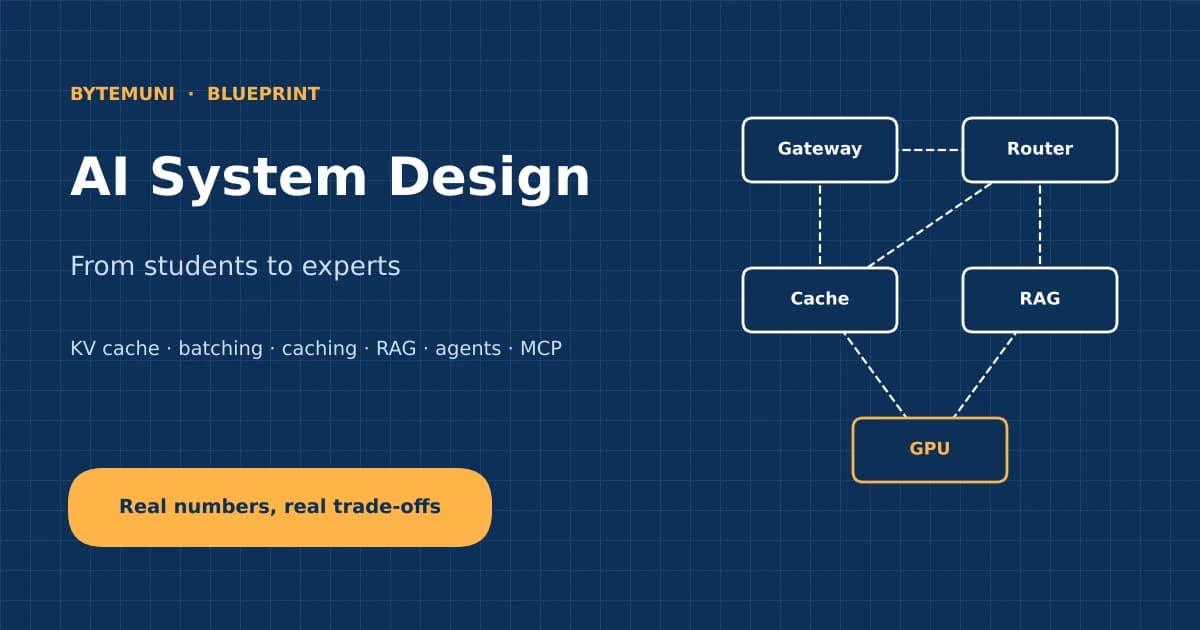
Draw the high-level design. Gateway → guardrails → cache → router → retrieval or agent → inference → output checks → streaming, plus observability.
Deep-dive the critical parts. Usually inference serving (batching, KV cache), RAG quality, or agent safety, depending on the question.
Cover cost. Caching, routing, smaller models, shorter outputs and batch APIs for offline work.
Cover reliability and safety. Fallbacks, timeouts, rate limits, prompt injection, privacy.
Explain evaluation. How will you know it works, and how will you catch regressions?
Discuss trade-offs and next steps.
Practice questions: design ChatGPT; design a customer-support bot over company documents; design a coding assistant like Cursor or Claude Code; design a real-time voice agent; design a semantic search engine; design an AI content-moderation pipeline; design a recommendation system for an e-commerce app. ByteMuni's generative AI interview questions for 2026 is a good companion for the theory side, and our guide to how ChatGPT and Claude are built explains the models themselves.
Our take
AI system design can look like an intimidating list of new jargon, but underneath it's the same engineering mindset as always: understand the bottleneck, measure it and design around it. The bottleneck is just different now. It's GPU memory instead of disk, tokens instead of requests, and "is the answer right?" instead of only "is the server up?"
Our numbers make the point. A single architectural choice (grouped-query attention) cut KV cache memory fourfold. A scheduling change (continuous batching) quadrupled throughput on the same hardware. And caching plus routing cut a hypothetical bill by 77%. None of these needed a smarter model, only a better-designed system around it.
For students, that's encouraging. You don't need to train a frontier model to be valuable in AI. Engineers who can make models fast, affordable, safe and measurable are exactly who companies are hiring in 2026.
Sources
Amit Shekhar (Outcome School): AI System Design guide (GitHub)
System Design Handbook: AI System Design, A Complete Guide (2026)
vLLM: Easy, Fast, and Cheap LLM Serving with PagedAttention (June 2023)
Yu et al.: Orca, A Distributed Serving System for Transformer-Based Generative Models (OSDI 2022)
Liu et al.: Lost in the Middle: How Language Models Use Long Contexts (2023)
Frequently asked questions
What is AI system design?
AI system design is the practice of architecting products that use AI models. It covers how requests flow through gateways, guardrails, caches, routers, retrieval and inference servers, and how the system stays fast, affordable, reliable and safe as usage grows.
How is AI system design different from traditional system design?
It uses the same foundations, such as load balancing, caching and queues. It also adds AI-specific problems: GPU memory limits, token-by-token generation, per-token costs, unequal request sizes,
What is a KV cache, and why does it matter?
The KV cache stores the attention Keys and Values of every token in an active conversation, so the model doesn't recompute them for each new token. It makes generation fast but consumes GPU memory. For example, Llama 3.1 8B needs about 128 KB per token, so long conversations limit how many users one GPU can serve.
What is continuous batching?
Continuous batching lets an inference server replace a finished request with a waiting one at every generation step, instead of waiting for a whole batch to finish. In ByteMuni's simulation, it kept 98% of batch slots busy compared with 24% for static batching, giving about four times the throughput.
How do you reduce the cost of an LLM application?
The biggest levers are prompt caching for repeated prompt beginnings, routing simple requests to smaller models and semantic caching for repeated questions. Shorter prompts and outputs, retrieving fewer but better documents and using batch APIs for work that isn't urgent also help.
What topics should I study for AI system design interviews?
Study LLM inference (prefill, decode, KV cache and batching), scaling and load balancing, caching, model routing, RAG, agents and MCP, streaming and rate limiting, guardrails and prompt injection, observability and evaluation, and cost estimation. Also cover classic ML system design, such as feature stores and recommendation systems.
How we research, write and check articles