AWS Lambda Web Functions: A Developer Guide to Lambda Without Handlers
AWS Lambda Web Functions let your Node.js server listen on a port and serve up to 128 requests per warm environment, billed on active CPU. This developer guide covers the new programming model, the launch limits, deploys and canaries, pricing checked against AWS's own examples, and the gotchas early adopters have already found.

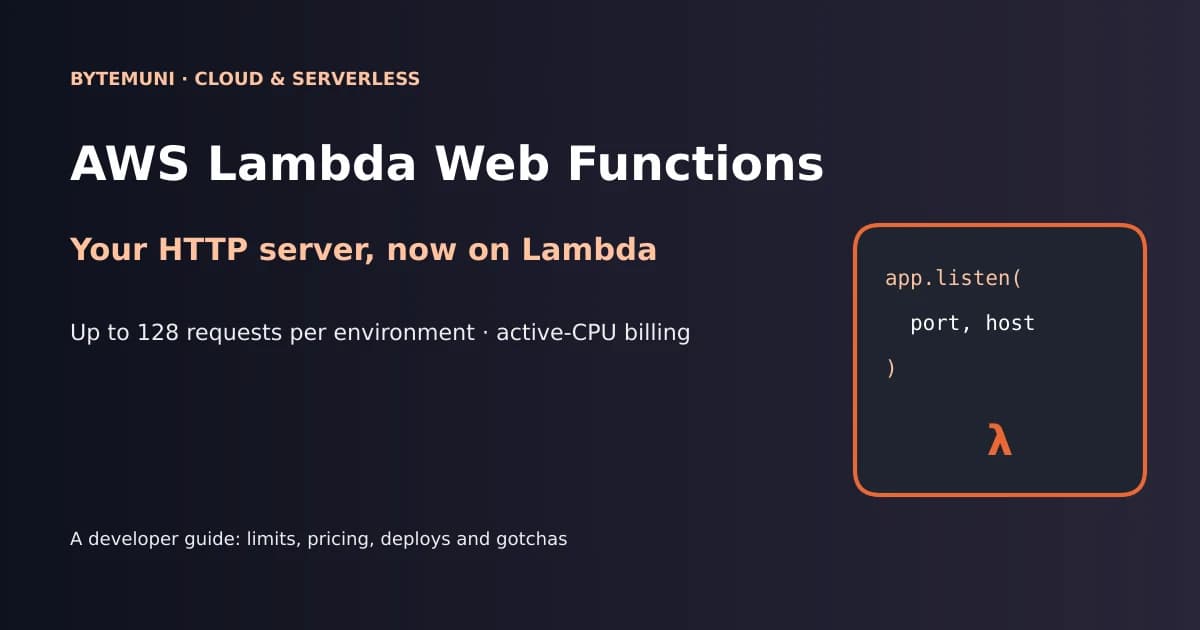
For more than a decade, putting a normal web app on AWS Lambda meant pretending it wasn't a web app. Every HTTP request arrived as a JSON event, your code returned a JSON object, and tools like serverless-express or the Lambda Web Adapter existed mostly to hide that gap. On October 12, 2026, AWS removed the pretending. Lambda Web Functions let your code be an ordinary HTTP server: it listens on a port, it handles requests the way Express or Hono always have, and Lambda takes care of the HTTPS endpoint, scaling and billing.
I spent the last few days reading the launch post, the developer guide, the pricing page and the first hands-on write-ups from AWS engineers and independent developers. I also ran a small local experiment and a cost model of my own. This guide is what I'd want as a developer before moving anything real onto Lambda Web Functions:
what actually changed in the programming model, and why "one request per environment" is gone
the limits that matter (2 vCPUs, 2 GB, 128 concurrent requests, timeouts, quotas)
how deploys, revisions, canaries and multi-Region endpoints work
the pricing, with AWS's own examples checked line by line
where it saves money, where it doesn't, and the gotchas early adopters have already hit
What are Lambda Web Functions?
AWS describes them as "a new form factor that lets you run standard HTTP web applications on Lambda without rewriting your code into an event handler." In the words of Micah Walter, the AWS senior solutions architect who wrote the launch post: "No adapters, no infrastructure to manage, and no framework lock-in."
The mechanics are simple. Lambda sets an environment variable called AWS_LAMBDA_HTTP_ENDPOINT to a host:port address. Your server listens on that address. Lambda accepts HTTPS traffic at a managed endpoint and forwards plain HTTP requests to your process. There's no handler, no event object and no adapter.
With this launch, Lambda now has three form factors, all built on the same Firecracker isolation technology:
| Form factor | Programming model | Billing | Best for |
|---|---|---|---|
| Event Functions (classic Lambda, renamed) | One event per environment, handler returns a response | Wall-clock duration | Queues, S3 uploads, EventBridge, service-to-service triggers |
| Web Functions (new) | Your code is an HTTP server; many requests share one environment | Active CPU + memory held + requests | Web apps, APIs, SSR, streaming, webhooks |
| MicroVMs (launched earlier in 2026) | Isolated, stateful sandboxes with customer-managed lifecycles | Separate | Running untrusted or user-generated code |
The rename is the part that makes some people nervous, so to be clear: AWS says calling existing functions "Lambda Event Functions" is a naming change only. It "requires no code changes or redeployments for your existing functions."
The big shift: one environment, many requests
This is the change that matters most, and it's easy to underestimate.
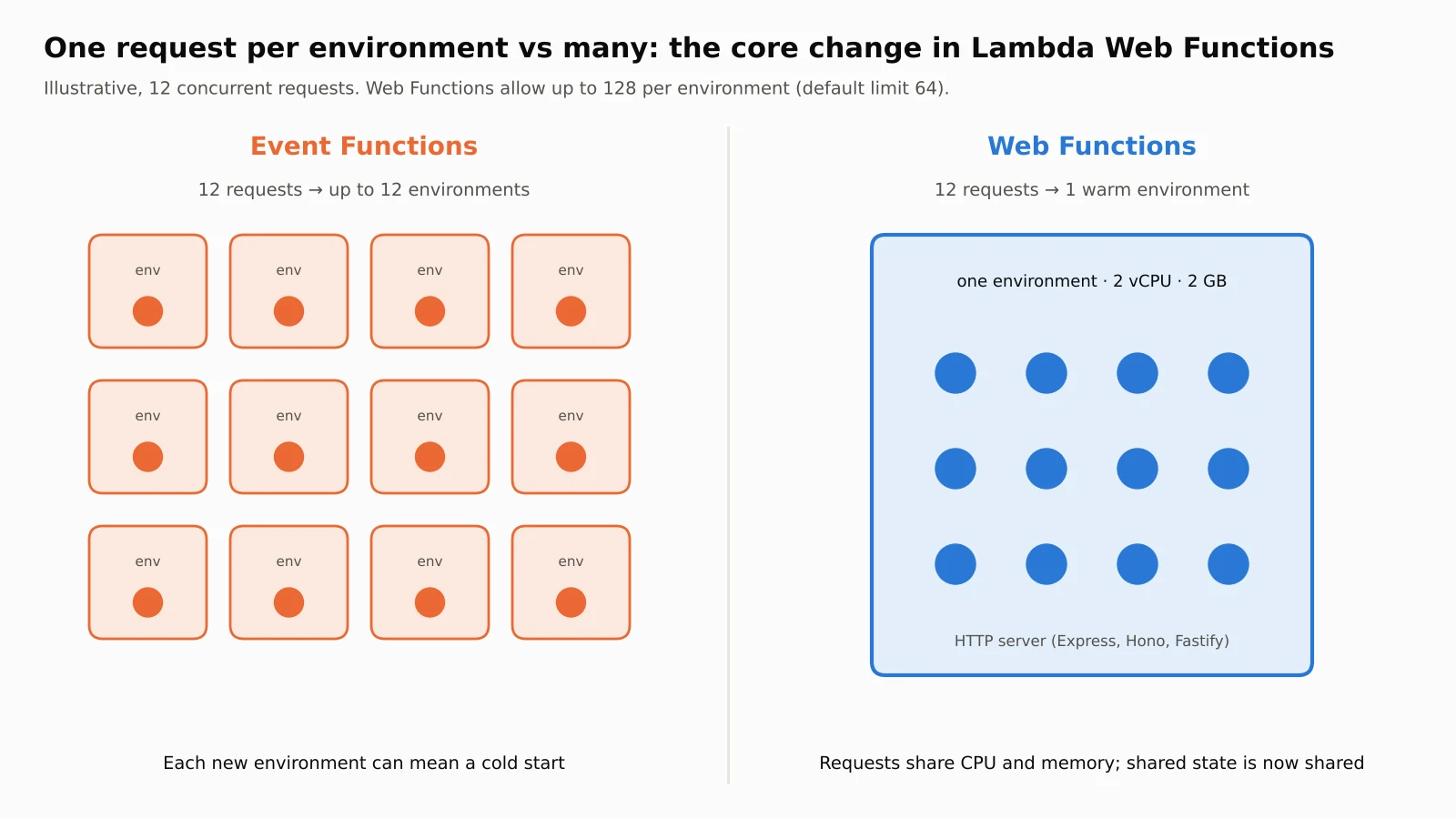
A classic Event Function serves one request per execution environment at a time. If 200 requests arrive at once, Lambda needs up to 200 environments, and every new one is a potential cold start. Between invocations, Lambda freezes the environment, so background work stops.
A Web Function environment behaves like a normal web server. According to the launch post, each one handles "up to 128 concurrent requests per environment." The scaling documentation adds the detail: the setting is maxConcurrencyPerEnvironment, it accepts 1 to 128, and the default is 64. It's also a ceiling, not a fixed number. Lambda manages a dynamic limit underneath it based on resource usage, starts new functions with a "conservative" limit, adjusts quickly, and remembers what it learned even after scaling to zero.
AWS's own sample app shows the effect. In their Compute blog post, Julian Wood, Kim Wendt and Samrat Karak sent 300 streaming requests, with up to 200 open at once. The whole load ran on 5 environments, one of which peaked at 59 concurrent requests, using 4.75 seconds of total CPU. They note that Event Functions would need up to 200 environments for the same load.
What this means for your code
Here's the part nobody should skip. When one process serves many requests at once, global mutable state becomes a bug. A Reddit user quoted by InfoQ, magnetik79, put it well: "now you're no longer working with one invoke/one request - now you might need to be sync/mutex aware."
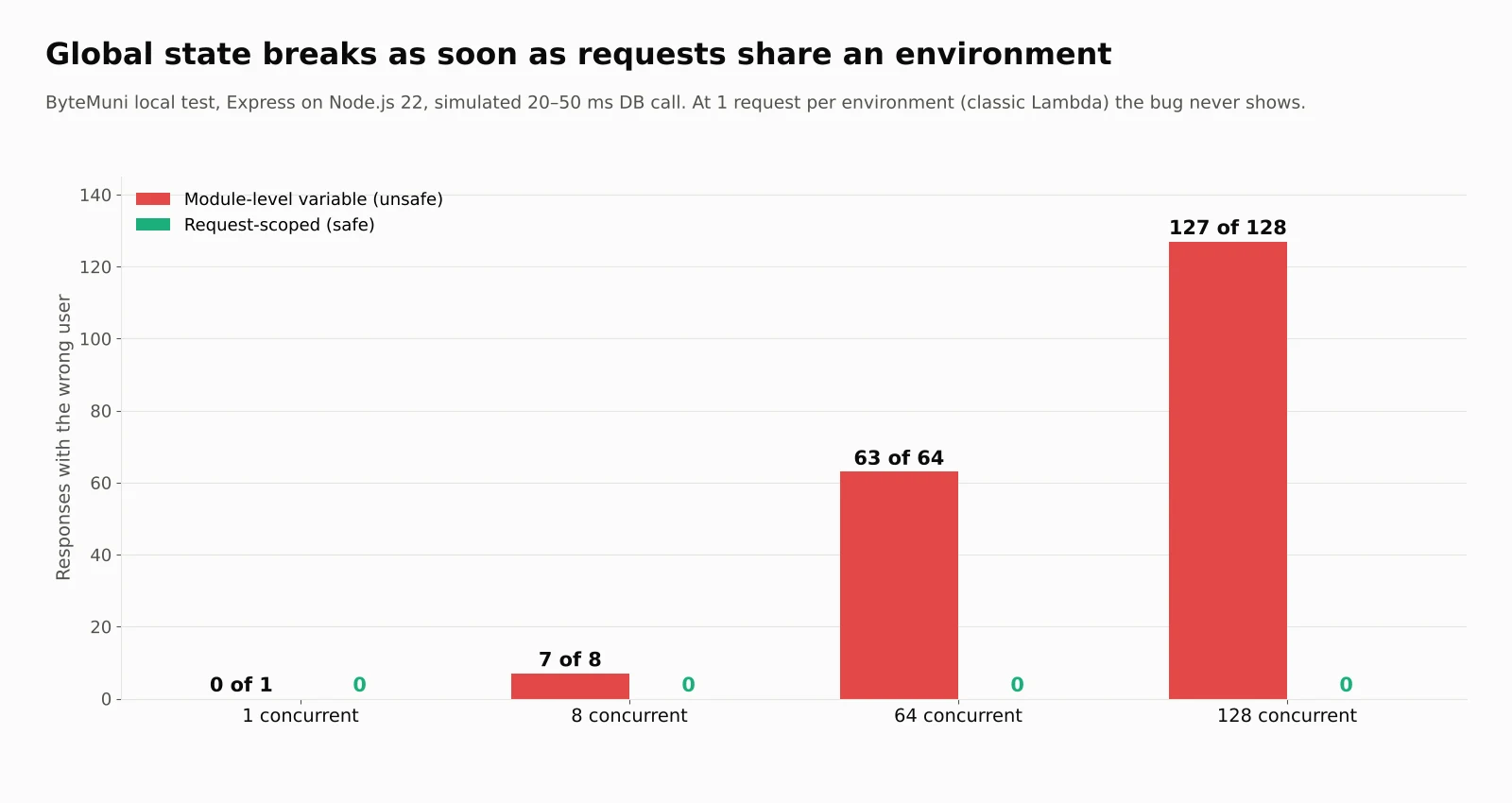
I wanted to see how quickly that bites, so I wrote a small Express server the Web Functions way and ran it locally on Node.js 22 (Lambda runs Node.js 24; this pattern behaves the same). One route stores the "current user" in a module-level variable, then awaits a simulated 20 to 50 ms database call. The other keeps the user in request scope.
// BAD: module-level state, harmless when one environment = one request
let currentUser = null;
app.get('/unsafe', async (req, res) => {
  currentUser = req.query.user;
  await sleep(20 + Math.random() * 30); // simulated DB call
  res.json({ asked: req.query.user, got: currentUser });
});

// GOOD: request data stays in request scope
app.get('/safe', async (req, res) => {
  const user = req.query.user;
  await sleep(20 + Math.random() * 30);
  res.json({ asked: user, got: user });
});
Then I fired batches of concurrent requests and counted how many responses came back with someone else's user:
| Concurrent requests | Wrong user returned (unsafe) | Wrong user returned (safe) |
|---|---|---|
| 1 | 0 | 0 |
| 8 | 7 | 0 |
| 64 (the default limit) | 63 | 0 |
| 128 (the maximum) | 127 | 0 |
At a concurrency of 1, which is how every classic Lambda environment works, the bug is invisible. At 8 concurrent requests, 7 of 8 users got the wrong answer. In a real app, that's one customer seeing another customer's data. If you're porting an old Lambda handler that cached "the current request" in a global, fix it before you move.
Two related notes from the AWS sample-app post: each environment only sees its own connections, because Lambda routes requests without session affinity. And because environments are long-lived, you can keep connections open and run background tasks, such as emitting telemetry, outside the request path. That's something Event Functions can't do.
Hello world: the code really doesn't change
This is the Express example from the launch post. The only Lambda-specific line reads the listen address:
import express from 'express';

const app = express();
const [host, port] = process.env.AWS_LAMBDA_HTTP_ENDPOINT.split(':');

app.get('/', (req, res) => {
  res.json({ message: 'Hello from Lambda Web Functions!' });
});

app.listen(port, host, () => {
  console.log(`Server running on port ${port}`);
});
To run it locally, set the variable yourself: AWS_LAMBDA_HTTP_ENDPOINT=127.0.0.1:3000 node index.js. The AWS sample apps use a fallback such as (process.env.AWS_LAMBDA_HTTP_ENDPOINT || "0.0.0.0:3000") so the same file runs on a laptop and on Lambda. Express, Fastify and Hono work without adapters. Next.js in standalone mode needs a small index.js that sets its host and port. The runtime loads index.js at the package root by default, and AWS_LAMBDA_NODEJS_ENTRYPOINT points it at a different file.
Two things I'd add from the community write-ups. Hardcoding a port means your server never becomes ready, so always read the variable. And handle SIGTERM, because Lambda sends it on scale-down and gives you about a second to clean up.
Deploying: one command, then revisions and endpoints
Deployment is the part that feels most unlike classic Lambda. With AWS CLI v2:
aws lambda-web deploy --name my-web-app --code ./my-app
Walter says the CLI bundled the source, created the Web Function, published its first revision, attached an endpoint and returned a live HTTPS URL "in under a minute." Run the same command again after a code change and it uploads a new revision and points the endpoint at it.
Three resources are worth knowing:
Web Function: the top-level resource, holding tags and the resource-based policy.
Revision: an immutable snapshot of code and configuration, including the timeout, per-environment concurrency, environment variables and execution role. Any change creates a new revision.
Endpoint: the HTTPS entry point, with its own domain, auth type, scaling limits and routing to one or two revisions by weight.
That two-revision routing gives you canary deploys with no extra tooling. This sends 90% of traffic to the current revision and 10% to the new one:
aws lambda-web update-web-function-endpoint \
    --function-name my-web-app \
    --endpoint-name dev \
    --auto-deployment-mode Disabled \
    --revision-weights '[{"revisionId": "<current-revision-id>", "weight": 90}, {"revisionId": "<new-revision-id>", "weight": 10}]'
Rolling back is the same command with 100% weight on the previous revision. If you're used to staged container rollouts, the habits from our Docker update and rollout checklist carry over well: smoke-test the new revision before you shift real traffic, and keep the old one around until you're sure.
You can also manage Web Functions through the Lambda API, the AWS Management Console, CloudFormation, AWS SAM, AWS CDK, the AWS SDKs and the Agent Toolkit for AWS.
Going multi-Region
Adding Regions is one flag:
aws lambda-web deploy --name my-web-app --code ./my-app \
    --regions us-east-1,eu-west-1,ap-northeast-1
Lambda replicates the code and revision configuration (including environment variables) to each Region and serves the app from one global URL ending in lambda-web.global.on.aws. Routing uses Amazon Route 53 latency-based routing, on what AWS calls "a best-effort basis." There are three endpoint types, fixed at creation: HomeRegion (one Region), MultiRegion (one global domain) and PerRegion (one domain per Region, you handle routing). Because the type and Regions can't change later, going global means creating a new endpoint.
In the AWS sample-app post, a single measurement from the UK showed 90 ms to us-east-1 and 16 ms to eu-west-2 through the global endpoint. The authors are clear that it isn't a benchmark, and I'd treat it the same way.
One thing to plan for: a global endpoint that serves a user from Tokyo but queries a database in Virginia still pays that cross-Region latency and data transfer. Multi-Region compute doesn't make your data multi-Region.
The limits developers should know
These are the launch numbers, gathered from the docs, the AWS blogs and early hands-on testing:
| Setting or limit | Value at launch | Source |
|---|---|---|
| Runtime | Node.js 24 (nodejs24.x) on Arm64 only | AWS launch post |
| Environment size | 2 vCPUs and 2 GB memory | AWS Compute blog |
maxConcurrencyPerEnvironment | 1–128, default 64 (set on the revision) | Scaling docs |
maxEnvironments | Optional, 2–10,000 per Region (set on the endpoint) | Scaling docs |
rateLimit | Optional, 0–10,000 requests per second per Region | Scaling docs |
Request timeout (timeoutSeconds) | 3–900 seconds, default 30 | Matias Martinez, DEV Community |
| Account quotas per Region | 10,000 RPS per endpoint, 100,000 RPS per account, 2,000 vCPUs | Scaling docs |
| Startup | Server must be listening within about 10 seconds | Martinez; Aidan Steele measured 9 seconds |
| Shutdown | About 1 second after SIGTERM | Martinez and Steele |
| Regions | N. Virginia, Ohio, Oregon, Tokyo, Ireland | AWS What's New |
The vCPU quota is the one to do arithmetic on. Each environment uses 2 vCPUs, so 2,000 vCPUs caps an account at roughly 1,000 environments per Region. Independent AWS developer Aidan Steele reported that his new account started lower, at 200 vCPUs (about 100 environments) and 10,000 RPS, so check your own quotas before a launch day.
The docs also give a useful capacity formula: peak in-flight requests ≈ maxEnvironments × maxConcurrencyPerEnvironment. With 10 environments at 64 each, you get 640 concurrent requests. At 200 ms per request, that's about 3,200 requests per second, so concurrency is the bottleneck, not a rateLimit of 8,000.
When you hit a limit, Lambda returns HTTP 429 and doesn't queue the request, so clients need retries with exponential backoff and jitter. Setting rateLimit to 0 returns 503 Platform.EndpointDisabled, which works as a kill switch.
AWS's tuning advice for maxConcurrencyPerEnvironment is practical: lower it for memory-bound or CPU-bound apps, raise it for I/O-bound ones, and keep the default of 64 for most apps. That 2 GB is shared by the V8 heap, buffers and every in-flight request, so a memory-heavy SSR page at 128 concurrent renders can run out.
Pricing: what you actually pay for
According to the Lambda pricing page, Web Functions in US East (N. Virginia) on Arm cost:
Active CPU: $0.0000276944 per vCPU-second
Memory: $0.0000036667 per GB-second, for the whole life of each environment, including idle time
Requests: $0.30 per million
Data transfer: standard AWS rates, billed in 1 ms increments
The key idea is that CPU you don't use isn't billed. A request waiting 150 ms on a database uses very little CPU while it waits, and the memory is shared by every concurrent request in that environment. The catch, as the docs say plainly, is that memory "keeps accruing while the environment exists."
Classic Event Functions charge $0.0000166667 per GB-second of wall-clock duration (x86, US East) and $0.20 per million requests. They also come with a free tier of 1 million requests and 400,000 GB-seconds a month. The pricing page lists no free tier for Web Functions.
I checked AWS's examples, and then compared them
AWS publishes four monthly examples, each assuming one environment running for a full 30-day month. I recomputed them with the published rates in a short Python script, and they match to within a cent of rounding. Then, following the method Matias Martinez used on DEV Community, I estimated the same traffic on an Event Function at 512 MB with x86 rates and no free tier:
| AWS example | Requests/month | Wall time / active CPU | Web Function | Event Function estimate |
|---|---|---|---|---|
| SSR web app | 15M | 150 ms / 40 ms | $25.78 | $21.75 |
| I/O-heavy API | 10M | 200 ms / 50 ms | $19.61 | $18.67 |
| Authorizer | 100M | 50 ms / 12 ms | $64.56 | $61.67 |
| LLM streaming | 5M | 3,000 ms / 200 ms | $33.94 | $126.00 |
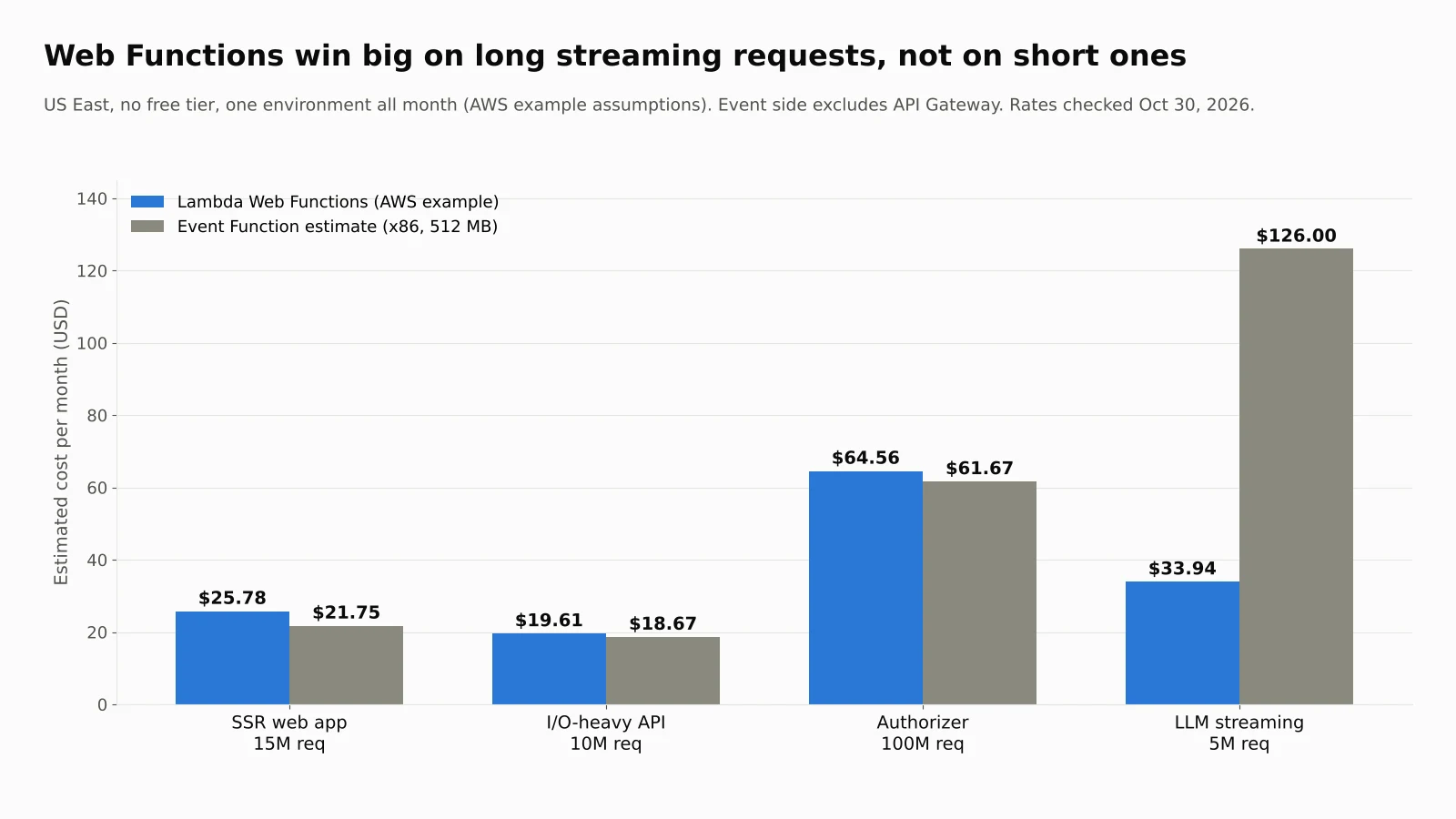
That's the honest picture. For three of AWS's four examples, Web Functions cost slightly more than my Event Function estimate, by roughly 5% to 19%. The vCPU-second rate is high and requests cost 50% more. For the long-running LLM streaming case, where requests spend 3 seconds connected but only 200 ms on the CPU, the Web Function is about 3.7 times cheaper.
So the savings track one thing: how long each request waits compared with how long it computes. To see where the line falls, I held the I/O-heavy API profile fixed (10M requests, 50 ms of CPU, 0.29 GB) and varied only the wall-clock time of each request. The break-even point was a little above 200 ms. Below that, the Event Function estimate was cheaper. Above it, the gap widened fast: at one second per request, the estimate was $85.33 against $19.60.
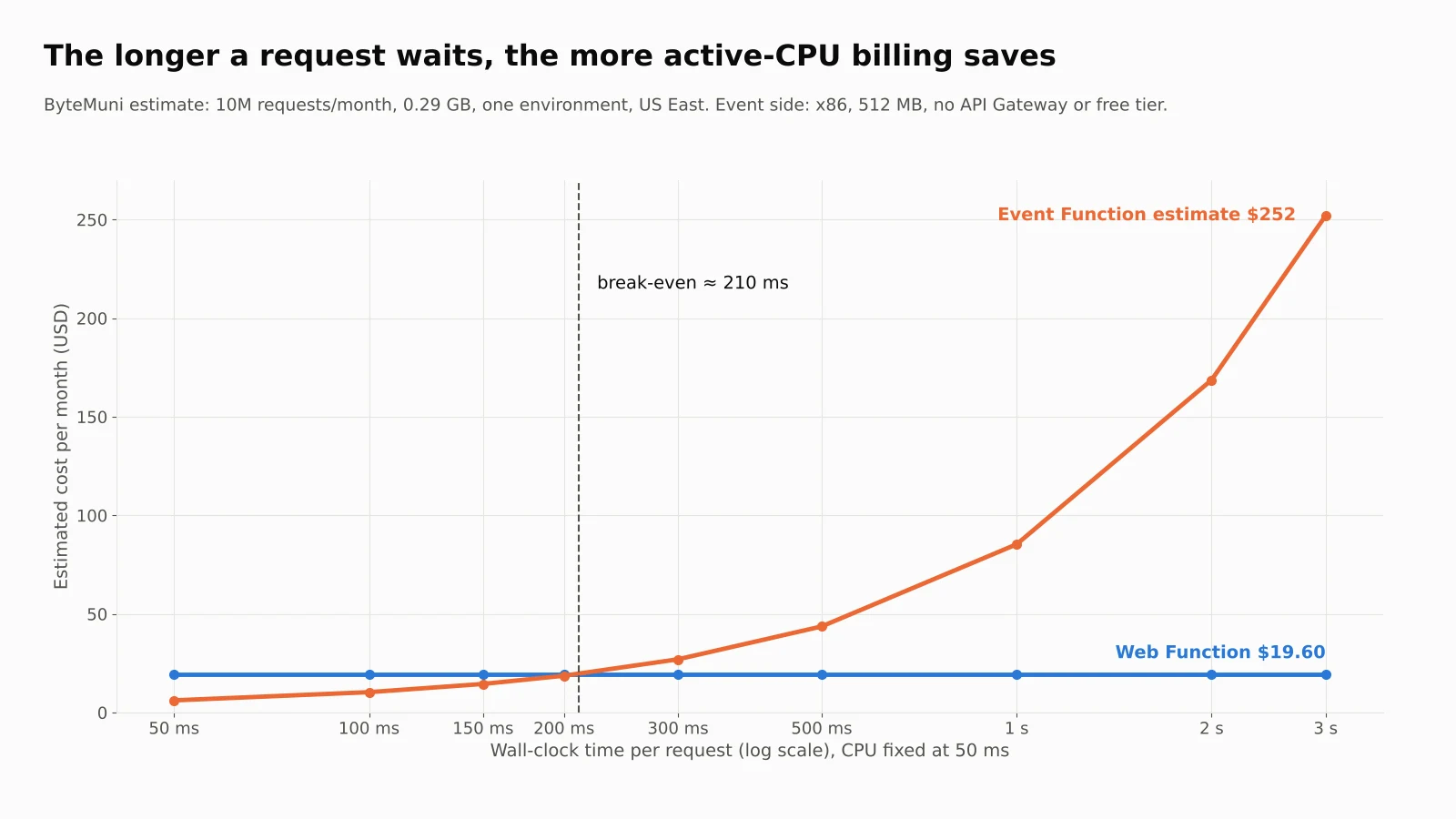
Please read those numbers with their assumptions. They're estimates, not bills:
AWS's examples assume one environment all month. Memory is billed per environment, so a real app running five environments pays five times the memory line.
My Event Function side uses x86 rates and 512 MB. Arm Event Functions are cheaper, and a right-sized Event Function might use less memory.
Neither side includes API Gateway. Many Event Function APIs pay for API Gateway too, while a Web Function comes with its own HTTPS endpoint. That alone can flip the comparison for some teams.
Free tiers are excluded. Small apps on Event Functions may pay nothing at all.
The takeaway I'd give a team: AI inference endpoints, streaming APIs and anything that spends most of its time waiting on downstream services are where Lambda Web Functions win clearly. Short, CPU-light requests are roughly a wash, so choose on programming model and cold starts, not price.
Security, auth and CloudFront
Every endpoint gets an HTTPS domain with TLS. You pick one of two auth types per endpoint, and you can change it without redeploying code:
ApplicationManaged: the endpoint is public and your code does the auth, with OAuth, JWTs, session cookies or Amazon Cognito.
IamAuth: Lambda validates SigV4 signatures (SigV4a for multi-Region endpoints), and callers need the
lambda:InvokeWebFunctionEndpointpermission.
Watch the default. Per Martinez, aws lambda-web deploy creates a public ApplicationManaged endpoint with no auth, and the AWS sample-app post tells readers to delete its sample endpoint after evaluating it. The docs provide a service control policy using the lambda:Request/WebFunctionAuthType condition key if your organization wants to block public endpoints entirely. A public server is a public server, whatever runs it. The lessons from patching PHP web servers after PHP2Shell apply here too: keep dependencies current, and assume anything reachable will be probed.
For custom domains, edge caching or AWS WAF, you put Amazon CloudFront in front. The recommended pattern is an IamAuth endpoint behind CloudFront with origin access control (OAC), so CloudFront signs every origin request and nobody can bypass it by calling the Lambda domain directly. Your app's own Authorization header still passes through. Web Functions also support VPC connectivity for reaching private resources like databases.
Gotchas early adopters have already found
The launch is only a couple of weeks old, and the first deep dives are already full of useful warnings. These come from Aidan Steele's notes, Matias Martinez's guide and the AWS sample-app post:
WebSockets don't work. Steele found that server-sent events (SSE) stream with no configuration, but WebSockets don't. Request bodies are also half-duplex, so read the whole body before writing the response.
"Active" doesn't mean working. An endpoint can show Active while your server returns errors, so smoke-test after every deploy.
Logs are stored at least twice. Steele found that environments write to a local log group and Lambda copies events to a central one in the home Region, both with never-expire retention by default. A multi-Region endpoint across N Regions means N+1 copies. Set retention on each.
Tooling is still catching up. Steele reported that SAM CLI 1.168.0 couldn't package Web Function code, and the full
lambda-webcommand set needed AWS CLI 2.37.13. Martinez notes that LocalStack 2026.10.0 already emulates Web Functions for local testing.No Extensions API. Steele found the extension and telemetry endpoints return 404, so observability agents built on Lambda Extensions won't attach. Ship telemetry from inside your process.
DNS is cached per environment. After private DNS changes, publish a new revision.
Signed requests to IamAuth endpoints need
X-Amz-Content-SHA256, even without a body.Cleanup isn't complete.
delete-web-functionleaves the default IAM role, S3 packages and log groups behind.
None of these are deal-breakers. They're the normal rough edges of a two-week-old service, and they're worth knowing before a production cutover.
How it compares with Cloud Run and Azure Container Apps
AWS isn't first to this model, and InfoQ says so directly. Google Cloud Run and Azure Container Apps already run web apps without adapter layers, scale to zero and offer configurable concurrency. Both take containers, so they aren't limited to Node.js.
What Lambda Web Functions add is the Lambda experience: zip deploys with no container image, revisions with built-in weighted traffic, multi-Region routing behind one global domain, and active-CPU billing inside the AWS account you already use. The trade-off, for now, is reach. One runtime, one architecture, one fixed size and five Regions is a narrow launch. InfoQ notes that community reactions were "largely positive," with questions mostly about Python support and how it differs from these alternatives.
Who should use Lambda Web Functions today?
Here's my take after going through all of this.
Good fit now:
Node.js APIs and backends that spend most of their time waiting on databases or other services
AI features that stream LLM tokens back to users, which is exactly what the pricing model rewards. If you're building AI agents that call tools and APIs, long-lived streaming endpoints are where Web Functions shine
Express, Hono or Fastify apps you'd like to move off servers without rewriting them
SSR apps that suffered from cold starts under bursty traffic
Webhooks and microservices that can now skip API Gateway
Wait a bit if you:
need Python, Java, Go or .NET (use Event Functions or a container platform for now)
need WebSockets
serve users far from the five launch Regions, such as South America
depend on Lambda Extensions for observability, or on mature SAM and CloudFormation canary workflows
Keep using Event Functions for queue consumers, S3 and EventBridge triggers, and other event processing. AWS's docs say plainly that Web Functions aren't meant for that work.
If you write code with an AI assistant, there's a nice side effect: the "run it locally, deploy the same file" model is easy for tools like GitHub Copilot in VS Code to work with, because there's no Lambda-specific handler format to get wrong.
The bottom line
Lambda Web Functions are one of the biggest changes to Lambda's programming model since it launched in 2014. You write a normal HTTP server, Lambda runs up to 128 requests through each warm environment, and you pay for the CPU you use rather than the time you spend waiting. For I/O-heavy and streaming workloads, the savings can be large. In AWS's own LLM streaming example, my estimate put the classic model at about 3.7 times the cost.
It isn't automatically cheaper, though, and it isn't finished. Short requests cost about the same or slightly more, the launch is Node.js-only in five Regions, and concurrency means shared-state bugs that classic Lambda used to hide. Start with one I/O-heavy Node.js service, audit it for global state, put CloudFront and IamAuth in front of it, and watch the 429s and memory metrics for a few weeks. That's how I'd move.
Sources:
Announcing AWS Lambda Web Functions, Micah Walter, AWS News Blog, October 12, 2026
AWS Lambda announces Lambda Web Functions, AWS What's New, October 12, 2026
Lambda Web Functions developer guide and scaling behavior, AWS documentation
AWS Lambda pricing, checked October 30, 2026
Exploring AWS Lambda Web Functions for building web applications, Julian Wood, Kim Wendt and Samrat Karak, AWS Compute Blog
AWS Introduces Lambda Web Functions for Node.js Applications, Renato Losio, InfoQ, October 23, 2026
Some notes on Lambda Web Functions, Aidan Steele
AWS Lambda Web Functions: your HTTP server on Lambda, with real concurrency and active-CPU billing, Matias Martinez, DEV Community
AWS Lambda Web Functions: A New Kind of Lambda for Web Apps, Madhura Jayashanka, AWS in Plain English, October 17, 2026
Frequently asked questions
What are AWS Lambda Web Functions?
Lambda Web Functions are a new Lambda form factor, launched October 12, 2026, where your code is a standard HTTP server listening on a port. Lambda provides the HTTPS endpoint, scaling to zero, multi-Region routing and active-CPU billing, so you can deploy Express, Hono or Fastify apps without an adapter.
What happened to regular Lambda functions?
They're now called Lambda Event Functions. AWS says it's a naming change only. Existing functions, APIs and templates keep working, with no code changes or redeployments.
How many requests can one Lambda Web Function environment handle?
Up to 128 concurrent requests. The maxConcurrencyPerEnvironment setting accepts 1 to 128 and defaults to 64. It's a ceiling: Lambda manages a dynamic limit underneath it based on resource usage.
How much do Lambda Web Functions cost?
In US East on Arm, they cost $0.0000276944 per vCPU-second of active CPU, $0.0000036667 per GB-second of memory for the life of each environment, and $0.30 per million requests, plus data transfer. AWS's examples range from $19.61 a month for an I/O-heavy API to $64.56 for a 100-million-request authorizer, each assuming one environment.
Are Lambda Web Functions cheaper than classic Lambda?
It depends on how long requests wait compared with how long they compute. In our estimate, AWS's 3-second LLM streaming example cost about 3.7 times more on a classic Event Function. For AWS's three shorter examples, Web Functions cost roughly 5% to 19% more than the classic estimate, before counting any API Gateway costs on the classic side.
Which languages and Regions are supported?
At launch, only Node.js 24 (nodejs24.x) on Arm64 is supported, in US East (N. Virginia), US East (Ohio), US West (Oregon), Asia Pacific (Tokyo) and Europe (Ireland). Python, Java and .NET remain on Event Functions for now.
How we research, write and check articles