Generative AI with LangChain and Hugging Face: How Transformers, RAG and Agents Work (Student Guide 2026)
A beginner-to-mid-level guide to generative AI with LangChain. Learn what a Transformer does with a runnable self-attention demo, how Hugging Face models fit in, and how LangChain v1 chains, structured output, tools, RAG and agents work. It includes tested Python code that runs without an API key, real-world examples, a 12-week roadmap and the mistakes to avoid.

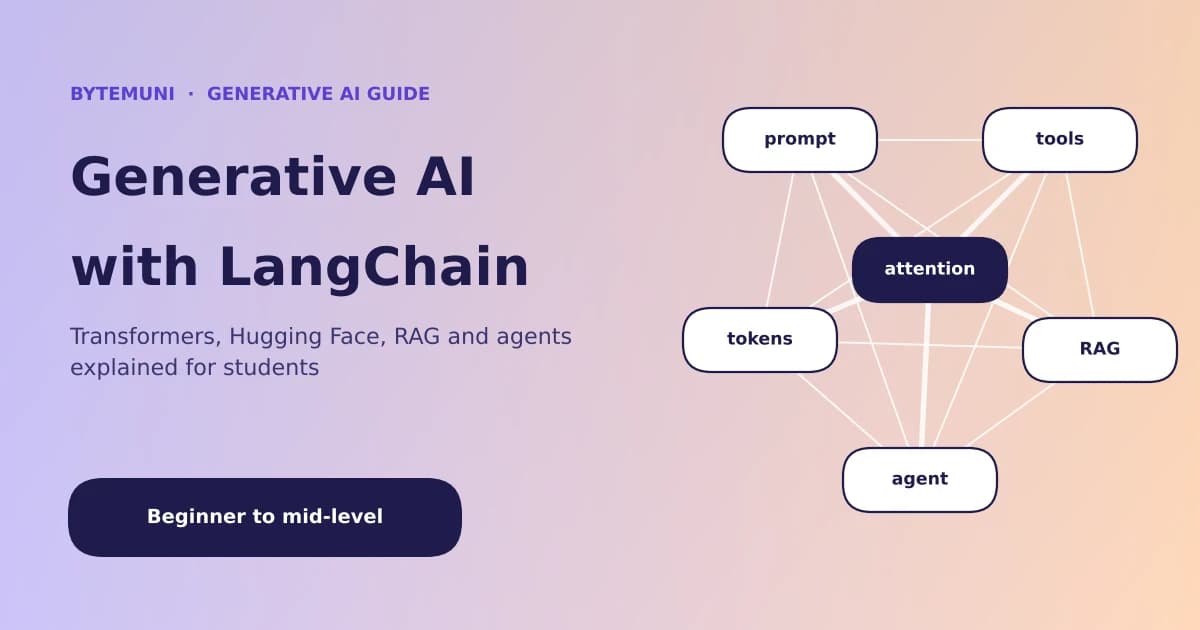
Every time ChatGPT drafts an email, Gemini summarises a PDF or a college chatbot answers "When is the fee deadline?", three ideas are working together: a Transformer that understands and generates text, a model hub such as Hugging Face where those models live, and a framework such as LangChain that connects the model to your data, your tools and your app. Building apps this way is what developers mean by generative AI with LangChain.
Most tutorials teach these one at a time, so students end up knowing words like "attention", "embeddings" and "agents" without seeing how they fit. This guide fixes that. You'll learn generative AI with LangChain from the ground up: what a Transformer actually does (with a 30-line demo you can run), how Hugging Face fits in, how LangChain chains, tools, RAG and agents work, and how real companies use them.
It's written in two layers. Beginners can read the plain-English explanations and run the offline demos without any API key. Mid-level developers get the LangChain v1 details, production tips and the trade-offs most tutorials skip.
How we tested the code. Every LangChain example in the "try it offline" boxes was run with LangChain 1.4.8 and langchain-core 1.7.4 in November 2026, using a fake chat model so it works without an API key. Examples that need a real model or a model download are marked, and use the same LangChain interfaces.
Generative AI in one minute
Generative AI is AI that creates new content (text, code, images, audio or video) instead of only classifying or predicting a label. A spam filter that says "spam / not spam" is traditional AI. A model that writes the reply to that email is generative AI.
For text, the engine behind almost all of it is a large language model (LLM): a neural network trained on huge amounts of text to do one thing extremely well: predict the next token. Ask it "The capital of India is" and it scores every possible next token, picks one (probably "New" and then "Delhi"), adds it to the text and repeats. That simple loop, run billions of times during training and thousands of times per answer, is what produces essays, code and conversations.
Here are the key terms you'll meet in the rest of this guide:
| Term | Plain-English meaning |
|---|---|
| Token | A chunk of text the model reads, often a word or part of a word. As a rough rule of thumb, one token is about four characters of English text |
| Embedding | A list of numbers that represents the meaning of a token or a sentence. Similar meanings get similar numbers |
| Transformer | The neural-network design used by today's LLMs. Its key trick is attention |
| Attention | A way for each word to look at every other word and decide which ones matter for its meaning |
| Context window | How many tokens the model can read at once (your prompt + documents + chat history) |
| Prompt | The instructions and input you send to the model |
| RAG | Retrieval-augmented generation: fetch relevant documents first, then let the model answer from them |
| Agent | An LLM that can decide to call tools (search, calculator, database) in a loop until a task is done |
If any term is new, ByteMuni's list of 40 AI terms every student should know explains each one with examples.
What is a Transformer? (explained simply)
Before 2017, language models mostly read text one word at a time, like reading a sentence through a keyhole. By the end of a long paragraph, they had partly "forgotten" the beginning. They were also slow to train, because each word had to wait for the previous one.
In 2017, researchers at Google published the paper Attention Is All You Need, which introduced the Transformer. Its big idea: let the model look at all the words at once and learn which words should pay attention to which. Because every word is processed in parallel, Transformers train efficiently on modern GPUs, and that is what made today's large models possible. The "T" in GPT stands for Transformer (Generative Pre-trained Transformer).
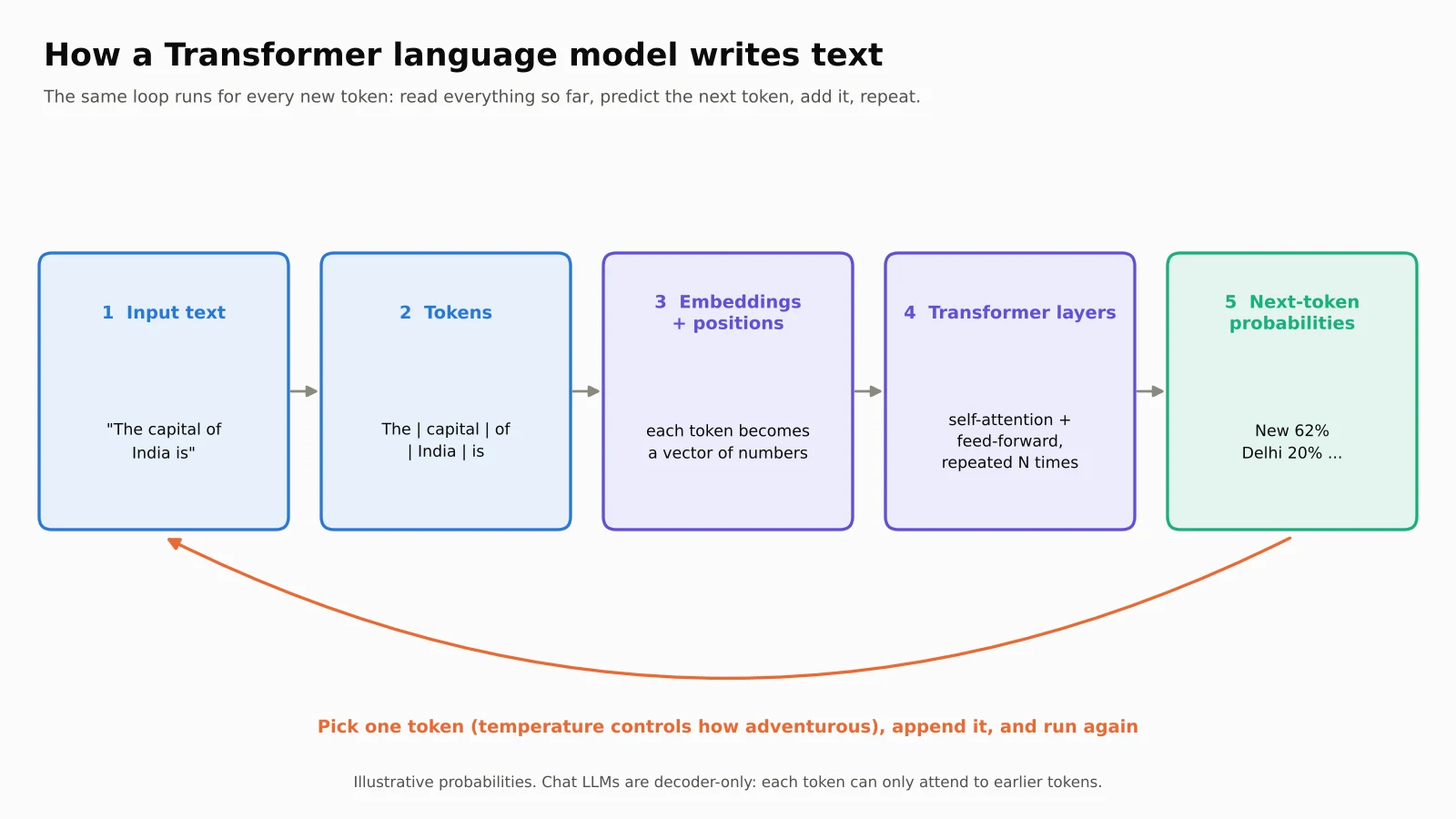
The five steps inside an LLM
Tokenise. The text "LangChain is fun" is split into tokens, which might be "Lang", "Chain", " is" and " fun". Each token gets an ID number.
Embed. Each ID is turned into an embedding (a vector of hundreds or thousands of numbers), plus information about its position in the sentence.
Attend. In each Transformer layer, self-attention lets every token gather information from the others. Large models stack dozens of these layers.
Think (feed-forward). After attention, each token's vector passes through a small neural network that transforms it further. Attention mixes information between words; the feed-forward step processes each word on its own.
Predict. The final layer gives a probability for every token in the vocabulary. One is picked, added to the text, and the whole process runs again for the next token.
Self-attention with a real example
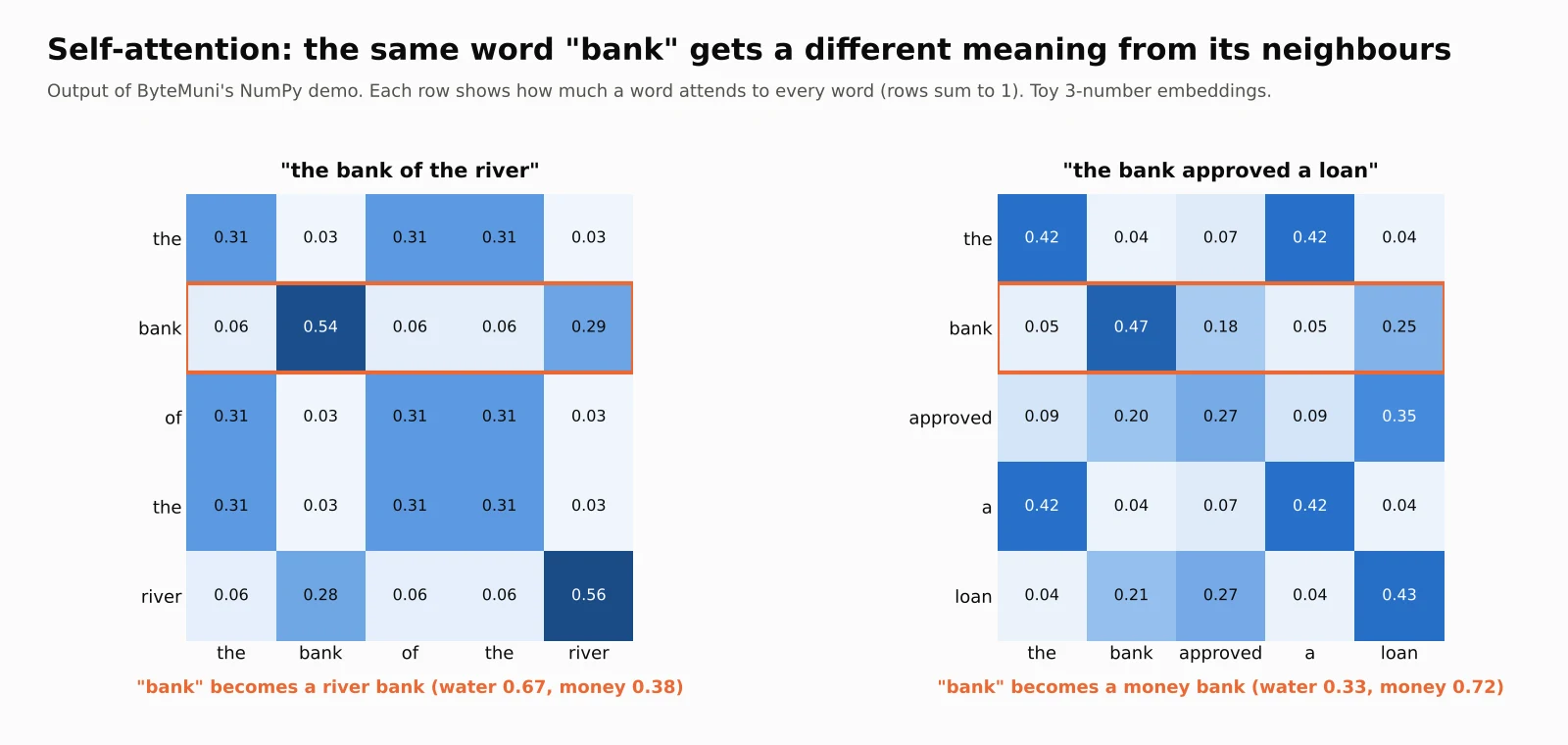
Take the word "bank". In "the bank of the river" it means a riverside; in "the bank approved a loan" it means a financial institution. A model has to work out which one from the surrounding words. Self-attention does exactly that.
For each word, the model creates three vectors:
Query (Q): "What am I looking for?"
Key (K): "What do I contain?"
Value (V): "What information do I pass on if someone pays attention to me?"
It compares each word's query with every other word's key (a dot product), turns those scores into percentages with softmax, and uses them to blend the values. The formula from the paper is:
Attention(Q, K, V) = softmax(Q · Kᵀ / √d) · V
The division by √d (the square root of the vector size) keeps the scores from growing too large, which would make softmax too "spiky" and training unstable.
Try it offline. This NumPy demo uses tiny hand-made embeddings with three numbers each: water-ness, money-ness and "grammar word"-ness. In a real model, the embeddings and the Q, K and V matrices are learned during training; here we keep them simple so you can see the mechanism.
import numpy as np

EMB = {
    "the": [0.0, 0.0, 1.0], "of": [0.0, 0.0, 1.0], "a": [0.0, 0.0, 1.0],
    "bank": [0.7, 0.7, 0.0],          # ambiguous: half water, half money
    "river": [1.0, 0.0, 0.0], "loan": [0.0, 1.0, 0.0], "approved": [0.0, 0.8, 0.2],
}

def softmax(x):
    e = np.exp(x - x.max(axis=-1, keepdims=True))
    return e / e.sum(axis=-1, keepdims=True)

def self_attention(words, scale=4.0):
    X = np.array([EMB[w] for w in words])
    Q = K = V = X                      # real models use learned W_q, W_k, W_v
    weights = softmax(Q @ K.T * scale / np.sqrt(X.shape[1]))
    return weights, weights @ V

for sentence in ["the bank of the river", "the bank approved a loan"]:
    words = sentence.split()
    w, out = self_attention(words)
    i = words.index("bank")
    water, money, _ = out[i]
    print(sentence, "->", "river bank" if water > money else "money bank")
Output from our run:
"the bank of the river"     bank looks at: bank 0.54, river 0.29  -> river bank (water 0.67, money 0.38)
"the bank approved a loan"  bank looks at: bank 0.47, loan 0.25, approved 0.18 -> money bank (water 0.33, money 0.72)
The same word ends up with a different vector depending on its neighbours. That context-aware meaning is what lets an LLM tell a river bank from a money bank, and it's the reason Transformers beat older models.
Multi-head attention and layers
A real Transformer runs many attention calculations side by side, called heads. One head might track grammar (which noun a verb belongs to), another might track topic, and another might link a pronoun like "it" to the right noun. The outputs are combined, passed through the feed-forward step, and sent to the next layer. Stacking many layers lets the model build up from simple patterns to complex reasoning.
How the next word is chosen: temperature
The model's final layer produces raw scores called logits. Softmax turns them into probabilities, and a setting called temperature controls how adventurous the choice is. We ran this on made-up scores for the prompt "The capital of India is":
| Temperature | Delhi | Mumbai | India | pizza | blue |
|---|---|---|---|---|---|
| 0.2 (focused) | 100% | 0% | 0% | 0% | 0% |
| 1.0 (default) | 75% | 17% | 6% | 2% | 1% |
| 2.0 (creative) | 50% | 23% | 14% | 9% | 4% |
Low temperature is right for facts, code and data extraction. Higher temperature gives more variety for brainstorming and creative writing, but also more nonsense ("The capital of India is pizza").
Encoder, decoder and encoder-decoder models
The original Transformer had two halves: an encoder that reads input and a decoder that writes output. Modern models often use only one half.
| Type | What it's good at | Well-known examples |
|---|---|---|
| Encoder-only | Understanding text: classification, search, embeddings | BERT, RoBERTa, sentence-transformer models |
| Decoder-only | Generating text: chat, code, writing | GPT family, Llama, Gemma, Qwen, Mistral |
| Encoder-decoder | Turning one text into another: translation, summarisation | T5, BART |
Mid-level note: chat LLMs are decoder-only models with causal (masked) attention, which means each token can only look at earlier tokens, not future ones. That's why they generate left to right. Embedding models used for search are usually encoders, which look in both directions.
Where Hugging Face fits in
Training a large model from scratch costs millions of dollars, so almost nobody does it. Instead, developers download a pre-trained model and use it as-is or fine-tune it. Hugging Face is the main place to do that.
The Hub is like GitHub for AI models and datasets. According to a post on Hugging Face's own blog, the Hub passed 3 million models in August 2026.
The
transformerslibrary loads and runs those models with a few lines of Python.pipeline()is the easiest entry point: give it a task name and a model, and it handles tokenising, running the model and decoding the output.
Needs a model download. These examples download models from the Hub on first run (a few hundred MB). Install with pip install transformers torch.
from transformers import pipeline

# Understanding: sentiment analysis with an encoder model
classifier = pipeline("sentiment-analysis",
                      model="distilbert/distilbert-base-uncased-finetuned-sst-2-english")
print(classifier("The placement training was really useful!"))
# e.g. [{'label': 'POSITIVE', 'score': 0.99...}]

# Generation: a small open chat model (decoder-only)
generator = pipeline("text-generation", model="Qwen/Qwen2.5-0.5B-Instruct")
messages = [{"role": "user", "content": "Explain recursion to a 12-year-old in two lines."}]
print(generator(messages, max_new_tokens=60)[0]["generated_text"][-1]["content"])
Real-world use: a college or a small startup can run a small open model like this on its own server, so student data never leaves the campus. The trade-off is quality: a 0.5-billion-parameter model is far weaker than frontier models such as GPT, Claude or Gemini, which you reach through an API.
Safety note for mid-level developers: downloaded models can contain code. Avoid trust_remote_code=True unless you have checked the repository, and prefer models in the safetensors format. ByteMuni has covered a real incident involving AI agents and Hugging Face that shows why this matters.
What is LangChain and why do you need it?
An LLM on its own is like a brilliant student locked in a room with no internet, no textbooks and no phone. It can only answer from memory (its training data, which has a cut-off date), and it can't take any action.
Real apps need more:
Your own data (college rules, company documents, product catalogues)
Tools (search, databases, calculators, email, APIs)
Memory of the conversation
Structured output that code can use, like JSON
The freedom to switch between OpenAI, Google, Anthropic, Hugging Face or a local model without rewriting everything
LangChain is an open-source framework (Python and JavaScript) that provides standard building blocks for all of this. LangChain and its lower-level sibling LangGraph both reached version 1.0 on October 22, 2025. LangChain 1.0 introduced create_agent as the standard way to build agents, added middleware for controlling the agent loop, and moved older APIs into a separate langchain-classic package. It requires Python 3.10 or newer.
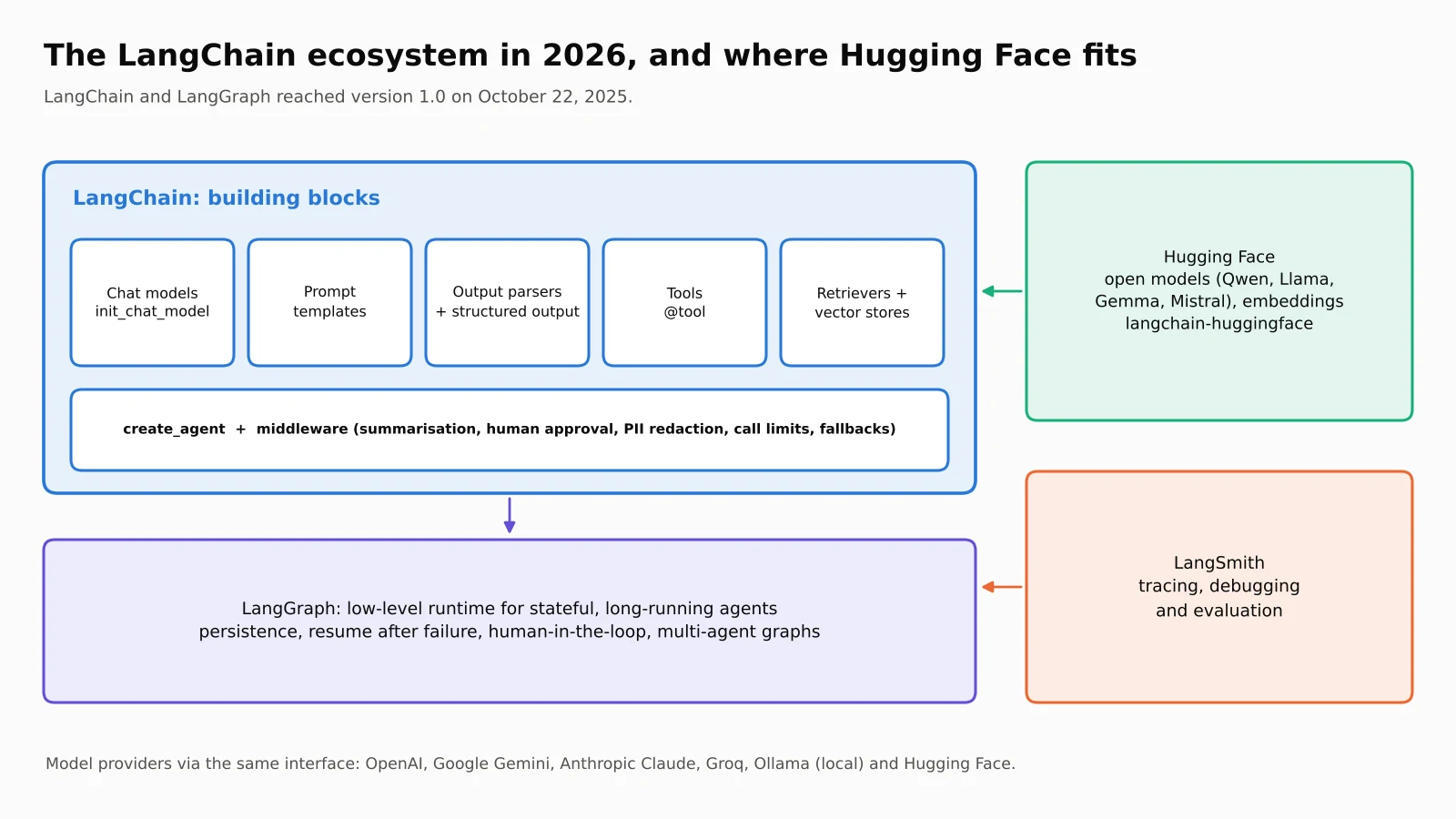
| Tool | What it is | When you use it |
|---|---|---|
| LangChain | Building blocks + create_agent | Most apps: chatbots, RAG, simple agents |
| LangGraph | Low-level graph runtime with state, persistence and human-in-the-loop | Complex, long-running or multi-agent workflows |
| LangSmith | Tracing, debugging and evaluation platform | Seeing what your app did and measuring quality |
| Hugging Face | Model hub + transformers library | Open models, embeddings, fine-tuning |
Generative AI with LangChain: the core building blocks
Install the basics with pip install langchain langchain-openai (or langchain-google-genai, langchain-anthropic, langchain-huggingface for other providers).
1. Chat models: one interface for every provider
init_chat_model creates a chat model from a provider:model string, so switching providers is a one-line change.
Needs an API key (set OPENAI_API_KEY, GOOGLE_API_KEY and so on as environment variables; never paste keys into your code).
from langchain.chat_models import init_chat_model

model = init_chat_model("openai:gpt-4.1-mini", temperature=0)
# model = init_chat_model("google_genai:gemini-2.5-flash")
# model = init_chat_model("anthropic:claude-sonnet-4-5")

response = model.invoke("Explain a Transformer in one line for a first-year student.")
print(response.content)
To use an open Hugging Face model through the same interface, wrap it with langchain-huggingface:
from langchain_huggingface import HuggingFacePipeline, ChatHuggingFace

llm = HuggingFacePipeline.from_model_id(
    model_id="Qwen/Qwen2.5-0.5B-Instruct",
    task="text-generation",
    pipeline_kwargs={"max_new_tokens": 100},
)
chat = ChatHuggingFace(llm=llm)
print(chat.invoke("What is an embedding?").content)
2. Messages: system, human and AI
Chat models work with a list of messages, each with a role:
SystemMessage: instructions that set behaviour ("You are a patient tutor").
HumanMessage: what the user says.
AIMessage: what the model replied (it can also contain tool calls).
ToolMessage: the result of a tool the model asked for.
A conversation's "memory" is simply this list growing over time and being sent back to the model each turn.
3. Prompt templates and chains (LCEL)
A prompt template is a reusable prompt with blanks. The | (pipe) operator connects steps into a chain: the output of one becomes the input of the next. This is called the LangChain Expression Language (LCEL).
Try it offline (tested; uses a fake model, so swap in init_chat_model(...) for real answers):
from langchain_core.prompts import ChatPromptTemplate
from langchain_core.output_parsers import StrOutputParser
from langchain_core.language_models.fake_chat_models import GenericFakeChatModel
from langchain_core.messages import AIMessage

model = GenericFakeChatModel(messages=iter([AIMessage(
    content="Embeddings turn words into lists of numbers so similar meanings sit close together.")]))

prompt = ChatPromptTemplate.from_messages([
    ("system", "You are a friendly tutor for {level} students."),
    ("human", "Explain {topic} in one sentence."),
])
chain = prompt | model | StrOutputParser()
print(chain.invoke({"level": "beginner", "topic": "embeddings"}))
Real-world example: an ed-tech app can keep one template, "Explain {topic} for a {level} student in {language}", and serve thousands of topics, three levels and several Indian languages without writing a new prompt for each.
4. Structured output: get JSON your code can trust
Apps usually need data, not paragraphs. LangChain lets you describe the shape you want with a Pydantic model and validates the result.
With a real model, the simplest way is with_structured_output:
from pydantic import BaseModel, Field

class Course(BaseModel):
    title: str
    level: str = Field(description="beginner, intermediate or advanced")
    hours: int

structured = model.with_structured_output(Course)   # model from init_chat_model
course = structured.invoke("Suggest one beginner course on LangChain.")
print(course.title, course.hours)
In our offline test, we fed a parser a reply where hours was "six" instead of a number. Pydantic rejected it with an OutputParserException instead of letting bad data into the app. That validation is the whole point: never trust free-form LLM text when your code depends on the format.
Real-world example: a resume screener extracts name, skills, cgpa and graduation_year from thousands of PDFs into a spreadsheet. Structured output turns messy text into clean rows.
5. Tools: letting the model take action
A tool is a normal Python function with a clear name, type hints and a docstring. LangChain turns it into a schema the LLM can read, so the model can decide when to call it and with what arguments.
from langchain_core.tools import tool

@tool
def cgpa_to_percentage(cgpa: float) -> float:
    """Convert a 10-point CGPA to an approximate percentage (CGPA x 9.5)."""
    return round(cgpa * 9.5, 2)

print(cgpa_to_percentage.name, cgpa_to_percentage.args)
print(cgpa_to_percentage.invoke({"cgpa": 8.4}))   # 79.8
The docstring matters: it's what the model reads to decide whether the tool fits. (The 9.5 multiplier is the CBSE-style conversion; many universities use their own formula, which is exactly the kind of rule you'd put in a tool rather than trust the model to remember.)
The model never runs your code itself. It only asks for a tool call; your program (or LangChain's agent loop) runs the function and sends the result back.
Generative AI with LangChain in practice: RAG over your own documents
LLMs don't know your college's fee deadline or your company's leave policy, and they may confidently invent an answer. Retrieval-augmented generation (RAG) solves this by finding the relevant text first and putting it in the prompt.
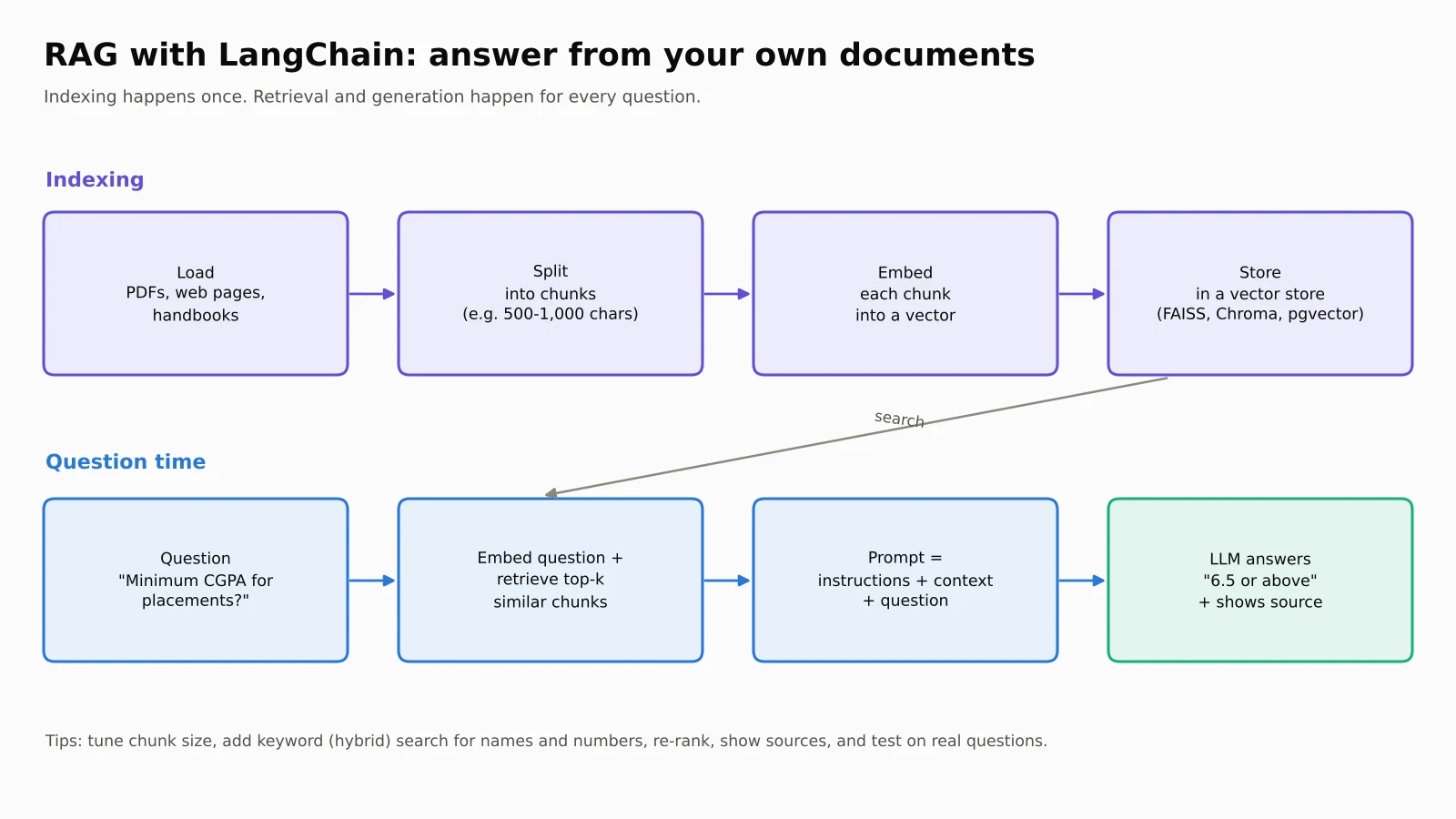
The pipeline has two stages:
Indexing (done once):
Load documents (PDFs, web pages, Word files) with a document loader.
Split them into chunks, for example 500 to 1,000 characters with some overlap, so each piece is focused.
Embed each chunk into a vector.
Store the vectors in a vector store (FAISS, Chroma, pgvector, Pinecone and others).
Querying (every question):
Embed the question and retrieve the most similar chunks.
Generate an answer using a prompt that says "answer only from this context".
Try it offline (tested). We indexed four lines of an imaginary college handbook. To keep it runnable without downloads, it uses a tiny TF-IDF embedding class; in a real app, use a proper embedding model such as HuggingFaceEmbeddings(model_name="sentence-transformers/all-MiniLM-L6-v2").
from langchain_core.embeddings import Embeddings
from langchain_core.vectorstores import InMemoryVectorStore
from langchain_core.documents import Document
from sklearn.feature_extraction.text import TfidfVectorizer

class TfidfEmbeddings(Embeddings):
    def __init__(self, corpus):
        self.v = TfidfVectorizer().fit(corpus)
    def embed_documents(self, texts):
        return self.v.transform(texts).toarray().tolist()
    def embed_query(self, text):
        return self.v.transform([text]).toarray()[0].tolist()

handbook = [
    "Hostel fees must be paid before 10 July. A late fee of Rs 500 applies after that.",
    "The library is open from 8 am to 10 pm on weekdays and 10 am to 6 pm on Sundays.",
    "Students need 75 percent attendance to sit the end-semester exams.",
    "Placement registration closes on 15 August. Students need a CGPA of 6.5 or above.",
]
store = InMemoryVectorStore.from_documents(
    [Document(page_content=t) for t in handbook], TfidfEmbeddings(handbook))
retriever = store.as_retriever(search_kwargs={"k": 1})

print(retriever.invoke("What is the minimum CGPA for placement registration?")[0].page_content)
# Placement registration closes on 15 August. Students need a CGPA of 6.5 or above.
Then connect the retriever to a prompt and model:
from langchain_core.prompts import ChatPromptTemplate
from langchain_core.runnables import RunnablePassthrough
from langchain_core.output_parsers import StrOutputParser

rag_prompt = ChatPromptTemplate.from_template(
    "Answer only from the context. If the answer is not there, say you don't know.\n"
    "Context: {context}\nQuestion: {question}")

format_docs = lambda docs: "\n".join(d.page_content for d in docs)
rag_chain = ({"context": retriever | format_docs, "question": RunnablePassthrough()}
             | rag_prompt | model | StrOutputParser())
print(rag_chain.invoke("What is the minimum CGPA for placement registration?"))
Mid-level tips for better RAG:
Chunking decides quality. Chunks that are too large bury the answer; chunks that are too small lose context. Test a few sizes on real questions.
Use hybrid search (keyword + vector) for names, codes and numbers, which pure embeddings often miss.
Re-rank the top 20 results with a cross-encoder and keep the best 3 to 5.
Show sources so users can check the answer.
Measure it. Build a small set of real questions with known answers and track how often the right chunk is retrieved.
RAG isn't the only way to give a model knowledge. ByteMuni's comparison of RAG vs CAG vs KAG explains when caching or knowledge graphs work better, and our look at the LEANN vector index shows how vector storage can shrink dramatically.
Agents in generative AI with LangChain v1: from answering to doing
A chain follows fixed steps you wrote. An agent lets the model choose the steps. It runs a loop:
The model reads the conversation and decides: answer now, or call a tool?
If it calls a tool, LangChain runs the tool and adds the result as a ToolMessage.
The model reads the result and decides again, until it can give a final answer.
In LangChain v1, you build this with create_agent, which runs on the LangGraph runtime.
Needs an API key (real model):
from langchain.agents import create_agent
from langchain_core.tools import tool

@tool
def get_exam_date(subject: str) -> str:
    """Look up the end-semester exam date for a subject."""
    dates = {"dbms": "12 December 2026", "os": "15 December 2026"}
    return dates.get(subject.lower(), "not scheduled yet")

agent = create_agent(
    model="openai:gpt-4.1-mini",
    tools=[get_exam_date],
    system_prompt="You are a helpful college assistant. Use tools for facts.",
)
result = agent.invoke({"messages": [{"role": "user", "content": "When is my DBMS exam?"}]})
print(result["messages"][-1].content)
We ran the same agent offline with a scripted fake model to show exactly what happens inside the loop:
HumanMessage  'When is my DBMS exam?'
AIMessage     ''  tool_calls=[('get_exam_date', {'subject': 'DBMS'})]
ToolMessage   '12 December 2026'
AIMessage     'Your DBMS exam is on 12 December 2026. Start revising normalisation and SQL joins now.'
Notice the second line: the model's first reply contains no text, only a request to call get_exam_date with subject="DBMS". LangChain ran the function, passed back "12 December 2026", and only then did the model write the answer. That's the whole agent pattern. For a deeper look at how agents plan and act, read ByteMuni's guide to agentic AI and how AI agents work.
Memory and middleware (mid-level)
Memory: pass a
checkpointer(for example LangGraph'sInMemorySaverfor testing, or a database-backed saver in production) and athread_id, and the agent remembers earlier turns of that conversation.Middleware hooks into the agent loop. LangChain v1 ships built-ins including
SummarizationMiddleware(summarise old messages when the history gets long),HumanInTheLoopMiddleware(pause for a person to approve, edit or reject a tool call, such as sending an email),PIIMiddleware(detect and redact personal data),ModelCallLimitMiddlewareandToolCallLimitMiddleware(stop runaway loops and costs), andModelFallbackMiddleware(switch to a backup model if one fails).
from langchain.agents import create_agent
from langchain.agents.middleware import HumanInTheLoopMiddleware, SummarizationMiddleware
from langgraph.checkpoint.memory import InMemorySaver

agent = create_agent(
    model="openai:gpt-4.1-mini",
    tools=[read_email, send_email],
    checkpointer=InMemorySaver(),
    middleware=[
        SummarizationMiddleware(model="openai:gpt-4.1-mini"),
        HumanInTheLoopMiddleware(interrupt_on={"send_email": True}),
    ],
)
Here read_email and send_email are your own tools. Exact middleware options change between minor versions, so check the LangChain docs for the version you install.
Why this matters in the real world: an agent that can send emails, issue refunds or delete files should never do it unchecked. Human approval for risky tools, call limits and PII redaction are what separate a demo from a product. ByteMuni's coverage of AI agents as insider threats shows what can go wrong when agents get too much access.
Real-world examples of generative AI with LangChain
Klarna's customer-support assistant. According to a LangChain case study published in February 2025, the fintech company Klarna built its AI assistant with LangGraph and LangSmith. The company reported that the assistant had handled 2.5 million conversations, cut average query resolution time by 80% and was doing work equivalent to about 700 full-time staff. These are Klarna's and LangChain's own figures, not an independent audit, but they show the pattern: an agent with tools (order lookup, refunds, policies) plus tracing to monitor quality.
Below are common patterns students can build, each mapped to the building blocks above:
| Use case | Building blocks | Example |
|---|---|---|
| College help desk | RAG + chat memory | Answers fee, hostel and exam questions from the official handbook, with sources |
| Resume screener | Document loaders + structured output | Extracts skills and CGPA from PDFs into a sheet for the placement cell |
| Customer support agent | Agent + tools + human approval | Looks up orders, drafts refunds, waits for a human to approve |
| Code documentation helper | RAG over a code repository | "Where is the payment retry logic?" answered with file references |
| Multilingual tutor | Prompt templates + small open model | Explains concepts in Hindi, Tamil or English on the college's own server |
| News or research summariser | Search tool + agent | Finds recent articles and writes a summary with links |
LangChain vs plain API vs LangGraph: when to use what
LangChain is useful, but it isn't always necessary. Experienced developers choose based on the job:
| Situation | Best choice | Why |
|---|---|---|
| One model, one prompt, no tools | Provider SDK directly | Fewer dependencies, easier to debug |
| Switching between providers, RAG, standard agents | LangChain | Standard interfaces and ready-made integrations |
| Long-running, branching or multi-agent workflows that must pause and resume | LangGraph | Explicit state, persistence and human-in-the-loop control |
| Running or fine-tuning open models | Hugging Face transformers | Direct access to model weights |
A fair criticism of LangChain, often raised by developers, is that its abstractions and frequent updates can make debugging harder. Version 1.0 reduced the core package's scope partly to address this. The practical advice: learn what each abstraction does underneath (as this guide shows with the offline demos), and you'll never be stuck when something breaks.
A learning roadmap for generative AI with LangChain
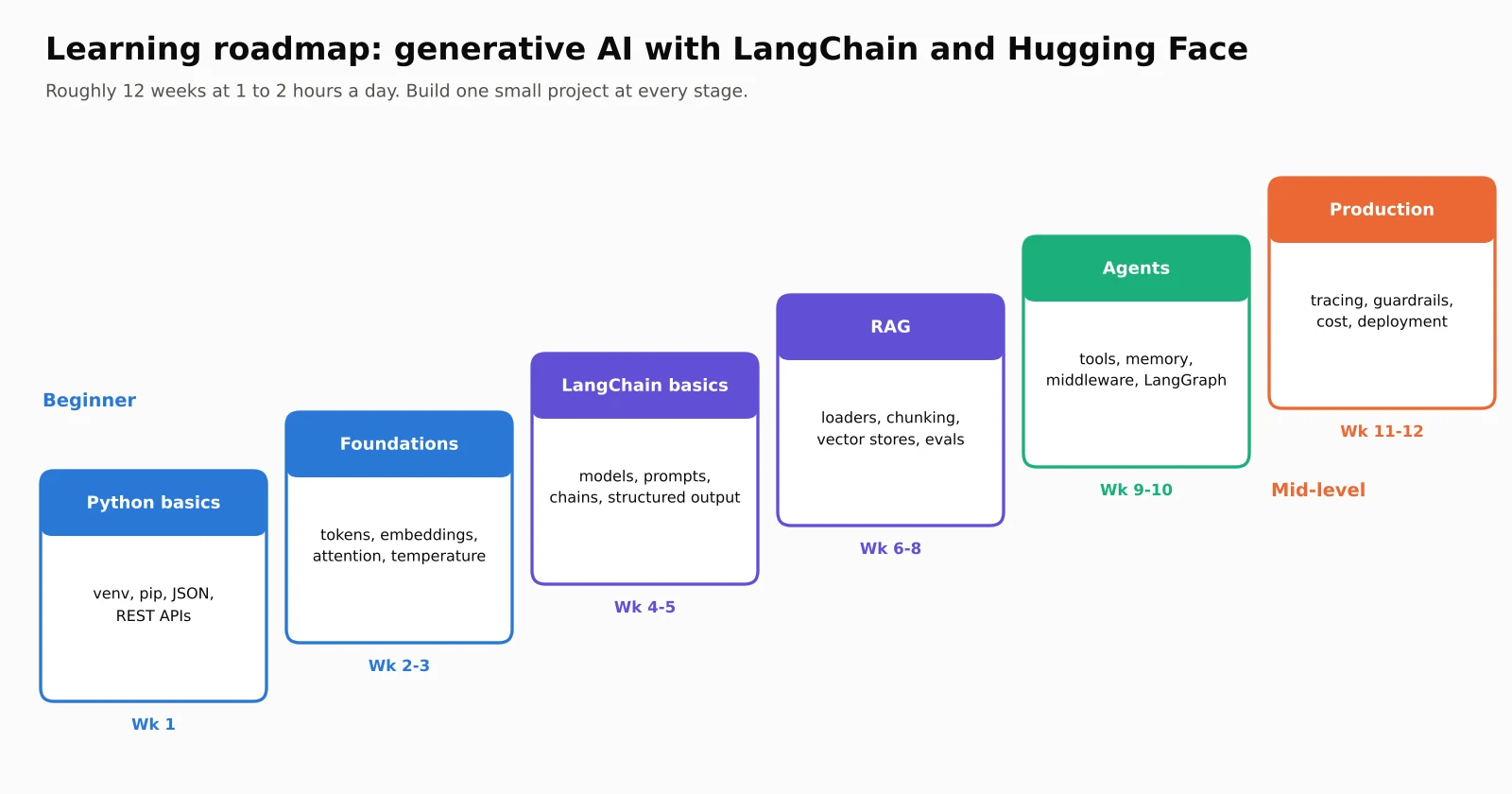
Beginner (weeks 1 to 3)
Get comfortable with Python, virtual environments,
pip, JSON and calling a REST API.Run the offline demos in this article and change the inputs. Add your own words to the attention demo and see what changes.
Try a Hugging Face
pipeline()for sentiment analysis and text generation.
Intermediate (weeks 4 to 8)
Build a chain with a prompt template and structured output.
Build a RAG chatbot over your college handbook or your own notes, with sources shown.
Build an agent with two or three tools (calculator, search, a small database).
Mid-level and beyond (weeks 9 to 12)
Add memory, human approval for risky tools and call limits.
Trace runs (LangSmith or an open-source alternative) and build a small evaluation set of 30 to 50 questions.
Learn LangGraph for a workflow that branches or pauses for approval.
Deploy one project with a simple web UI and write up what failed and how you fixed it. Interviewers love that.
If you're preparing for placements, ByteMuni's generative AI interview questions for 2026 covers the questions most often asked about Transformers, RAG and agents.
Common mistakes beginners make with generative AI and LangChain
Treating the LLM as a database. It predicts likely text; it doesn't look facts up. Use RAG or tools for facts.
Skipping evaluation. "It worked on my three questions" isn't testing. Keep a list of real questions with expected answers.
Hard-coding API keys in code pushed to GitHub. Use environment variables or a secrets manager.
Ignoring cost and context limits. Every token in the prompt, retrieved documents and chat history costs money and time. Summarise or trim long histories.
Giving agents dangerous tools without approval. Add human-in-the-loop for anything that sends, pays or deletes.
Copying old tutorials. Many pre-2025 examples use APIs such as
LLMChainorinitialize_agentthat now live inlangchain-classic. For new projects, usecreate_agentand LCEL.
Our take
Generative AI can look like magic, but it is built from understandable parts: a Transformer predicting the next token, attention giving words their context, and a framework connecting that engine to the real world. Once you see those parts clearly, LangChain stops being a pile of class names and becomes a toolkit you can reason about.
Start small. Run the offline demos, build one RAG chatbot on documents you actually care about, then give an agent a single safe tool. Each project will teach you more than another hour of videos, and it will give you something real to talk about in your next interview.
Sources
Frequently asked questions
What is generative AI with LangChain?
It means building generative AI applications, such as chatbots, RAG systems and agents, using the LangChain framework to connect large language models to prompts, your own data, tools and memory. LangChain provides standard building blocks so you can switch model providers without rewriting your app.
What is the difference between a Transformer and an LLM?
A Transformer is a neural-network architecture built around self-attention. An LLM (large language model) is a very large model, usually a Transformer, trained on huge amounts of text to predict the next token. GPT, Llama, Gemma and Qwen are all LLMs built on the Transformer architecture.
Is LangChain free?
Yes. LangChain and LangGraph are open-source libraries. You pay only for what you connect them to, such as API calls to paid models, a hosted vector database or the LangSmith platform. Open models from Hugging Face can run for free on your own hardware.
Do I need to know machine learning to use LangChain?
No. You need Python basics and an understanding of prompts, tokens and embeddings. Knowing how Transformers work helps you debug and design better apps, but you don't need to train models yourself.
What is the difference between LangChain and Hugging Face?
Hugging Face is where open models and datasets live, plus the transformers library to run them. LangChain is a framework that connects any model, from Hugging Face, OpenAI, Google or others, to prompts, data, tools and agents. They work together through the langchain-huggingface package.
Should I learn LangChain or LangGraph first?
Start with LangChain. Its create_agent covers most use cases and runs on LangGraph underneath. Move to LangGraph when you need custom workflows with branches, loops, long-running state or multiple cooperating agents.
How we research, write and check articles