SAML vs OAuth vs OpenID Connect: Which Is Best for SSO Login?
OAuth 2.0 grants API access; it does not log users in. Here is what SSO login is, how SAML 2.0 and OpenID Connect each handle it, and which one to pick for your app in 2026.

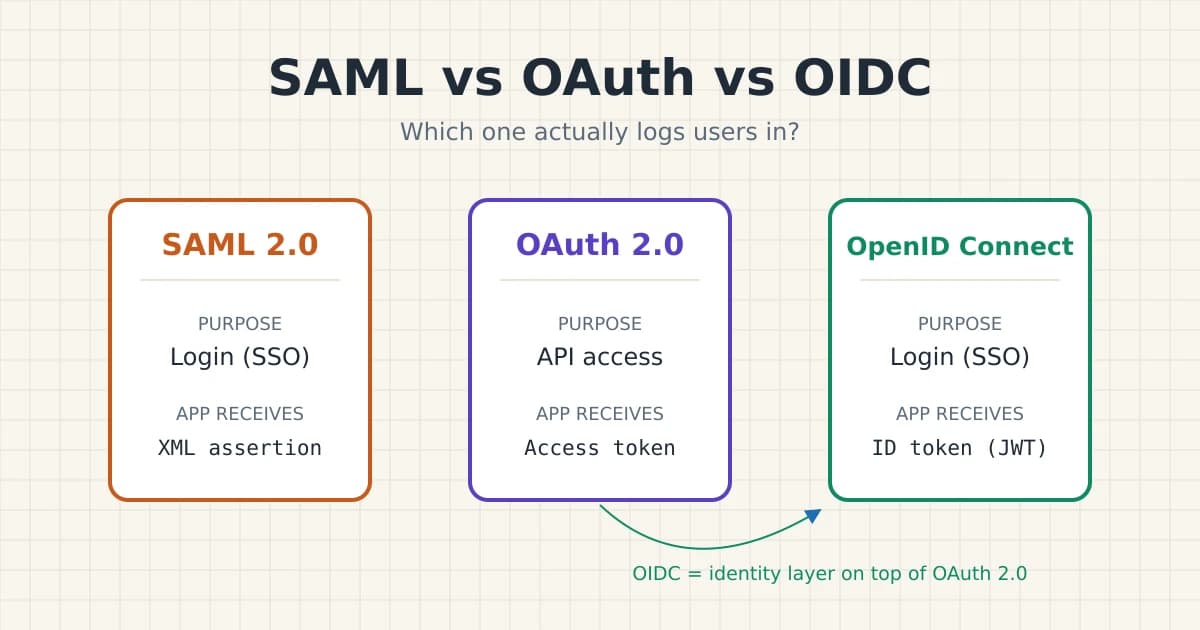
In the SAML vs OAuth debate, the honest answer is that they solve different problems. SAML 2.0 logs a user in to an app. OAuth 2.0 lets an app call an API on the user's behalf. For single sign-on (SSO), the real choice is between SAML 2.0 and OpenID Connect (OIDC), the login layer built on top of OAuth 2.0.
Below: what SSO login is and why teams adopt it, the SSO flow step by step, SAML, OAuth and OIDC explained from their specs, a comparison and decision table, the security mistakes that break real deployments, and a real OIDC request you can adapt.
What is SSO login? IdP, service provider, session and token in plain words
Single sign-on means you prove who you are once, to one trusted system, and then many apps let you in without asking for your password again. "Sign in with Google" on a new website is SSO. So is logging in to your company laptop in the morning and finding Slack, Jira and Gmail already open to you.
Five terms show up in every SSO discussion:
Identity Provider (IdP): the system that actually checks your password and MFA. Google, Microsoft Entra ID (Microsoft's cloud directory), Okta and Keycloak (an open-source identity server) are common IdPs.
Service Provider (SP) or Relying Party (RP): the app you want to use. SAML calls it a service provider; OIDC calls it a relying party, because it relies on the IdP's word.
Session: the "you are logged in" state, usually a cookie. With SSO there are at least two: one at the IdP and one at each app.
Token: a piece of data the IdP issues that the app can check. In OIDC the login token is called an ID token.
Assertion: SAML's word for its token. The SAML 2.0 technical overview from OASIS (the standards body behind SAML) describes assertions as carrying statements about a principal that an asserting party claims to be true.
The key idea: the app never sees your password. It only sees a signed statement from the IdP saying "this is Priya, she logged in at 9:02 with MFA". The app decides whether to trust that statement based on keys it agreed on with the IdP in advance.
Why do teams need SSO, and what does it cost them?
SSO moves login out of every individual app and into one place. That one change brings several benefits:
Fewer passwords to reuse. Every separate login is one more password someone may recycle. With SSO there is one strong credential to protect.
One place to enforce MFA. Turn on multi-factor authentication at the IdP and every connected app inherits it, including apps that have no MFA feature of their own.
Instant offboarding. When someone leaves, disabling one IdP account cuts access to every connected app. Without SSO, an admin has to remember every tool the person had.
Fewer helpdesk resets. One password to forget instead of many.
A single audit trail. The IdP logs who signed in to which app and when, which helps during incident response and compliance reviews.
The trade-offs are real too. The IdP becomes a single point of failure: if it goes down, nobody logs in anywhere. It is also a high-value target, because one stolen IdP session opens every connected app. Each app needs keys, URLs and attribute mappings agreed with the IdP. And logout is harder than login, because ending the IdP session does not end each app's local session. SAML defines a Single Logout profile for near-simultaneous logout of active sessions, and OIDC covers logout in separate OpenID Foundation specs, but both depend on every app implementing them correctly.
How does SSO work, step by step?
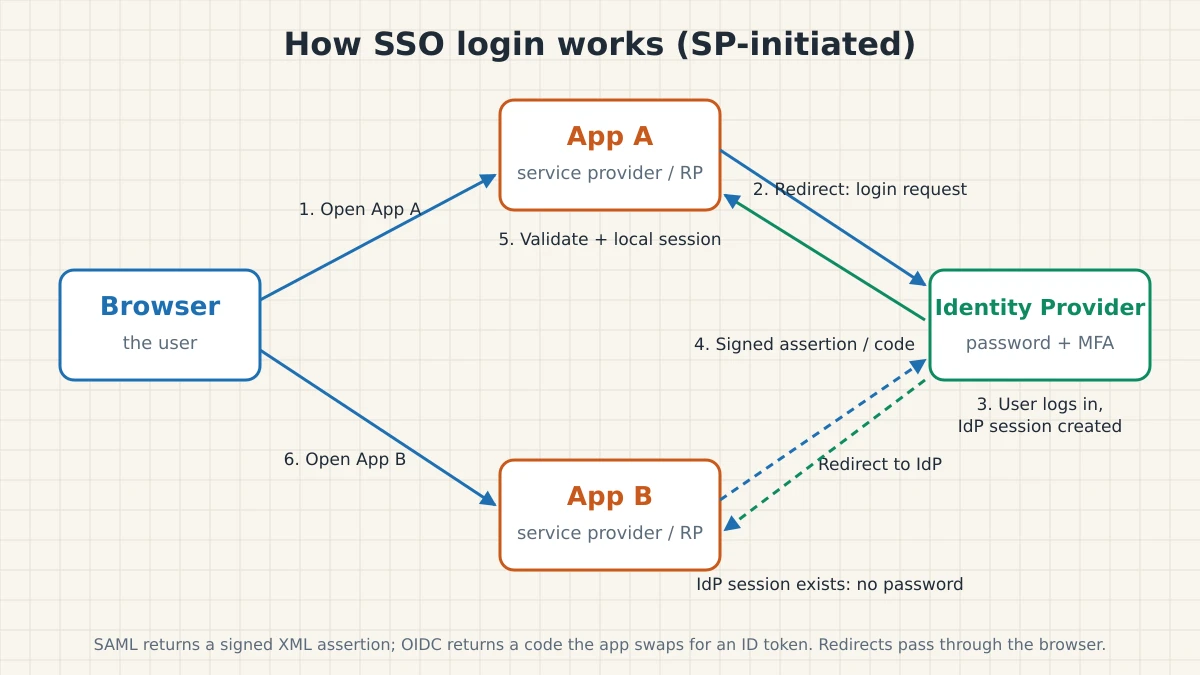
Before getting into SAML vs OAuth details, it helps to see that both SAML and OIDC logins follow the same shape. Here is a typical "SP-initiated" login, where the user starts at the app:
The user opens the app. The app finds no local session cookie.
The app redirects the browser to the IdP with a login request. In SAML this is an
AuthnRequest; in OIDC it is an authorization request withscope=openid.The IdP checks for its own session. If there is none, it shows the login page and asks for the password and MFA.
The IdP sends proof back through the browser. In SAML, the browser auto-posts a signed XML assertion to the app. In OIDC, the browser carries a short-lived authorization code, and the app's server exchanges that code directly with the IdP for an ID token.
The app validates the proof (signature, issuer, audience, expiry) and creates its own local session.
The user opens a second app. Steps 1 and 2 repeat, but at step 3 the IdP already has a session, so it skips the password prompt and sends proof straight back. This step is the "single" in single sign-on.
SAML 2.0 explained: signed XML assertions, bindings and metadata
SAML 2.0 (Security Assertion Markup Language) is an XML-based OASIS standard from 2005. It was designed for web browser SSO across organizations, and it shows: everything is XML, everything is signed, and the browser does the carrying.
Assertions and what they say
A SAML assertion can hold three kinds of statements, according to the OASIS technical overview: authentication statements (how and when the user logged in), attribute statements (details such as email or group membership), and authorization decision statements (what the user may do). In practice, most SSO deployments use the first two.
Bindings: how assertions travel
Bindings define how SAML messages ride on lower-level protocols. The two you will meet in browser SSO are:
HTTP Redirect binding: the message travels in a 302 redirect URL. Usually used for the SP's
AuthnRequest, which is small.HTTP POST binding: the message is base64-encoded inside an HTML form that the browser auto-submits. Usually used for the IdP's response, because signed assertions are too large for a URL.
Because the response passes through the user's browser, the technical overview says it is mandated that the response message be digitally signed using XML Signature, and the SP must validate that signature before processing the assertion.
SP-initiated vs IdP-initiated login
In SP-initiated SSO, the user starts at the app, which sends an authentication request to the IdP (the flow in the previous section). In IdP-initiated SSO, the user is already logged in to the IdP's portal and clicks a tile for an app. The IdP builds an assertion and posts it to the app's Assertion Consumer Service URL with no request from the app at all. That convenience has a cost: the app has no request ID to match the response against, which makes replayed or injected responses harder to spot.
Metadata and certificates
Before any login happens, the IdP and SP exchange metadata: XML files listing endpoint URLs, supported bindings and the public keys that verify signatures. In practice you upload the IdP's metadata into the app and the app's metadata into the IdP. When the IdP rotates its signing certificate, every SP needs the new one, or logins start failing.
SAML is still widely used in enterprise and B2B SaaS. When a large customer's IT team asks "do you support SSO?", they often mean SAML, and some older internal apps speak nothing else.
OAuth 2.0 is authorization, not login, so where does OpenID Connect fit?
This is the part most SAML vs OAuth articles get wrong. The first line of RFC 6749 describes OAuth 2.0 as a framework that lets a third-party application obtain limited access to an HTTP service. That is delegated authorization: "let this app read my calendar", not "this is who I am".
The four roles, scopes and the authorization code flow
RFC 6749 defines four roles:
Resource owner: the user who can grant access.
Client: the app that wants access.
Authorization server: issues access tokens after the user approves.
Resource server: the API that accepts those access tokens.
The client asks for scopes, space-separated strings such as calendar.read that name the access it wants. The authorization server may grant fewer scopes than requested. The result is an access token, which RFC 6749 calls a credential used to access protected resources. Its format is not defined by the spec, and the client is usually not meant to read it.
The flow to use today is the authorization code grant with PKCE (Proof Key for Code Exchange, RFC 7636). The client sends only the SHA-256 hash of a random secret (the code_challenge) at the start, then proves it holds the secret (the code_verifier) when swapping the code for tokens. A stolen code is useless without the verifier. RFC 9700, the OAuth 2.0 Security Best Current Practice published in January 2025, says public clients (mobile apps and single-page apps) MUST use PKCE, and recommends it for confidential clients too.
Why an access token is not proof of login
RFC 6749 states that how the authorization server authenticates the user is beyond the scope of the specification. An access token tells an API "the bearer may do X". It does not tell your app who the user is, when they logged in, or that the token was issued for your app at all.
That last point is the dangerous one. If your app accepts any valid access token from an IdP as a login, a token the user granted to some other app can be replayed against yours, and that other app can log in as the user on your site. This is why a plain access token is not proof of login, and why a separate identity layer was needed.
OpenID Connect: the identity layer on top of OAuth 2.0
OpenID Connect Core 1.0 opens by calling itself a simple identity layer on top of the OAuth 2.0 protocol. It reuses the OAuth flows and adds three things:
The ID token. A JSON Web Token (JWT, a signed JSON object in three base64url parts) that is addressed to your app. Its required claims include
iss(who issued it),sub(a stable user ID),aud(which must contain your client ID),exp(expiry) andiat(issue time).The UserInfo endpoint. An API that returns profile claims, such as name and email, when called with the access token.
Discovery. Under OpenID Connect Discovery 1.0, a provider publishes a JSON document at
/.well-known/openid-configurationlisting its endpoints and signing keys, so a library can configure itself from one URL.
Every OIDC request must include the openid scope; the spec says that without it the behavior is entirely unspecified. "Sign in with Google" and "Sign in with Microsoft" are OIDC. Google's developer docs say its OAuth 2.0 APIs can be used for both authentication and authorization, with the authentication side conforming to OpenID Connect. Microsoft's identity platform docs describe OIDC as extending OAuth 2.0 for use as another authentication protocol and as the way to enable SSO between apps.
SAML vs OAuth vs OIDC: comparison and which to pick for SSO
The SAML vs OAuth table below adds OIDC as the third column, because that is the real SSO alternative. Read the OAuth 2.0 column as "what OAuth alone gives you".
| Aspect | SAML 2.0 | OAuth 2.0 | OpenID Connect |
|---|---|---|---|
| Purpose | Authentication and SSO | Delegated authorization (API access) | Authentication and SSO on top of OAuth 2.0 |
| What the app receives | Signed assertion about the user | Access token (and optionally a refresh token) | ID token, plus OAuth access token |
| Token format | XML, signed with XML Signature | Not defined by RFC 6749; often opaque to the client | ID token is always a JWT |
| Transport | Browser redirects and auto-submitted HTML forms | Browser redirects plus direct HTTPS calls to the token endpoint | Same as OAuth 2.0 |
| Mobile and SPA fit | Poor; built around browser form posts | Good with auth code + PKCE | Good with auth code + PKCE |
| Calling APIs | Not designed for it | Its main job | Yes, via the OAuth access token |
| Typical users | Enterprise IT, B2B SaaS, legacy internal apps | Any app calling third-party or internal APIs | Consumer login, new web and mobile apps, modern workforce SSO |
| Setup complexity | Higher: XML, certificates, metadata exchange | Medium | Medium; discovery automates much of the config |
| Classic pitfall | Weak signature validation, XML signature wrapping | Using an access token as proof of login | Skipping ID token checks (iss, aud, exp, nonce) |
Which is best for SSO? A decision guide by scenario
| Your situation | Use | Why |
|---|---|---|
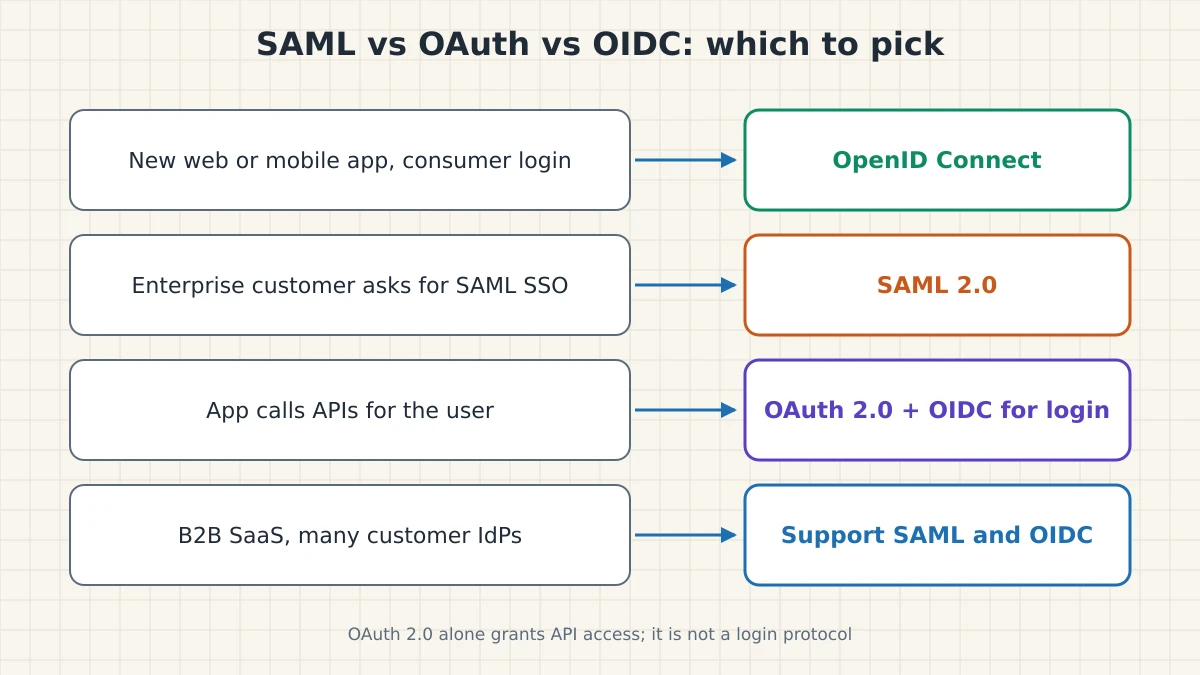
| New web or mobile app, or consumer "Sign in with…" login | OIDC | JSON and JWT, works with PKCE on mobile and SPAs, and the big consumer IdPs support it |
| Enterprise customers asking for "SAML SSO", or an older enterprise app | SAML 2.0 | Many corporate IdP setups and older apps expect it |
| Your app calls APIs on the user's behalf | OAuth 2.0, with OIDC for the login | OAuth gets the access token; OIDC proves who the user is |
| B2B SaaS selling to many companies | Support both SAML and OIDC | Customers bring their own IdP; let them choose the protocol their IT team prefers |
| Connecting internal apps to Entra ID, Okta, Google Workspace or Keycloak | Whichever the app supports, preferring OIDC | These IdPs can speak both SAML and OIDC |
My take on SAML vs OAuth
My read is that "SAML vs OAuth" is the wrong frame, and "SAML or OIDC, plus OAuth when you call APIs" is the right one. For a new product in 2026, I would build login on OIDC first and add SAML when the first enterprise customer asks for it, through an IdP or library rather than by hand. Calling SAML dead would be wrong; it is still what many enterprise buyers check for. If you are preparing for security interviews, the authentication-vs-authorization distinction shows up often, and it pairs well with the topics in our cybersecurity interview questions for 2026.
SSO security mistakes that break SAML and OIDC logins
Neither protocol is "secure" or "insecure" on its own. Most real SSO breaches come from implementations that skip a check the spec requires.
SAML mistakes
Not validating the signature, or validating the wrong element. In XML signature wrapping (XSW), an attacker keeps a genuinely signed assertion in the document but adds a forged, unsigned one that the app's code reads instead. The 2012 USENIX Security paper "On Breaking SAML: Be Whoever You Want to Be" analyzed 14 major SAML frameworks and reported critical XSW flaws in 11 of them.
Assuming the problem is solved. In March 2025, GitHub Security Lab disclosed CVE-2025-25291 and CVE-2025-25292 in the ruby-saml library, affecting versions up to 1.17.0. Two XML parsers disagreed about the same document, which enabled signature wrapping and an authentication bypass. The fixes shipped in ruby-saml 1.12.4 and 1.18.0, and GitLab released patched versions.
Accepting replayed or misdirected assertions. OASIS's SAML 2.0 security and privacy considerations say SPs must check each assertion's validity period and reject expired ones, should treat assertions as one-time-use, and should check the audience and Recipient values against their own endpoint.
OAuth and OIDC mistakes
No CSRF protection. RFC 9700 says clients MUST prevent cross-site request forgery: rely on PKCE, or use one-time
statevalues. Without either, an attacker can log a victim into the attacker's account.Using the implicit grant. The implicit flow (
response_type=token) returns the access token in the browser URL. RFC 9700 says clients SHOULD NOT use it and should use the code flow instead. The OAuth 2.1 draft, still an IETF Internet-Draft at the time of writing, removes it entirely.Using the password grant. RFC 9700 says the resource owner password credentials grant MUST NOT be used, because it exposes the user's password to the client.
Not validating the ID token. OIDC Core requires the app to check that
issexactly matches the provider,audcontains its own client ID, the current time is beforeexp, the signature verifies, andnoncematches if one was sent. Google's docs add a practical warning: itshdrequest parameter only tidies the account picker, so restrict a Workspace domain by checking thehdclaim in the signed ID token instead.Long-lived, over-scoped tokens. RFC 9700 says access tokens should carry the minimum privileges needed and be audience-restricted, and that refresh tokens for public clients MUST be sender-constrained or rotated. Stolen tokens are a real attack goal, as the GhostAction phishing campaign targeting developers' OAuth tokens showed.
Loose redirect URIs. Wildcards or prefix matching let attackers send codes to a URL they control. RFC 9700 says authorization servers MUST use exact string matching, with a narrow exception for localhost URIs in native apps.
How to add SSO to your app without writing your own parser
The safest SSO code is the code you do not write. XML signature handling and JWT checks are where the bugs above live. Use a well-maintained library for your framework, or put an IdP such as Keycloak, Auth0, Okta, Microsoft Entra ID or Google in front of your app, and keep it patched.
Pick the IdP your users already have, or run Keycloak if you need to self-host.
Register your app to get a
client_id, and register the exact redirect URI, such ashttps://app.example.com/auth/callback.Point your library at the discovery URL, such as
https://accounts.google.com/.well-known/openid-configurationfor Google.Use the authorization code flow with PKCE and the
openidscope.Let the library validate the ID token, then create your own short-lived session cookie.
Your library generates PKCE values for you, but it helps to see them once. This runs on Python 3.6+ with only the standard library:
import base64, hashlib, secrets
from urllib.parse import urlencode

code_verifier = secrets.token_urlsafe(64)  # 86 characters; RFC 7636 allows 43-128
code_challenge = base64.urlsafe_b64encode(
    hashlib.sha256(code_verifier.encode("ascii")).digest()
).rstrip(b"=").decode("ascii")

params = {
    "response_type": "code",
    "client_id": "YOUR_CLIENT_ID",
    "redirect_uri": "https://app.example.com/auth/callback",
    "scope": "openid email profile",
    "state": secrets.token_urlsafe(32),
    "nonce": secrets.token_urlsafe(32),
    "code_challenge": code_challenge,
    "code_challenge_method": "S256",
}
# Read the real authorization_endpoint from the provider's discovery document
print("https://idp.example.com/authorize?" + urlencode(params))
The resulting authorization request looks like this (illustrative values, line breaks added for reading):
https://idp.example.com/authorize?response_type=code
  &client_id=YOUR_CLIENT_ID
  &redirect_uri=https%3A%2F%2Fapp.example.com%2Fauth%2Fcallback
  &scope=openid+email+profile
  &state=Xq2v9kTzL0wQe7mN
  &nonce=p3RtY8uLs1aVc6bD
  &code_challenge=qjrzSW9gMiUgpUvqgEPE4_-8swvyCtfOVvg55o5S_es
  &code_challenge_method=S256
After login, the IdP redirects to your callback with code and state. Your server checks state, then posts grant_type=authorization_code, the code, the same redirect_uri, your client_id and the original code_verifier to the token endpoint. Per RFC 7636, always use S256, not plain.
The bottom line on SAML vs OAuth
Stop asking which of SAML and OAuth is better for login, because OAuth 2.0 was never a login protocol. Build new logins on OpenID Connect with the authorization code flow and PKCE. Add SAML 2.0 when enterprise customers or older apps require it, and use OAuth access tokens only for calling APIs. Whichever you pick, let a maintained library or IdP do the parsing and validation, and keep it patched.
Frequently asked questions
Is OAuth an SSO protocol?
No. OAuth 2.0 is a framework for granting an app limited access to an API, and RFC 6749 says how the user is authenticated is beyond its scope. SSO built "on OAuth" is really OpenID Connect, which adds an ID token for login.
Is SAML outdated in 2026?
SAML 2.0 is older (an OASIS standard from 2005) and XML-heavy, but it is still widely used for enterprise and B2B SSO. New apps usually start with OIDC and add SAML when a customer's IdP or an older app needs it.
Can SAML and OIDC work together?
Yes. Major identity providers such as Microsoft Entra ID, Okta, Keycloak and Google Workspace can speak both, so one IdP can log users in to SAML apps and OIDC apps with the same account and session.
Is "Sign in with Google" SSO?
Yes. It is OpenID Connect: Google's developer docs say its authentication implementation conforms to the OpenID Connect spec. Your app receives an ID token from Google, and once the user has a Google session, other apps using Google sign-in do not ask for the password again.
Is JWT the same as OAuth?
No. A JWT is a token format: signed JSON in three base64url parts. OAuth 2.0 is a framework for issuing access tokens and does not mandate any format. OIDC requires its ID token to be a JWT.
Which is more secure, SAML or OIDC?
Neither is secure or insecure by itself. Most failures come from skipped checks: SAML signature wrapping and unchecked assertions, or OIDC apps that skip ID token validation, state or PKCE. A maintained library that follows the spec matters more than the protocol choice.
Concepts in this article
- OAuth
- A standard for granting an app limited access to an account without sharing the password.
- Active Directory
- Microsoft's directory service for Windows domain identities and permissions.
- Authentication and MFA
- Proving who a user or service is, with passwords, keys, tokens and multi-factor checks.
- CVE
- The public identifier system for disclosed security vulnerabilities.
- HTTP
- The request–response protocol of the web: methods, status codes and headers.
- JSON
- A text format for structured data, read and written with JSON.parse and JSON.stringify.
- SHA-256
- A widely used cryptographic hash function that produces a 256-bit digest.
- Variables and scope
- Where a variable can be read: global, function and block scope, and how let, const and var differ.
How we research, write and check articles