Google Personal Intelligence and Ads: What Changed and How to Turn It Off
Google's privacy policy now says data from Gmail and Photos that you connect to AI Mode can help personalise ads. Here's what really changed, who it affects, and how to switch it off.

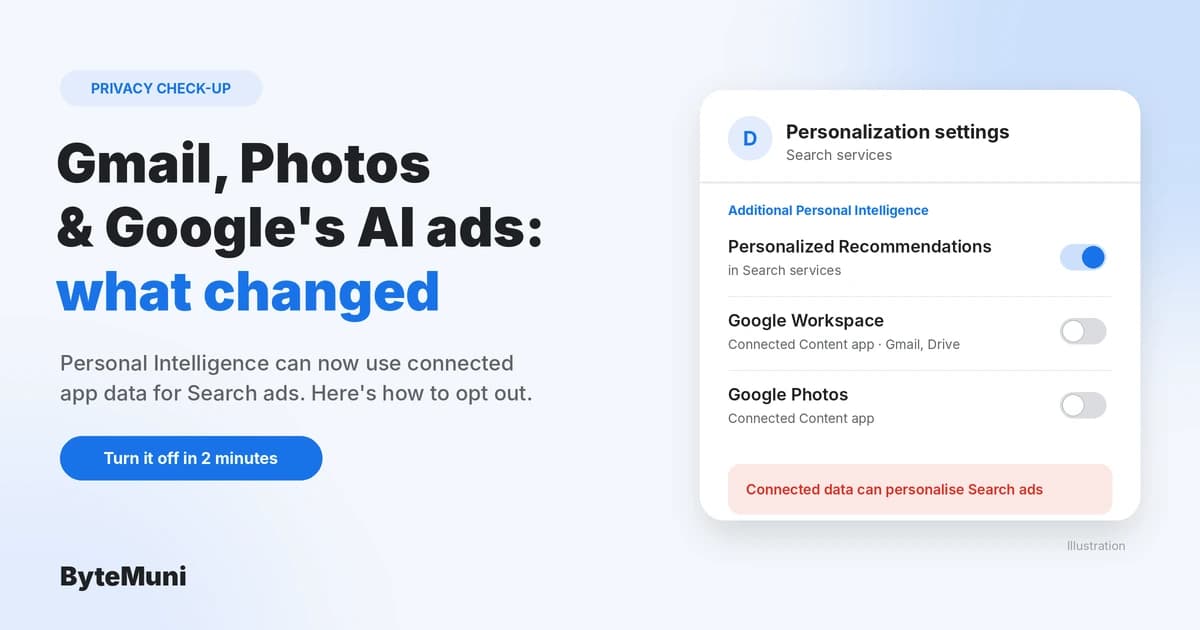
Google Personal Intelligence lets Gemini and AI Mode in Search read your Gmail, Google Photos and other connected apps to give more personal answers. Google's updated privacy policy, effective October 16, 2026, now states that data you let Search access this way can also be used to personalise ads. It's off by default, so this only applies if you've connected your apps.
The change has been widely reported as "Google will use your Gmail for ads," which isn't quite right. This guide explains exactly what the policy says, what it doesn't say, who it applies to, and how to check or turn off Google Personal Intelligence in a couple of minutes.
The short version
What changed: Google's privacy policy now says Search "may process some of the data that you allow Search to access to personalize content, including ads."
Default: Google says it doesn't show personalised ads based on your Gmail, Drive or Photos content unless you choose to make that data available to other Google services that support personalised ads.
Personal Intelligence is opt-in. Google's January announcement says, "Connecting your apps is off by default."
Advertisers don't get your emails or photos. The policy says Google doesn't share information that personally identifies you with advertisers, and doesn't personalise ads on sensitive categories such as race, religion, sexual orientation or health.
India is in scope: the beta is rolling out globally except in the European Economic Area, Switzerland, the UK and Nigeria.
To opt out: disconnect Google Workspace and Google Photos from Search's Personal Intelligence settings, or turn off personalised recommendations in Search entirely. Steps below.
What did Google change in its privacy policy?
The update, first reported by Android Authority and later covered by The Hacker News and NDTV, adds language about Google services sharing data with each other. The current policy, effective October 16, 2026, says:
"You may choose to allow certain Google services, including services like Search or Gemini Apps, to access data from other Google services you use, such as Google Photos and Workspace apps like Gmail and Drive, in order to provide you with a more personalized experience, subject to the policies and settings of the accessing service."
It then gives an example that explains the headlines:
"For example, Search may process some of the data that you allow Search to access to personalize content, including ads."
And it sets the default:
"We don't show you personalized ads based on your content from Drive, Gmail, or Google Photos, unless you choose to make data from these services available to other Google services that support personalized ads."
In plain terms: Google isn't saying it now scans everyone's inbox for ad targeting. It's saying that if you connect Gmail or Photos to Search so it can answer personal questions, the information Search uses can also feed into the ads you see. The policy update is a disclosure of that trade-off.
What is Google Personal Intelligence?
Google Personal Intelligence is a beta feature that lets Google's AI tailor answers using your own data. Google introduced it in the Gemini app on January 14, 2026, and brought it to AI Mode in Google Search through Search Labs a week later, on January 22.
Here's what Google's own pages say about Google Personal Intelligence:
Connected apps: in the Gemini app, currently Gmail, Google Photos, Search and YouTube, with more Google apps promised "with your permission." In AI Mode, it draws on Google Workspace (such as Gmail) and Google Photos.
Off by default: you choose which apps to connect, and you can change or turn off connections at any time.
Who can use it: users over 18, on personal Google accounts only. Google Workspace business, enterprise and education accounts aren't included.
Where: rolling out as a beta to eligible users globally, except the EEA, Switzerland, the UK and Nigeria. Some features are US-only.
Training: Google says Gemini doesn't train directly on your Gmail inbox or Google Photos library. It trains on limited data, such as your prompts and Gemini's responses, after filtering or obscuring personal information.
A practical example from Android Authority's report: if you ask AI Mode for restaurant ideas, Search could use a hotel booking in your Gmail to suggest places near where you're staying. That's the kind of data that, under the new policy wording, could also inform the ads you see.
Does Google read my Gmail to show me ads?
Not by default, and not unless Google Personal Intelligence (or a similar connection) is switched on. According to Google's privacy policy:
Google doesn't show personalised ads based on your Gmail, Drive or Photos content unless you choose to make that data available to Google services that support personalised ads.
Google doesn't share information that personally identifies you with advertisers. NDTV, summarising Google's position, adds that advertisers don't get access to your Drive, Gmail or Photos information, or details such as your name or email address.
Google doesn't show personalised ads based on sensitive categories such as race, religion, sexual orientation or health.
The new part is the exception. If you've connected Gmail or Photos to Search through Personal Intelligence, the data Search uses from them can be a signal for ad personalisation.
What is the real privacy trade-off?
The useful distinction, which Android Authority also drew, is between two different uses of the same data:
Using your data to answer you: "What time is my flight?" or "Show me photos from my Goa trip." Many people are comfortable with this, because it's the point of the feature.
Using that same data to decide which ads you see: many people aren't comfortable with this, even though no advertiser sees the underlying email or photo.
Google's policy now makes clear that, for Search, turning on the first can enable the second. Whether that's acceptable is your call, but it should be an informed one.
Two more details worth knowing:
Disconnecting may not erase everything. Android Authority notes that disconnecting an app doesn't necessarily delete data already saved. Information in your Search Services History may remain after you disconnect an app or delete the original email or photo. Review and delete that history separately if it matters to you.
Your work account isn't part of this. Personal Intelligence is limited to personal accounts, so a company or school Google Workspace account isn't connected through this feature.
The broader question of how much personal context we hand to AI assistants keeps coming up. Our look at AI agents inside bank accounts covers a higher-stakes version of the same trade-off.
How do I check or turn off Google Personal Intelligence?
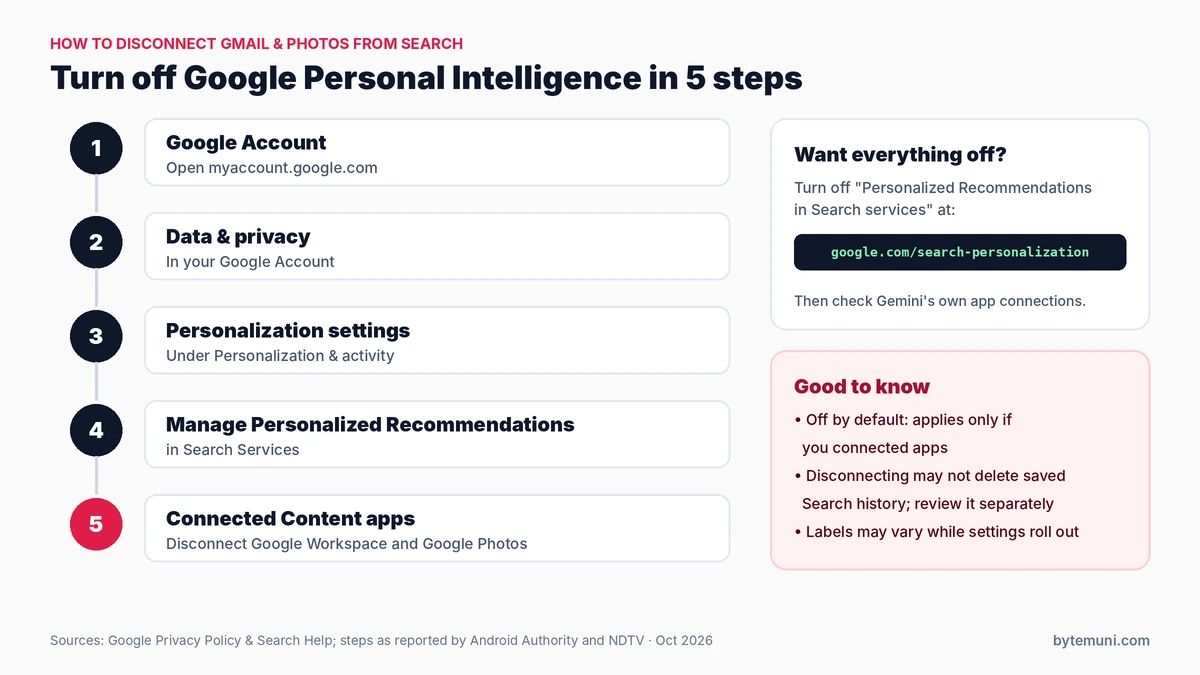
The settings path for disconnecting Gmail and Photos from Search, as reported by Android Authority and NDTV.
You have two levels of control: disconnect specific apps, or turn off personalisation in Search entirely. Google's support page notes that these settings are rolling out gradually, so the exact labels on your account may differ slightly.
Option 1: Disconnect Gmail and Photos from Search
Per the steps reported by Android Authority and NDTV:
Open your Google Account and go to Data & privacy.
Under Personalization & activity, select Personalization settings.
Choose Manage Personalized Recommendations in Search Services.
Under Additional Personal Intelligence, find Connected Content apps.
Disconnect Google Workspace and Google Photos.
Option 2: Turn off personalised recommendations in Search
Google's support page gives this path:
Go to your Google Account and select Data & privacy.
Select Personalization settings.
Turn Personalized Recommendations in Search services off.
You can also go straight to google.com/search-personalization.
Turning this off doesn't make Search ignore everything. Google says Search still uses current context such as your location, language, device type and recent searches. It also doesn't delete your existing Search Services History or other activity.
Option 3: Check the Gemini app too
Personal Intelligence in the Gemini app has its own settings. Google says you can choose which apps are connected, control how past chats are used, and view or delete your chats at any time. If you connected Gmail or Photos to Gemini, review those connections there as well.
Option 4: Review your general ad settings
Google's policy says that, depending on your settings, it may show personalised ads based on your interests and activity. Google's general ad personalisation controls are in My Ad Center (myadcenter.google.com), where you can see why you're shown ads and turn personalised ads off.
Is this only a Google thing?
No. Advertising is coming to AI assistants more broadly:
ChatGPT: OpenAI began showing ads to logged-in adult US users on its Free and Go tiers in January 2026. On October 21, it expanded ads to 26 more countries, for 89 in total, still only on the Free and Go plans. According to PPC Land, ChatGPT ads went live in India on August 29, 2026. OpenAI says, "We keep conversations private from advertisers and do not sell customer data," and that "advertising does not influence the answers ChatGPT provides."
Google: the difference here is that Google runs one of the world's largest ad businesses and holds your email, photos and documents. That's why the wording about connected apps matters.
These aren't identical arrangements, and each company's own policy is the authority on how its system works. The common thread is that free AI tools increasingly rely on advertising, so it's worth reading what data they use and why. For a broader look at the ethical questions around AI and personal data, see our explainer on AI concepts and ethical challenges.
Should you keep Google Personal Intelligence on?
There's no single right answer. AI assistants that act on your personal context are becoming common; our explainer on proactive AI agent apps shows where the category is heading. Here's a simple way to decide whether Google Personal Intelligence is worth it for you:
Keep it on if you value personal answers ("When's my next bill due?", "Find my passport photo") and you're comfortable with Search using that context for ads, given Google's commitments not to share identifying information with advertisers or target on sensitive categories.
Connect selectively if you want some benefit with less exposure. For example, connect Photos but not Gmail, where receipts, bookings and personal conversations live.
Turn it off if you'd rather keep your inbox and photo library completely separate from anything ad-related. Then review your Search Services History, since disconnecting may not delete what's already saved.
Whatever you choose, the settings take a couple of minutes to check. Since the feature is off by default, it's also worth confirming whether you ever turned it on at all. Many people tap "Allow" on a prompt without remembering it.
The bottom line
Google's policy change around Google Personal Intelligence doesn't mean your Gmail is suddenly feeding ad targeting by default. It means that if you invite Google's AI into your inbox and photos through Search, that invitation now explicitly extends to ad personalisation too. Google has written that down clearly, which is better than leaving it vague. Now it's up to each user to decide whether the convenience is worth it, and to know where the off switch is.
Sources: Google Privacy Policy (effective October 16, 2026) · Google: Personal Intelligence in Gemini · Gemini: Personal Intelligence overview · Google Search Help: personalised recommendations · Android Authority · The Hacker News · NDTV · 9to5Google: Personal Intelligence in AI Mode · PPC Land: ChatGPT ads in 89 countries
Frequently asked questions
Is Google using my Gmail to show me ads?
Not by default. Google’s privacy policy says it doesn’t personalise ads based on your Gmail, Drive or Photos content unless you choose to make that data available to Google services that support personalised ads, such as by connecting apps to Search through Personal Intelligence.
What is Google Personal Intelligence?
It’s a beta feature that lets Gemini and AI Mode in Search use data from connected apps like Gmail and Google Photos to give more personal answers. Google launched it in Gemini on January 14, 2026, and connecting apps is off by default.
Is Google Personal Intelligence available in India?
Google says the beta is rolling out to eligible users over 18 globally, except in the European Economic Area, Switzerland, the UK and Nigeria. That means India is included, though some features are US-only.
How do I turn off Google Personal Intelligence in Search?
In your Google Account, go to Data & privacy, then Personalization settings, then Manage Personalized Recommendations in Search Services, and disconnect Google Workspace and Google Photos under Connected Content apps. Or turn off personalised recommendations entirely at google.com/search-personalization.
Does disconnecting delete my data?
Not necessarily. Android Authority reports that data saved in your Search Services History may remain after you disconnect an app, so review and delete that history separately.
Do advertisers see my emails or photos?
Google says it doesn’t share information that personally identifies you with advertisers, and NDTV reports that advertisers don’t get access to your Gmail, Drive or Photos information.