Rust Programming Language: A Beginner-Friendly Guide With Real Examples (and Why Anthropic Moved Its API to Rust)
Anthropic recently moved Claude's Messages API from Python to Rust and reported roughly 40% to 50% less CPU use. This beginner-friendly guide explains the Rust programming language from the ground up, with every example compiled and run: ownership, borrowing, Option and Result, traits, iterators, threads, tests and a small JSON API. It also includes an honest Python vs Rust comparison with a real benchmark.

In late October 2026, Anthropic said it had moved the Messages API, the core API behind Claude, from Python to Rust. The team behind it started with no experienced Rust developers, and Claude wrote most of the code. The engineers' rough estimate was 40% to 50% less CPU. That story has a lot of students asking the same question: what is the Rust programming language, and should I learn it?
This guide answers that from the ground up. It's written for students and developers who know a little programming, maybe Python, Java or C, and want to understand Rust properly. Every code example below was compiled and run with Rust 1.97 before publishing, and you'll see the real output. Here's what we'll cover:
what Rust is and why companies like Anthropic, Google and Microsoft use it
the facts behind Anthropic's Python-to-Rust migration
installing Rust and your first program
the core ideas: variables, ownership, borrowing, structs, enums and pattern matching
error handling without exceptions, plus traits, generics, iterators and threads
building a small JSON API in Rust
an honest Python vs Rust comparison, with a benchmark I ran
a learning roadmap for students
What is the Rust programming language?
The official Rust by Example book describes it in one line: Rust is "a modern systems programming language focusing on safety, speed, and concurrency. It accomplishes these goals by being memory safe without using garbage collection."
Those last few words are the whole story. Most languages pick one of two approaches to memory:
Manual memory (C, C++): very fast, but one mistake, such as using freed memory or writing past the end of an array, can crash the program or open a security hole.
Garbage collection (Python, Java, Go, C#): safe and easy, but a background collector uses extra CPU and memory, and can pause your program.
Rust takes a third path. It checks memory rules at compile time, through a system called ownership. If your code could cause a memory bug, it usually won't compile. When it does compile, it runs as fast as C or C++, with no garbage collector.
A few quick facts:
Origin: Rust began in 2006 as a personal project of Graydon Hoare, then a Mozilla employee. Mozilla later sponsored it, and version 1.0 was released in May 2015.
Compilation: Rust compiles to native machine code through LLVM, the same compiler backend used by Clang.
Release cadence: a new stable version ships every six weeks. Rust 1.99.0 came out on October 1, 2026.
Popularity: Rust topped Stack Overflow's "most loved" or "most admired" language list in every developer survey from 2016 through 2025.
Why Anthropic moved its Messages API to Rust
Here's what we actually know, because this story has been exaggerated in places online.
On the Latent Space podcast episode "How Anthropic ships the #1 LLM in the World," published October 27, 2026, Anthropic's Claude Platform leaders Katelyn Lesse and Angela Jiang described the move. According to CellCog's write-up of the episode, one of them said: "as of last week we fully rolled out the messages API written in Rust." The key points, as reported:
The old system was a Python monolith. The new one was meant to be a pure port: same behavior, no new features.
The team started with no Rust developers. A couple of engineers with Rust experience were hired later.
Claude did most of the implementation. Humans designed the system, planned the migration and verified the results. "Claude is going to write the code," one of the engineers said.
Shadow testing: the team built a full Rust fork of the API, ran real traffic through it in parallel, and checked that its outputs matched the Python system before switching over.
Results: CPU use fell by "somewhere like 40 to 50%," and time to first token improved by "somewhere between like 10 and 20%."
Why it mattered: CPU is a shared, fixed budget across products, agent sandboxes, CI and research. A conventional rewrite, they said, "would have taken years and years and years."
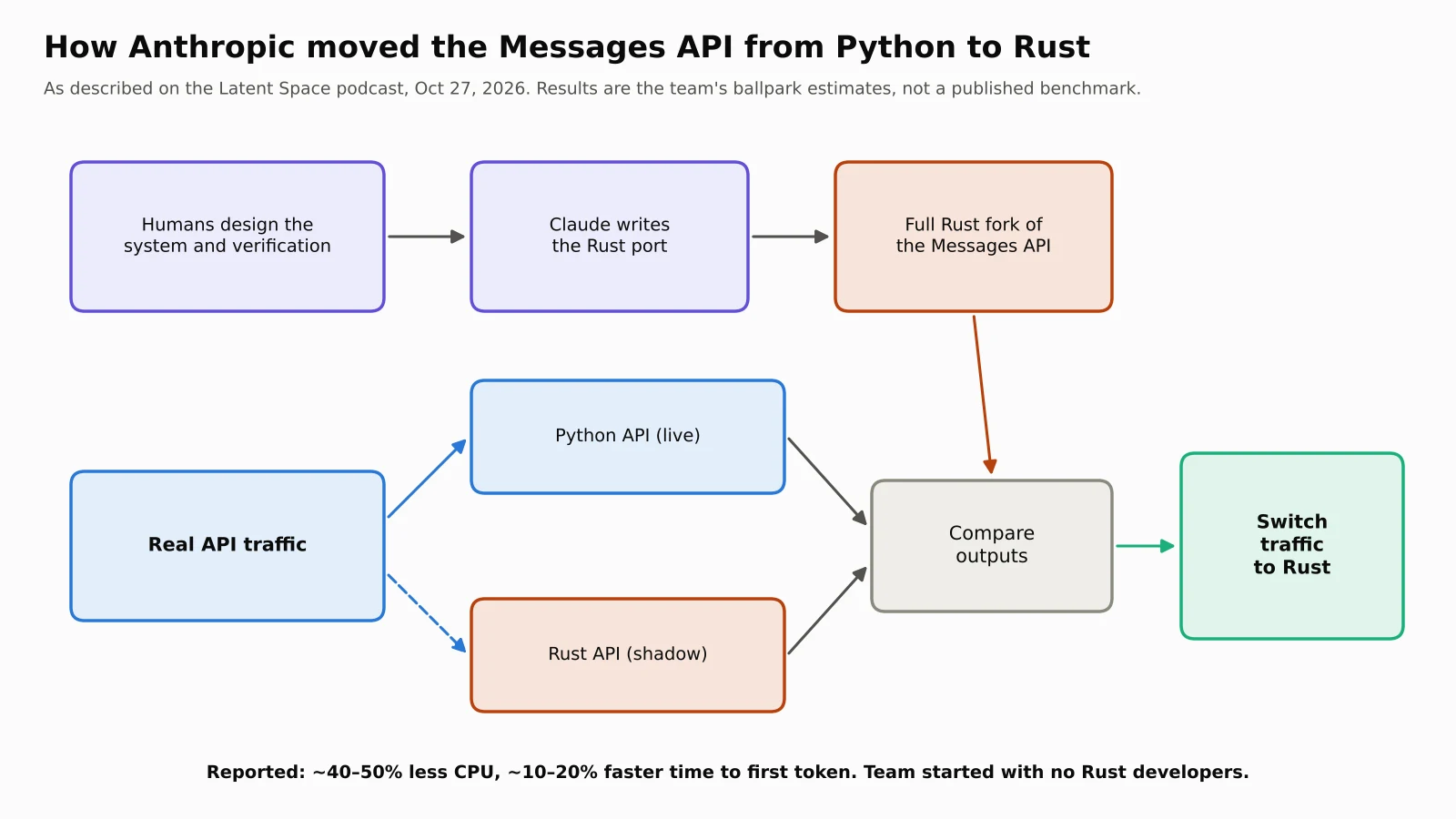
Two honest caveats. First, the 40% to 50% CPU and 10% to 20% latency numbers are ballpark figures from an interview. Anthropic hasn't published a benchmark or methodology. Second, a port also cleans up an old monolith, so not all of the gain is necessarily down to the language itself.
You may also see claims online that Rust is becoming Anthropic's main language for CLIs and agent tools. I couldn't find a primary source for that, so I've left it out.
Anthropic isn't alone, either. Google reported in November 2025 that memory-safety bugs had fallen below 20% of Android's vulnerabilities for the first time, and credited Rust adoption. It said Rust code showed about a 1,000 times lower memory-safety vulnerability density than its C and C++ code. It also found that Rust changes were rolled back 4 times less often and spent 25% less time in code review.
Install the Rust programming language and write your first program
Rust installs through rustup, the official toolchain manager. On Linux or macOS, run:
curl --proto '=https' --tlsv1.2 -sSf https://sh.rustup.rs | sh
On Windows, download rustup-init.exe from rust-lang.org. Then check it worked:
rustc --version
cargo --version
Cargo is Rust's build tool and package manager, a bit like pip and a build system combined. Create a project:
cargo new hello_rust
cd hello_rust
cargo run
Cargo creates Cargo.toml (project settings and dependencies) and src/main.rs. Here's a slightly personalized hello world:
fn main() {
    let name = "ByteMuni";
    println!("Hello, {name}! Welcome to Rust.");
}
Output:
Hello, ByteMuni! Welcome to Rust.
fn main() is where the program starts. The ! in println! means it's a macro, code that generates other code at compile time. It also checks your format string while compiling, so a typo in {name} is caught before the program runs.
Variables, types and shadowing
In Rust, variables are immutable by default. You opt in to change with mut:
fn main() {
    let score = 10;            // immutable by default
    let mut lives = 3;         // `mut` makes it changeable
    lives -= 1;

    let price: f64 = 99.5;     // explicit type
    let grade: char = 'A';
    let passed: bool = score > 5;

    let spaces = "   ";        // shadowing: same name, new value and type
    let spaces = spaces.len();

    let pair = ("Rust", 2015); // tuple
    let (lang, year) = pair;   // destructuring
    let marks = [90, 85, 77];  // array of 3 i32 values

    println!("score={score} lives={lives} price={price} grade={grade} passed={passed}");
    println!("spaces={spaces} {lang} 1.0 shipped in {year}, first mark={}", marks[0]);
}
Output:
score=10 lives=2 price=99.5 grade=A passed=true
spaces=3 Rust 1.0 shipped in 2015, first mark=90
A few things to notice:
Type inference: Rust works out most types itself. Integers default to
i32and decimals tof64.Explicit sizes:
i32is a signed 32-bit integer,u8an unsigned 8-bit one, and so on.Shadowing: writing
let spacestwice creates a new variable with the same name. It can even have a different type, here going from text to a number.
Ownership: the idea that makes the Rust programming language different
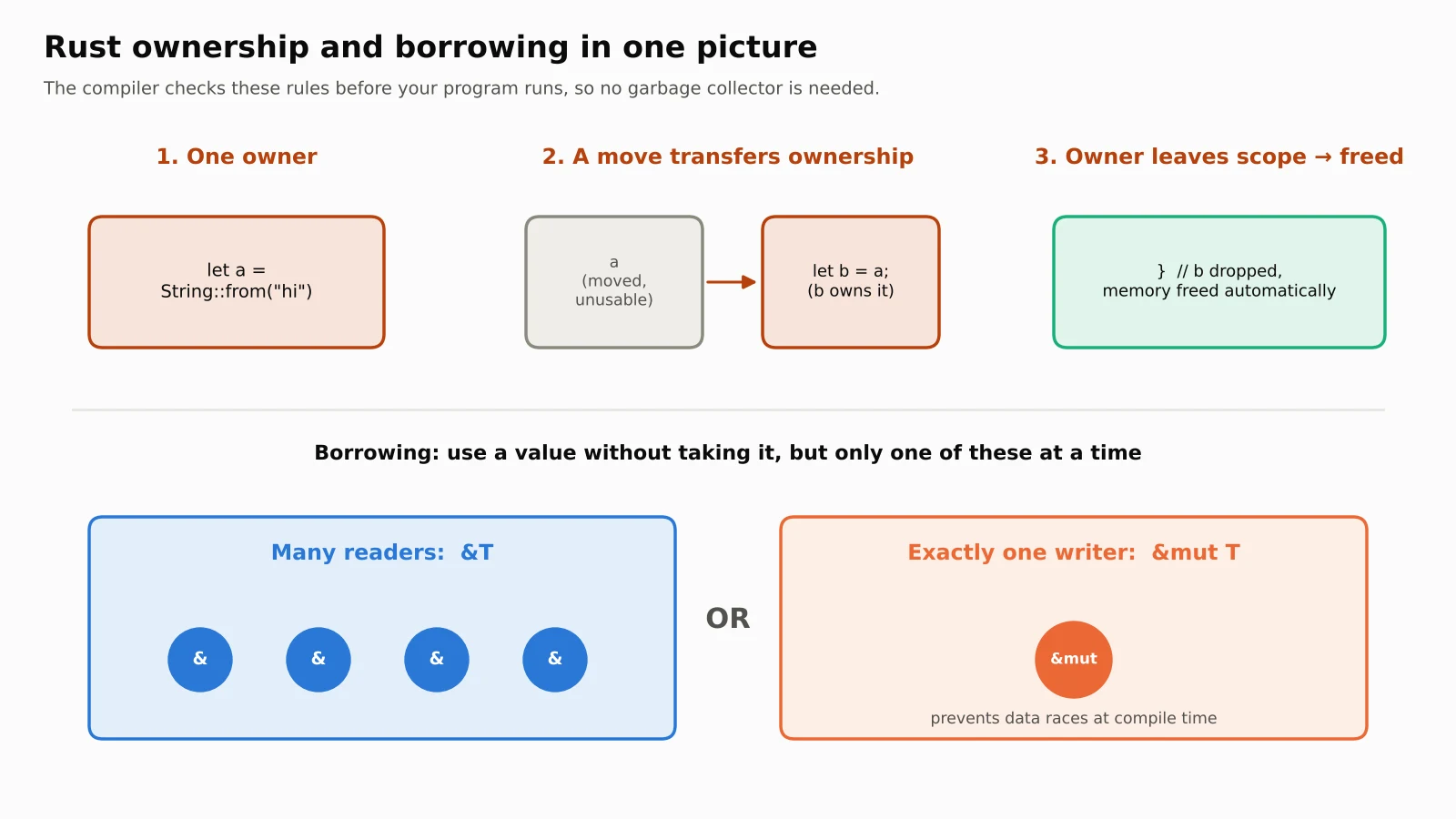
If you understand one thing about Rust, make it this. Ownership follows three rules:
Each value has exactly one owner.
There can only be one owner at a time.
When the owner goes out of scope, the value is dropped, meaning its memory is freed automatically.
fn takes_ownership(s: String) {
    println!("I own: {s}");
}   // `s` is dropped (freed) here

fn main() {
    let a = String::from("hello");
    let b = a;                 // ownership MOVES from a to b
    // println!("{a}");        // error: value borrowed here after move
    println!("b = {b}");

    let c = b.clone();         // explicit deep copy
    takes_ownership(b);        // b moves into the function
    println!("c is still usable: {c}");

    let x = 5;
    let y = x;                 // integers are Copy, so x stays valid
    println!("x={x}, y={y}");
}
Output:
b = hello
I own: hello
c is still usable: hello
x=5, y=5
What happens if you uncomment that println!("{a}") line? Here's the real compiler error from Rust 1.97:
error[E0382]: borrow of moved value: `a`
 --> main.rs:4:16
  |
2 |     let a = String::from("hello");
  |         - move occurs because `a` has type `String`, which does not implement the `Copy` trait
3 |     let b = a;
  |             - value moved here
4 |     println!("{a}");
  |                ^ value borrowed here after move
  |
help: consider cloning the value if the performance cost is acceptable
  |
3 |     let b = a.clone();
  |              ++++++++
This is why people say the Rust compiler feels like a teacher. It shows where the value moved, why it moved, and even suggests a fix. In C, the same mistake could compile and then crash, or quietly corrupt memory.
Simple values like integers, floats, booleans and chars implement Copy, so assigning them copies the value instead of moving it. That's why x still works after let y = x.
Borrowing and references
Moving everything around would get tiring. So Rust lets you borrow a value with a reference, &, without taking ownership:
fn length(text: &String) -> usize {   // immutable borrow
    text.len()
}

fn shout(text: &mut String) {          // mutable borrow
    text.push_str("!!!");
}

fn main() {
    let mut msg = String::from("Rust is fast");
    let n = length(&msg);              // lend it, don't give it away
    shout(&mut msg);
    println!("{msg} (length before: {n})");
}
Output:
Rust is fast!!! (length before: 12)
The borrowing rule is short but powerful. At any moment you can have either any number of read-only references (&T) or exactly one mutable reference (&mut T), but never both. That single rule prevents a whole class of bugs called data races at compile time. It's the reason Rust can promise "fearless concurrency."
Structs, enums and pattern matching
Structs group related data, and impl blocks add methods. Enums in Rust are much more powerful than in most languages, because each variant can carry its own data. match then makes you handle every case:
#[derive(Debug)]
struct Student {
    name: String,
    marks: u32,
}

impl Student {
    fn new(name: &str, marks: u32) -> Self {
        Student { name: name.to_string(), marks }
    }
    fn grade(&self) -> Grade {
        match self.marks {
            90..=100 => Grade::A,
            75..=89 => Grade::B,
            0..=74 => Grade::Needs(75 - self.marks),
            _ => Grade::Invalid,
        }
    }
}

#[derive(Debug)]
enum Grade {
    A,
    B,
    Needs(u32), // a variant can carry data
    Invalid,
}

fn main() {
    for s in [Student::new("Asha", 93), Student::new("Ravi", 81), Student::new("Meera", 60)] {
        match s.grade() {
            Grade::A => println!("{} got an A", s.name),
            Grade::B => println!("{} got a B", s.name),
            Grade::Needs(n) => println!("{} needs {n} more marks for a B", s.name),
            Grade::Invalid => println!("{:?} has invalid marks", s),
        }
    }
}
Output:
Asha got an A
Ravi got a B
Meera needs 15 more marks for a B
If you add a new Grade variant and forget to handle it in match, the code won't compile. That's a big reason large Rust codebases stay maintainable: the compiler points to every place you need to update.
No null: Option
Rust has no null. Tony Hoare, who introduced null references, later called them his "billion-dollar mistake." Instead, a value that might be missing uses Option<T>, which is either Some(value) or None:
fn find_roll(names: &[&str], target: &str) -> Option<usize> {
    names.iter().position(|n| *n == target)
}

fn main() {
    let class = ["Asha", "Ravi", "Meera"];
    match find_roll(&class, "Ravi") {
        Some(i) => println!("Ravi is roll number {}", i + 1),
        None => println!("Ravi not found"),
    }
    // No null in Rust: you must handle the None case
    let missing = find_roll(&class, "John").map(|i| i + 1).unwrap_or(0);
    println!("John's roll number: {missing} (0 means not found)");
}
Output:
Ravi is roll number 2
John's roll number: 0 (0 means not found)
Because the type says "this might be missing," you can't accidentally use a missing value as if it were there. The "NoneType has no attribute" errors you may know from Python become compile-time errors instead.
Error handling with Result and the ? operator
Rust doesn't have exceptions. A function that can fail returns Result<T, E>: either Ok(value) or Err(error). The ? operator passes an error back up to the caller in one character:
use std::num::ParseIntError;

fn parse_age(input: &str) -> Result<u8, ParseIntError> {
    let age: u8 = input.trim().parse()?;   // `?` returns early on error
    Ok(age)
}

fn main() {
    for input in ["21", "abc", "300"] {
        match parse_age(input) {
            Ok(age) => println!("{input:>4} -> valid age {age}"),
            Err(e) => println!("{input:>4} -> error: {e}"),
        }
    }
}
Output:
  21 -> valid age 21
 abc -> error: invalid digit found in string
 300 -> error: number too large to fit in target type
Notice the 300 case. A u8 can only hold 0 to 255, and Rust reports that as an error instead of silently wrapping around. Errors are part of the function's type signature, so callers can see exactly what can go wrong.
Traits and generics
A trait defines shared behavior, a bit like an interface in Java. Generics let one function work for many types, and Rust compiles a specialized version for each one, so there's no runtime cost. This is what people mean by "zero-cost abstractions."
trait Shape {
    fn area(&self) -> f64;
    fn name(&self) -> String { String::from("shape") } // default method
}

struct Circle { r: f64 }
struct Rect { w: f64, h: f64 }

impl Shape for Circle {
    fn area(&self) -> f64 { std::f64::consts::PI * self.r * self.r }
    fn name(&self) -> String { "circle".into() }
}
impl Shape for Rect {
    fn area(&self) -> f64 { self.w * self.h }
}

// Generic function: works for ANY type that implements Shape
fn describe<T: Shape>(s: &T) -> String {
    format!("{} with area {:.2}", s.name(), s.area())
}

fn largest<T: PartialOrd + Copy>(items: &[T]) -> T {
    let mut max = items[0];
    for &i in items { if i > max { max = i; } }
    max
}

fn main() {
    println!("{}", describe(&Circle { r: 2.0 }));
    println!("{}", describe(&Rect { w: 3.0, h: 4.0 }));
    println!("largest i32: {}", largest(&[3, 9, 2]));
    println!("largest f64: {}", largest(&[1.5, 0.2, 7.25]));
}
Output:
circle with area 12.57
shape with area 12.00
largest i32: 9
largest f64: 7.25
Rect didn't define name(), so it used the trait's default method and printed "shape."
Collections, closures and iterators
Rust's iterators feel a lot like Python's list comprehensions, but they compile down to tight loops:
use std::collections::HashMap;

fn main() {
    let marks = vec![45, 92, 78, 66, 88, 30];
    let passed: Vec<i32> = marks.iter().filter(|&&m| m >= 50).cloned().collect();
    let average = marks.iter().sum::<i32>() as f64 / marks.len() as f64;
    println!("passed: {passed:?}, average: {average:.1}");

    let text = "rust is fast rust is safe rust is fun";
    let mut counts: HashMap<&str, usize> = HashMap::new();
    for word in text.split_whitespace() {
        *counts.entry(word).or_insert(0) += 1;
    }
    let mut sorted: Vec<_> = counts.into_iter().collect();
    sorted.sort_by(|a, b| b.1.cmp(&a.1).then(a.0.cmp(b.0)));
    println!("word counts: {sorted:?}");
}
Output:
passed: [92, 78, 66, 88], average: 66.5
word counts: [("is", 3), ("rust", 3), ("fast", 1), ("fun", 1), ("safe", 1)]
Vec is a growable list, HashMap is a dictionary, and |m| ... is a closure, Rust's version of a lambda.
Fearless concurrency with threads
Here's eight threads safely adding to one shared counter. Arc (atomic reference counting) shares ownership across threads, and Mutex makes sure only one thread changes the value at a time:
use std::sync::{Arc, Mutex};
use std::thread;

fn main() {
    let counter = Arc::new(Mutex::new(0));   // shared, thread-safe counter
    let mut handles = vec![];

    for _ in 0..8 {
        let c = Arc::clone(&counter);
        handles.push(thread::spawn(move || {
            for _ in 0..1000 {
                *c.lock().unwrap() += 1;
            }
        }));
    }
    for h in handles { h.join().unwrap(); }
    println!("final count = {}", *counter.lock().unwrap()); // always 8000
}
Output:
final count = 8000
Here's the important part. If you tried to share the counter without Arc and Mutex, Rust wouldn't compile the program. In many other languages, that same mistake compiles fine and gives a different wrong total each time you run it.
Testing is built in
Write tests next to your code and run them with cargo test. Even examples in documentation comments get run as tests:
/// Returns true if `n` is a prime number.
///
/// ```
/// assert!(rust_guide::is_prime(13));
/// assert!(!rust_guide::is_prime(15));
/// ```
pub fn is_prime(n: u64) -> bool {
    if n < 2 { return false; }
    let mut i = 2;
    while i * i <= n {
        if n % i == 0 { return false; }
        i += 1;
    }
    true
}

#[cfg(test)]
mod tests {
    use super::*;

    #[test]
    fn small_primes() {
        assert!(is_prime(2));
        assert!(is_prime(97));
    }

    #[test]
    fn non_primes() {
        assert!(!is_prime(0));
        assert!(!is_prime(1));
        assert!(!is_prime(100));
    }
}
Running cargo test gave:
test tests::small_primes ... ok
test tests::non_primes ... ok
test src/lib.rs - is_prime (line 3) ... ok
That third line is the documentation example being tested, so your docs can't drift out of date without the tests noticing.
Build a small JSON API in Rust
Since this whole story started with an API, let's build a tiny one. This uses three popular crates (Rust packages): axum for the web framework, tokio for async networking, and serde for JSON. Add them with:
cargo add axum@0.8
cargo add tokio --features full
cargo add serde --features derive
Then write the server:
use axum::{routing::{get, post}, Json, Router};
use serde::{Deserialize, Serialize};

#[derive(Deserialize)]
struct MessageRequest { text: String }

#[derive(Serialize)]
struct MessageResponse { reply: String, words: usize }

async fn health() -> &'static str { "ok" }

async fn echo(Json(req): Json<MessageRequest>) -> Json<MessageResponse> {
    let words = req.text.split_whitespace().count();
    Json(MessageResponse { reply: req.text.to_uppercase(), words })
}

#[tokio::main]
async fn main() {
    let app = Router::new()
        .route("/health", get(health))
        .route("/v1/messages", post(echo));
    let listener = tokio::net::TcpListener::bind("127.0.0.1:3000").await.unwrap();
    println!("listening on http://127.0.0.1:3000");
    axum::serve(listener, app).await.unwrap();
}
I tested it with curl:
$ curl -X POST localhost:3000/v1/messages \
    -H 'content-type: application/json' -d '{"text":"hello from rust"}'
{"reply":"HELLO FROM RUST","words":3}

$ curl -X POST localhost:3000/v1/messages \
    -H 'content-type: application/json' -d '{"txt":"oops"}'
Failed to deserialize the JSON body into the target type: missing field `text` at line 1 column 14
The second request returned HTTP 422 automatically. Because the request body is a typed struct, a missing or misspelled field is rejected before your handler even runs, with no manual validation code. Typed requests and responses like this are part of what makes Rust appealing for API work. To be clear, this is a learning example, not Anthropic's code.
Python vs Rust: an honest comparison
Python and the Rust programming language aren't really rivals. They're good at different jobs, and many teams use both.
| Python | Rust | |
|---|---|---|
| How it runs | Interpreted (CPython) | Compiled to native machine code |
| Typing | Dynamic, with optional type hints | Static and strict, checked at compile time |
| Memory | Garbage collected (reference counting) | Ownership, no garbage collector |
| Speed | Slower for pure-Python loops | Comparable to C and C++ |
| Concurrency | GIL limits CPU threads in standard CPython builds | Threads checked for data races at compile time |
| Errors | Exceptions, often found at runtime | Result and Option, enforced at compile time |
| Learning curve | Gentle, great first language | Steeper, especially ownership and lifetimes |
| Development speed | Very fast to prototype | Slower to write, fewer bugs later |
| Best for | AI and ML, data science, scripting, automation | APIs at scale, systems, CLIs, WebAssembly, embedded |
| Package manager | pip and PyPI | Cargo and crates.io |
I benchmarked one task in both languages
To make this concrete, I wrote the same algorithm in both languages: count the prime numbers below 2 million using simple trial division. Same logic, same answer (148,933 primes). I ran each three times on the same 2-core machine, with Python 3.13 and Rust 1.97 in release mode.
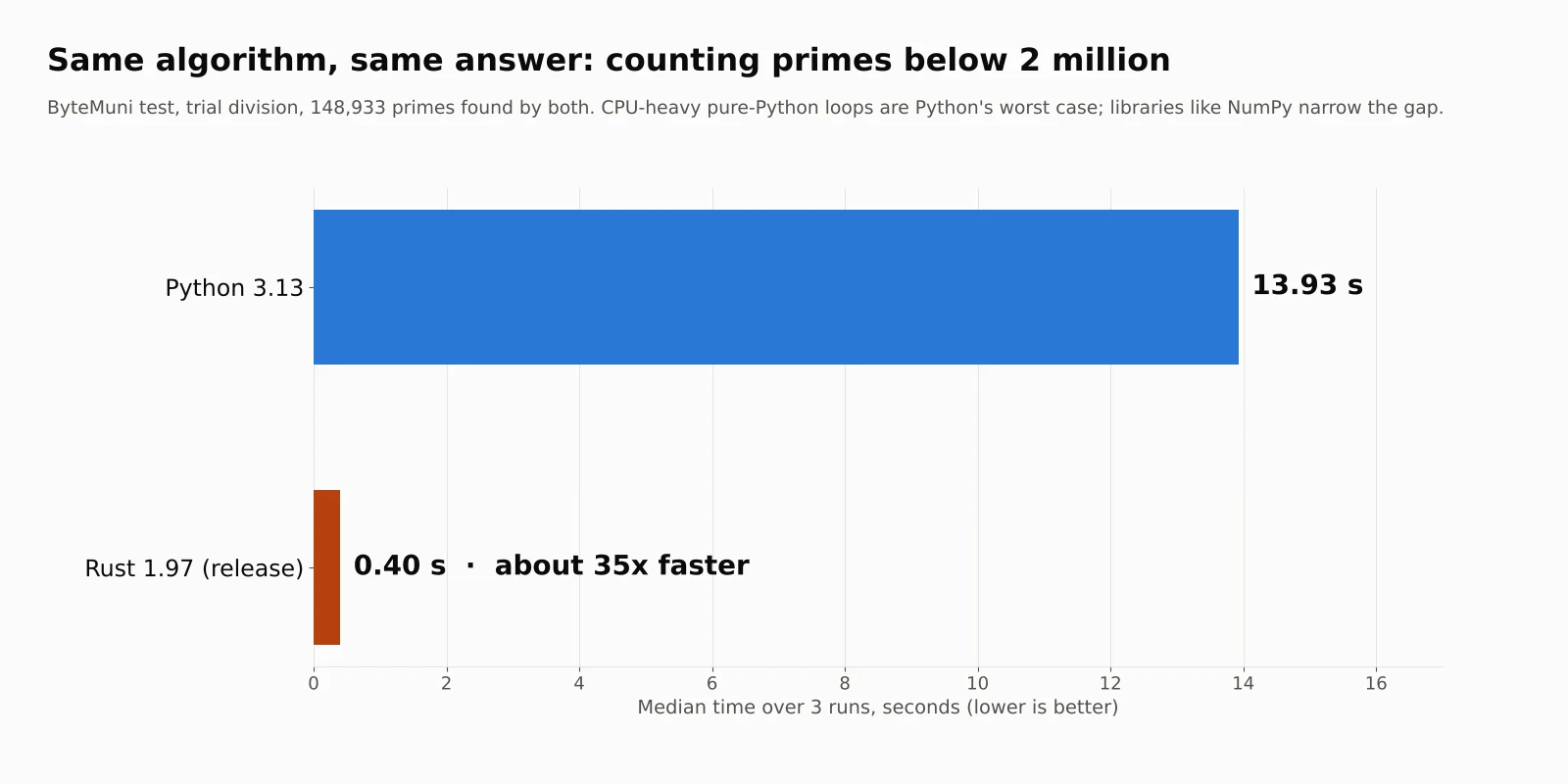
Python 3.13: median 13.93 seconds
Rust 1.97 (release build): median 0.40 seconds, about 35 times faster
Read this fairly, though. It's a CPU-heavy loop, which is Python's worst case. Real Python programs often call fast libraries written in C, C++ or Rust, such as NumPy, pandas or Polars, and the gap shrinks a lot. Web services spend much of their time waiting on databases and networks, where language speed matters less. That's one reason Anthropic's reported saving was 40% to 50% CPU, not 35 times.
When to choose which
Choose Python for machine learning, data analysis, quick scripts, prototypes and anything where development speed matters most.
Choose Rust for high-traffic services where CPU and memory cost real money, command-line tools, systems programming, game engines, WebAssembly and security-sensitive code.
Use both: tools like PyO3 and maturin let you write the slow parts of a Python project in Rust. Popular Python tools such as Ruff, uv and Polars are built in Rust.
Rust programming language learning roadmap for students
Here's a practical order, based on the official Rust by Example chapters:
Week 1: install Rust and learn Cargo, variables, types, functions and control flow.
Week 2: ownership, borrowing and slices. Take your time here, because everything else builds on it.
Week 3: structs, enums,
match,OptionandResult.Week 4: collections, iterators, closures, modules and crates.
Week 5: traits, generics and a first look at lifetimes.
Week 6: testing, error handling with crates like
anyhowandthiserror, then a small project.After that: threads, async with tokio, and a real project such as a CLI tool or a web API with axum.
The best free resources are all official:
The Rust Programming Language ("the Book") for concepts
Rust by Example for runnable code
Rustlings for small hands-on exercises
If you use an AI coding assistant, Rust is a good fit for it. The strict compiler catches many mistakes in generated code immediately, the same reason Anthropic could trust Claude to port a large codebase with careful verification. Our guides to setting up an AI coding agent for reverse engineering, GitHub Copilot in VS Code and how agentic AI works cover how to work with these tools well.
Common beginner mistakes in the Rust programming language
Fighting the borrow checker. When it complains, read the whole error. It usually tells you exactly what to change.
Calling
.clone()everywhere. It works, but it can hide design problems and slow things down. Borrow with&first.Overusing
.unwrap(). It crashes the program onNoneorErr. That's fine in quick experiments, but usematchor?in real code.Starting with lifetimes. Most beginner code doesn't need explicit lifetime annotations. Learn ownership first.
Trying to write Rust like Python or Java. Lean on enums,
matchand iterators instead of inheritance and nulls.
My take
The Rust programming language isn't the easiest first language, and it doesn't need to replace Python. But for students, it's one of the most valuable second languages you can learn. It teaches how memory actually works, makes you think about errors explicitly, and those habits make you a better programmer in any language.
Anthropic's migration also shows why Rust matters now. When AI writes more of the code, a strict compiler and strong tests become the safety net, and Rust gives you a very strong compiler. The interesting lesson isn't only "Rust is fast." It's that careful humans, a strict language and an AI coding agent together finished a rewrite the team said would otherwise have taken years.
The bottom line
The Rust programming language gives you C-level speed with memory safety and no garbage collector, enforced by its ownership and borrowing rules at compile time. Anthropic reported roughly 40% to 50% CPU savings after moving its Messages API from Python to Rust, and Google saw memory-safety bugs drop sharply in Android. In my own test, Rust ran a CPU-heavy task about 35 times faster than pure Python. Start with Cargo and the ownership chapter, write small programs, and let the compiler's error messages teach you.
Sources:
Rust by Example, official Rust documentation
The Rust Programming Language, official Rust book
Install Rust, rust-lang.org
Rust 1.99.0 release announcement, Rust Blog, October 1, 2026
Anthropic Rewrote Claude's Messages API in Rust, CellCog, October 31, 2026 (summarizing the Latent Space episode of October 27, 2026)
Anthropic Messages API Rust Rewrite: 40-50% Less CPU? Claimed vs verified, ExplainX
How Anthropic ships the #1 LLM in the world, Lilith AI Radar
Rust adoption drives Android memory safety bugs below 20% for the first time, The Hacker News, November 2025
Rust 101: Everything you need to know about Rust, Nishant Aanjaney Jalan, CodeX
Using Rust, IBM Developer
Frequently asked questions
What is the Rust programming language used for?
Rust is used for high-performance web services and APIs, command-line tools, operating system components, browsers, game engines, WebAssembly, embedded devices and security-sensitive software. Companies including Anthropic, Google, Microsoft and AWS use it in production.
Why did Anthropic move its Messages API from Python to Rust?
According to Anthropic's Claude Platform team on the Latent Space podcast (October 27, 2026), CPU is a shared, limited budget across products, agent sandboxes, CI and research. Porting the Python monolith to Rust cut CPU use by roughly 40% to 50%, by the team's estimate. Claude wrote most of the code, and humans designed and verified it with shadow testing.
Is Rust harder to learn than Python?
Yes, at first. Ownership, borrowing and strict types take time to understand. But the compiler's detailed error messages guide you, and many developers find that Rust code needs less debugging once it compiles.
Is Rust faster than Python?
For CPU-heavy work, usually much faster. In our benchmark, the same prime-counting loop took 13.93 seconds in Python 3.13 and 0.40 seconds in Rust 1.97. The gap shrinks when Python uses optimized libraries like NumPy, or when a program mostly waits on the network or a database.
What should I learn first in Rust?
Start with Cargo, variables and functions, then spend extra time on ownership and borrowing. After that, learn structs, enums, match, Option and Result. The official Rust Book, Rust by Example and Rustlings are the best free resources.
Does Rust have a garbage collector?
No. Rust frees memory automatically when a value's owner goes out of scope, based on ownership rules checked at compile time. That gives it predictable performance without garbage collection pauses.
How we research, write and check articles