Why the Microsoft Outlook Outage Kept Coming Back: An Engineering Deep Dive (and Where AI Fits)
Microsoft restarted its servers, they came back, and they fell over again. This engineering deep dive explains why the November 2026 Microsoft Outlook outage kept coming back. It rebuilds the timeline from Microsoft's own updates, measures the cost of secure connections, and simulates a cascading failure. It also checks the evidence on whether AI played a role.

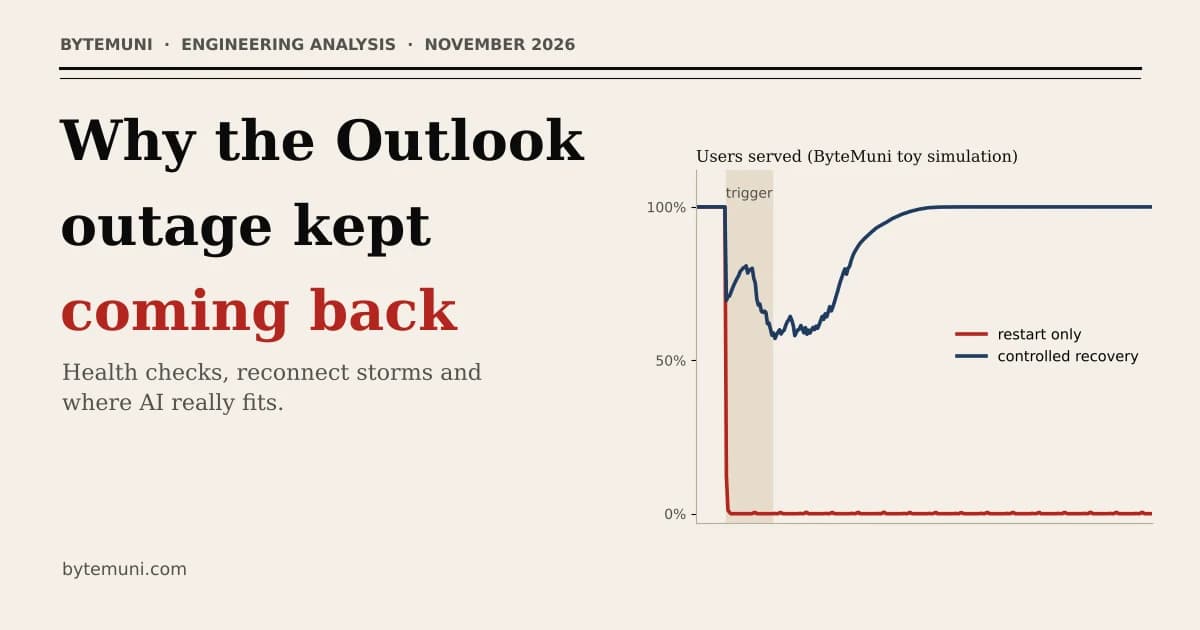
On Thursday night, Microsoft engineers did what any of us would do with a broken server: they restarted it. The servers came back. Microsoft said they were stable. Then real users reconnected, and the servers fell over again.
That pattern, fix, recover, collapse, repeat, is the most interesting part of the November 2026 Microsoft Outlook outage. It's also the part most coverage skips. Plenty of articles explain what broke. This one asks a harder engineering question: why did the outage keep coming back after Microsoft had already started fixing it?
To answer it honestly, we did three things:
We rebuilt the timeline from Microsoft's own status updates, as reported by news outlets.
We measured, on our own machine, why "secure connection" setup is so expensive.
We built a small simulation that reproduces the "keeps coming back" behaviour.
We'll also look at the question everyone is asking: is AI behind it? We'll separate what's confirmed from what's opinion.
Where things stand (as of about 3:30 PM IST / 10:00 GMT, Friday 13 November 2026) - The outage began on Thursday afternoon GMT, around 9:30 PM IST, and had run for about 18 hours. - Microsoft reported "early signs of stabilization," but said service capacity had "not yet returned to normal levels." - It said there's no indication of a cyberattack, and it promised a post-incident report with the root cause. That report hasn't been published yet. - Everything below about the cause is based on Microsoft's public statements. Where we go beyond them, we say so.
We first covered whether AI is to blame on the day the outage began, in Microsoft 365 outage: is AI to blame? This follow-up goes deeper into the engineering behind the outage and the latest updates.
What happened, in brief
The trouble started on Thursday, 12 November, around 16:00 GMT (9:30 PM IST), according to Al Jazeera. People couldn't open their Outlook mailboxes. Within about an hour, the outage tracker Downdetector had reports from 74 countries and territories. Outlook complaints peaked at roughly 130,000 to 140,000 reports, depending on which outlet's snapshot you read. Downdetector only counts people who bother to report, so the real number of affected users is certainly higher. Microsoft says more than 430 million people use Microsoft 365 apps, but it hasn't said how many were hit.
What was affected:
Outlook and Exchange Online: hit hardest.
Other Microsoft services: Microsoft also listed Teams, SharePoint Online, Microsoft 365 Copilot and Defender XDR as possibly affected.
AI companies: OpenAI and Anthropic both reported problems with tools that connect to Microsoft's services, according to the BBC.
Australia: Al Jazeera reported that the spy agency and federal police were affected. ABC News Australia reported Service NSW closing regional centres and a bail court unable to access case papers.
Asia: government systems in Singapore and Japan were disrupted, as were communications at the Supreme Court of the Philippines (Al Jazeera).
UK: the BBC reported problems at GP surgeries, pharmacies, police and schools.
Microsoft's tracking IDs for the incident are EX1550543 (Exchange Online) and MO1550821 (Microsoft 365), as reported by SecurityWeek.
The timeline: how the explanation changed
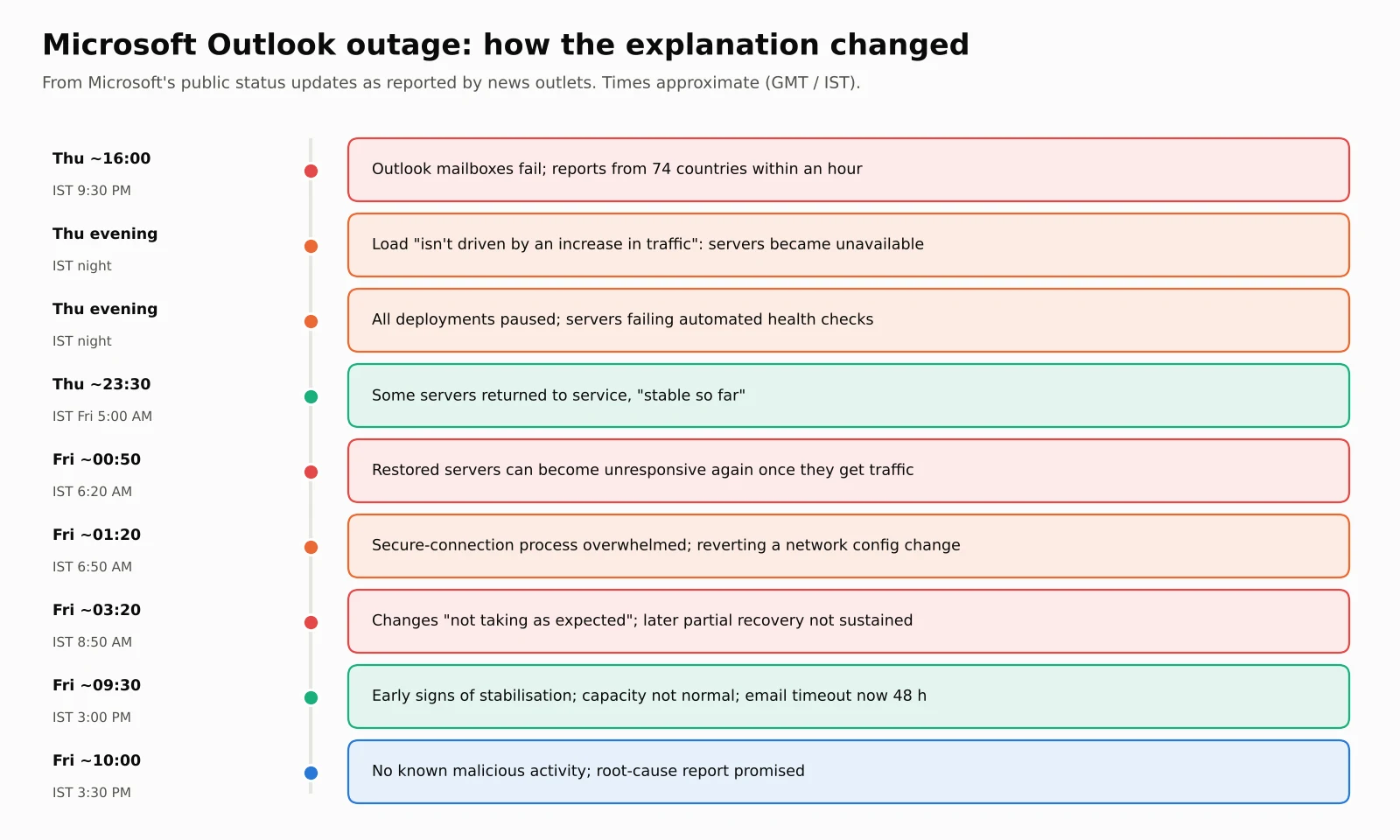
The most revealing thing about this outage is how Microsoft's own explanation evolved hour by hour. Here are the key public updates, taken from Microsoft's status posts as reported by live blogs (Tom's Guide, TechRadar, ABC News, ABC Australia, Forbes and Al Jazeera). Times are approximate, because outlets logged them at slightly different moments.
| Time (GMT) | Time (IST) | What Microsoft said or did |
|---|---|---|
| Thu, ~16:00 | Thu, ~9:30 PM | Users start reporting that they can't reach Outlook mailboxes |
| Thu evening | Thu night | Infrastructure is under "elevated load across multiple regions"; traffic is redistributed |
| Thu evening | Thu night | The elevated load "isn't driven by an increase in traffic"; a number of servers became "unexpectedly unavailable" |
| Thu evening | Thu night | All deployments and configuration changes paused; servers found "failing automated health checks" |
| Thu evening | Thu night | Testing a change to bypass the health-check component; "not identified any recent change correlated with the start of impact" |
| Thu, ~23:30 | Fri, ~5:00 AM | A portion of servers returned to service, "stable so far" |
| Fri, ~00:50 | Fri, ~6:20 AM | Restored servers "can become unresponsive again once they receive traffic"; some traffic limited |
| Fri, ~01:20 | Fri, ~6:50 AM | A process "responsible for establishing secure connections becomes overwhelmed"; reverting a recent network configuration change |
| Fri, ~03:20 | Fri, ~8:50 AM | Latest changes "not taking as expected" |
| Fri, ~05:00 | Fri, ~10:30 AM | Some machines stuck in a bad state that stops changes from syncing |
| Fri, ~09:30 | Fri, ~3:00 PM | "Early signs of stabilization," capacity not yet normal; email timeout window extended to 48 hours |
| Fri, ~10:00 | Fri, ~3:30 PM | No known malicious activity; post-incident report promised |
Two details stand out.
First, it was never a traffic spike. Microsoft explicitly said the extra load came from servers dropping out, not from more users. The same amount of work was being squeezed onto fewer machines.
Second, the "change" story shifted. On Thursday evening, Microsoft said it hadn't found any recent change linked to the start of the problem. Later, it said it was investigating "a small number of configuration updates" as possible contributors. By early Friday, it was reverting a recent network configuration change that coincided with the start of the outage, to see whether it was involved. Microsoft hasn't said that change was the cause. It's normal for an incident team's picture to change as evidence comes in, but it means nobody outside Microsoft knows the root cause yet.
How your inbox reaches you, in simple terms
Microsoft hasn't published the internal design of Exchange Online for this incident, so we can't draw its architecture. But large email and web services generally follow a similar pattern, and it's enough to understand what went wrong.
Your Outlook app opens a secure connection. Before any email moves, your device and Microsoft's server perform a TLS handshake: they agree on encryption keys and verify identity. This is the padlock in your browser.
A load balancer picks a server. Thousands of servers share the work. A load balancer spreads users across them.
Health checks decide who gets traffic. Automated checks regularly ask each server, "Are you OK?" A server that fails gets taken out of rotation so users aren't sent to a broken machine.
Your app keeps the connection open and reuses it. That's important, because opening a secure connection is expensive. Reusing one is cheap.
Every one of those four pieces appears in Microsoft's updates: unavailable servers, load shifting, failing health checks and an overwhelmed secure-connection process. Put them together, and you get a classic failure pattern engineers call a cascading failure.
Why the outage kept coming back: the vicious cycle
Here's the cycle, step by step. The steps Microsoft has stated are marked. Where we connect the dots, it's our analysis of a well-known pattern, not Microsoft's confirmed explanation.
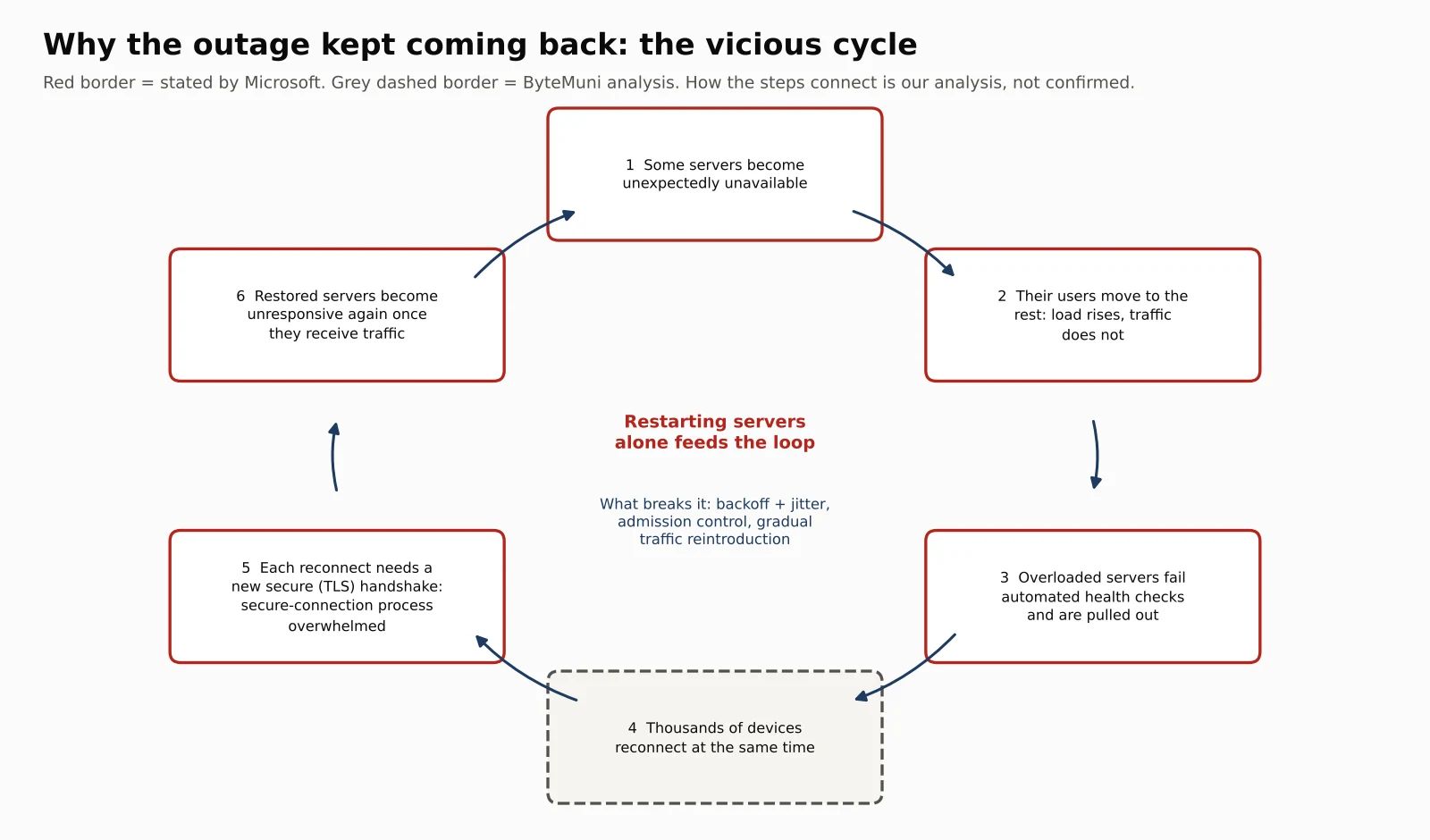
Step 1: some servers drop out. For a reason Microsoft hasn't explained yet, a number of servers became "unexpectedly unavailable."
Step 2: everyone else's load rises. Their users get moved to the remaining servers. Those servers now carry more than their share, even though total traffic hasn't changed. That's exactly Microsoft's "elevated load" without "an increase in traffic."
Step 3: health checks start pulling out the overloaded servers. An overloaded server responds slowly, so it fails its health check, and the system removes it. That's sensible for one bad server. But when many servers are struggling because of load, removing them makes the load worse for the rest. A safety mechanism turns into an amplifier. Microsoft said servers were failing automated health checks and tested both a bypass and an alternative health-check method. Walayat Hussain of Australian Catholic University told ABC News Australia that Microsoft's own automated checks appeared to be pulling servers out of service.
Step 4: thousands of devices reconnect at once. When a server disappears, every device connected to it tries to reconnect, and most apps retry quickly and automatically. Engineers call a crowd of simultaneous reconnections a thundering herd.
Step 5: secure connections are expensive, so the reconnect storm overwhelms servers. Every reconnection needs a fresh TLS handshake, which costs far more CPU than serving a request on an existing connection. Microsoft's finding fits this exactly: the process that establishes secure connections was becoming overwhelmed. SecurityWeek also reported that Microsoft was investigating elevated processor usage on affected servers.
Step 6: restored servers get crushed on arrival. This is the "keeps coming back" part. A freshly restarted server comes back with no connections, so the waiting crowd rushes to it, all needing handshakes at once. It's overwhelmed within moments and becomes unresponsive. That matches Microsoft's warning that restored servers "can become unresponsive again once they receive traffic." Technology journalist Rupert Goodwins described the same dynamic to Al Jazeera: servers coming back up get swamped by everything else trying to talk to them.
Researchers have a name for this: a metastable failure. A 2021 paper by Nathan Bronson and colleagues, presented at the HotOS workshop, defines it as a state where a trigger pushes a system into a bad state that persists even after the trigger is removed. The paper argues the real root cause is the feedback loop that keeps the system stuck, not the original trigger. A 2022 OSDI study by Lexiang Huang and colleagues found that at least 4 of 15 major AWS outages in the previous decade were metastable failures.
So "what started it?" and "why did it last 18+ hours?" may have different answers. Even if Microsoft finds the original trigger, the long duration is likely explained by the cycle above. To be clear: this is our analysis, and it fits Microsoft's public statements, but Microsoft hasn't confirmed it.
We measured it: how expensive is a "secure connection"?
"Handshakes are expensive" is easy to say, so we measured it. ByteMuni's benchmark (tls_handshake_cost.py) runs a TLS 1.3 client and server entirely in memory with OpenSSL 3.5. Removing the network means we only count CPU work. We compared:
a brand-new connection, which needs a full handshake, with no session reuse, as after a server restart;
a small request on a connection that's already open.
| Certificate type | New connection (full handshake) | Request on an open connection | Ratio |
|---|---|---|---|
| RSA-2048 | about 1.3 ms of CPU | about 4.3 µs of CPU | about 290–330× |
| ECDSA P-256 | about 1.0 ms of CPU | about 4.0 µs of CPU | about 220–275× |
Three runs each on a 2-CPU cloud machine, counting client and server work together. Absolute numbers depend on hardware; the ratio is what matters.
In the encryption layer alone, a new secure connection costs a few hundred times more CPU than a request on an existing one. Real email requests also do mailbox work, such as reading data and checking permissions, so the real-world gap is smaller. But the point stands: a mass reconnection is one of the most expensive things you can ask a server to do, and it arrives at the worst moment, right after a failure.
We simulated it: why restarts alone don't fix a cascade
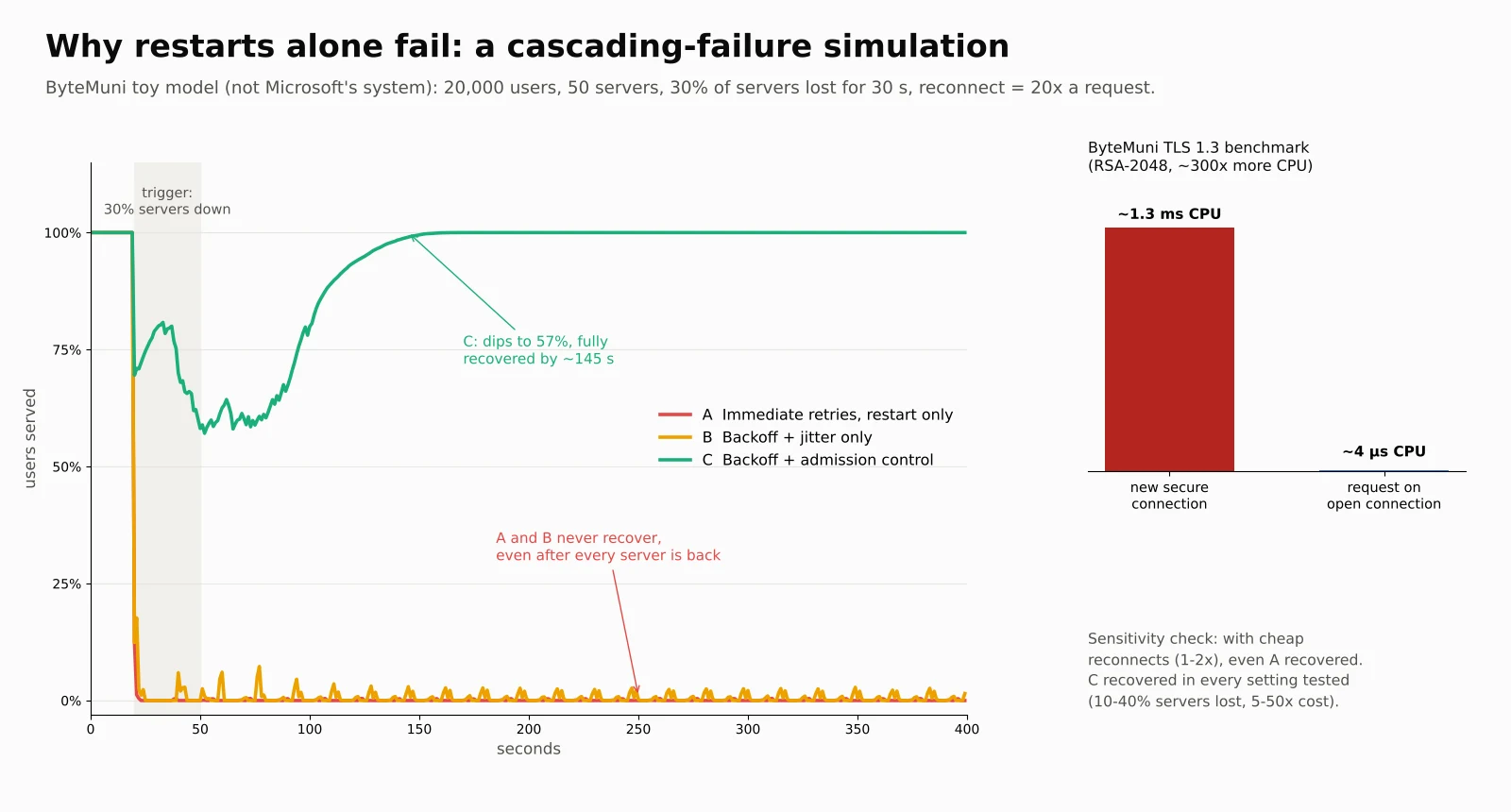
To see how the cycle behaves, we built a small simulation (cascade_sim.py). It's a toy model, not a copy of Microsoft's system, whose internals aren't public. It has:
20,000 users and 50 servers, running at 60% of capacity on a normal day;
a reconnection costing 20 times a normal request, a deliberately conservative figure compared with our benchmark;
health checks that pull out any server overloaded for 3 seconds in a row and restart it;
a trigger: 30% of servers drop out for 30 seconds, then come back.
We ran three versions:
A, naive: devices retry immediately, and restored servers take traffic at once.
B, backoff: devices wait longer between each retry, with random jitter so they don't retry in sync.
C, protected: backoff, plus admission control. Each server only accepts as many new connections as its spare capacity allows, and quickly turns the rest away to try again later.
What happened:
A, naive: service collapsed to almost 0% and never recovered, even after the 30-second trigger ended and every server came back. That's a metastable failure in miniature.
B, backoff: also stuck near 0%. Spreading out retries helped in some milder settings we tested, but not here.
C, protected: service dipped to 57% and then fully recovered in about 2½ minutes.
We also checked how much these results depend on our assumptions:
Cheap reconnections: when a reconnection cost only 1–2× a request, even the naive system recovered on its own.
Expensive reconnections: at 20× and above, it got stuck every time, even with health-check removal switched off. In our model, the retry storm alone is enough to keep the system down.
Across settings: the protected version recovered fully in every combination we tried, losing 10–40% of servers with reconnect costs of 5–50×.
The exact thresholds are artefacts of a toy model, so don't read them as predictions about Microsoft. The mechanism is the useful part: restarting servers doesn't fix a cascade while the herd is still waiting. Controlling how fast traffic comes back does.
That's what Microsoft's later actions look like. It placed temporary limits on traffic in some locations, said health "remains variable as traffic is carefully reintroduced," and extended the email timeout window to 48 hours, so delayed messages wouldn't bounce while the system slowly refilled. These are textbook moves for this kind of failure. Microsoft hasn't described its strategy in these terms, so this is our reading of its updates.
Can we see AI behind it? An evidence check
People's first instinct was to blame AI, because Microsoft has bet so heavily on it. Our earlier article covered that debate in depth. Here's an updated check, with each claim separated into evidence and opinion, using what's known as of Friday.
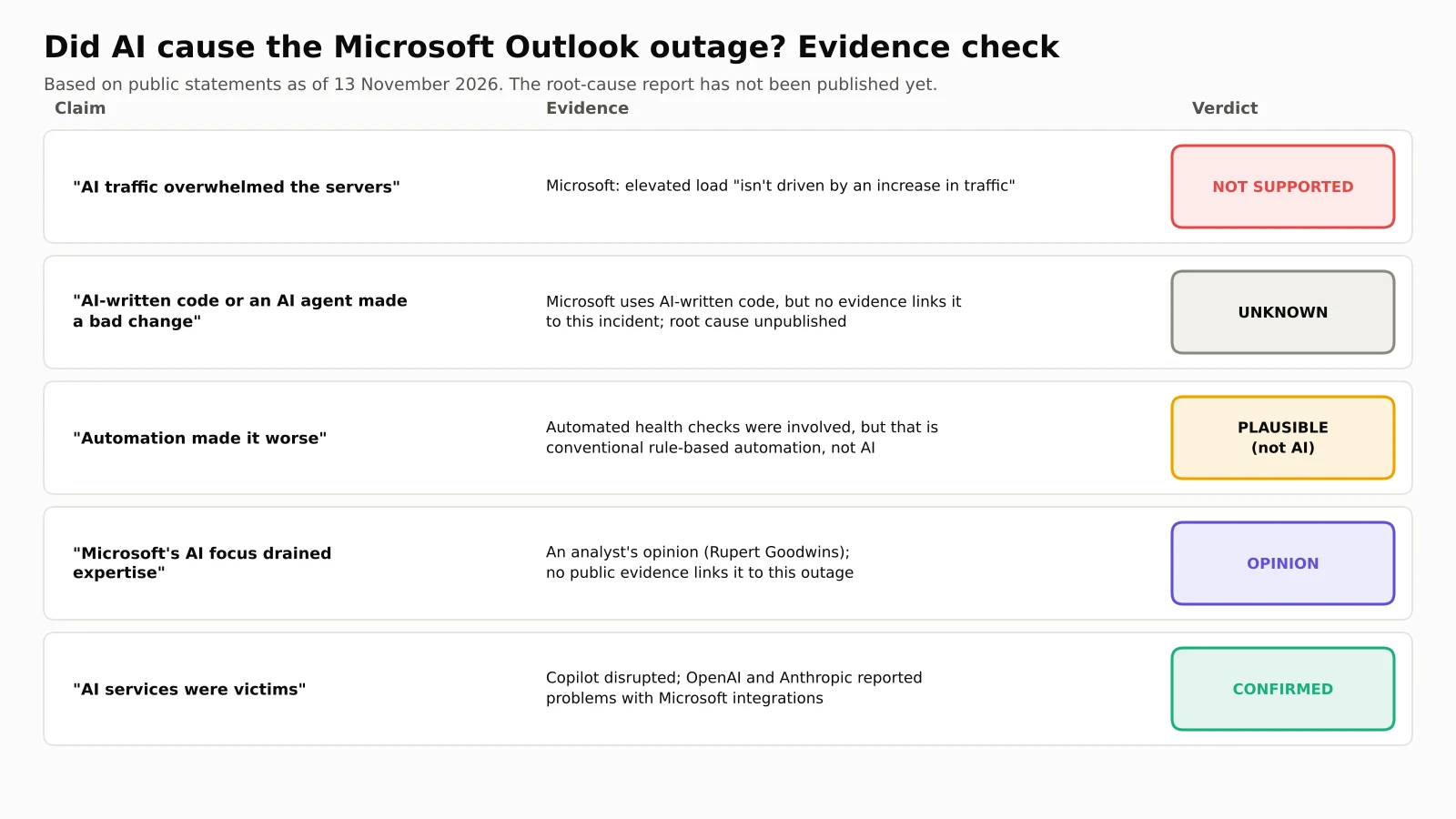
1. "AI traffic overloaded the servers." Not supported. Microsoft specifically said the load wasn't caused by more traffic. Walter Pasquarelli, an affiliate researcher at Cambridge's Bennett School of Public Policy, told Al Jazeera he'd seen no evidence of unusual computing load from AI systems.
2. "AI-written code or an AI agent made a bad change." Unknown, and unsupported for now. It's true that Microsoft uses a lot of AI in development. In April 2025, CEO Satya Nadella said that "maybe 20%, 30%" of the code in Microsoft's repositories was AI-generated. But there is no public evidence connecting AI-written code or an AI agent to this incident. The root cause isn't published, and the network configuration change Microsoft reverted hasn't been confirmed as the trigger. Bad configuration changes caused major outages long before AI coding tools existed. Until Microsoft's post-incident report is out, anyone claiming an AI cause is guessing.
3. "Automation made it worse." Plausible, but that's not the same as AI. Automated health checks appear to have been part of the problem, as Microsoft's own updates suggest. That's ordinary automation: a rule like "if a server doesn't answer within X seconds, remove it." It isn't an AI making decisions, and the distinction matters. Calling every automated system "AI" makes it harder to learn the right lesson.
4. "Microsoft's AI focus drained investment and expertise." Opinion, not proven. Goodwins told Al Jazeera he believes Microsoft's focus on AI left services like email under-invested, and that experienced engineers have left. That's an informed opinion, not evidence. For context, Microsoft did cut more than 15,000 jobs in 2025 and announced another 4,800 in 2026, mainly in sales and Xbox, according to GeekWire. But nothing public links those cuts to this outage.
5. "AI was a victim." Confirmed. Microsoft 365 Copilot was disrupted, and OpenAI and Anthropic reported problems with integrations that rely on Microsoft's services. That's the clearest AI story here. As AI assistants and AI agents plug into email, calendars and documents, an email outage becomes an AI outage too.
The honest answer: there's no public evidence that AI caused this outage. What we can see looks like a classic distributed-systems failure, the kind engineers have studied for decades. The cause of the first trigger is still open, and Microsoft's report may change the picture.
Not the first time: how this compares
| Outage | What triggered it (per the company) | Roughly how long | The pattern |
|---|---|---|---|
| CrowdStrike, July 2024 | A faulty software update | Many PCs needed manual fixes, so recovery took days for some organisations | A bad change pushed everywhere at once |
| AWS us-east-1, October 2025 | A race condition in DynamoDB's DNS automation | About 15 hours | Recovery triggered "congestive collapse"; health checks alternated between failing and healthy |
| Azure Front Door, October 2025 | An inadvertent configuration change | About 8 hours | Bad config spread fleet-wide; failing nodes pushed traffic onto healthy ones |
| Microsoft 365, January 2026 | North American infrastructure not processing traffic as expected | Almost 10 hours | Load plus reduced capacity during maintenance |
| Microsoft 365, November 2026 | Not yet published | 18+ hours (and counting) | Servers unavailable, failing health checks, overwhelmed secure-connection process |
The AWS case is a close parallel. In its official post-event summary, Amazon wrote that a key internal system "had entered a state of congestive collapse" while recovering. Health checks for its load balancers started alternating between failing and healthy, which repeatedly pulled capacity out of service. AWS engineers had to throttle incoming work and temporarily disable automatic health-check failover. The Microsoft incident shows the same family of problems: recovery itself becomes the load that breaks the system.
Lessons for engineers (and for your next system design interview)
If you build backend systems, this outage is a free case study. These are standard, well-documented defences, and the outage shows why each one matters.
Retry with exponential backoff and jitter. Wait longer after each failure, and add randomness so millions of devices don't retry in sync. AWS's Marc Brooker popularised this pattern in a 2015 post on the AWS Architecture Blog. Our simulation shows it isn't always enough on its own, but without it, almost nothing else works.
Use admission control and load shedding. A server that rejects extra work quickly and cheaply stays healthy enough to serve the users it already has. One that tries to serve everyone serves no one.
Bring capacity back gradually. Ramp traffic up on recovered servers instead of opening the floodgates at once. In practice, "carefully reintroduced" means exactly this.
Make health checks hard to weaponise. Many load balancers stop ejecting servers once too many are failing at the same time. If half your fleet "fails" at once, the problem is usually load, not the servers.
Make reconnections cheaper. TLS session resumption, keep-alive connections and spreading out connection attempts all reduce the cost of a reconnect storm.
Use staged rollouts and fast rollback for configuration. Several outages in the table started with a configuration change, so ship changes to a small slice first.
Plan a fallback for communication. Pasquarelli's advice to organisations was to define the minimum service you need to keep running during a global outage, such as a backup way to reach staff and customers.
These ideas come up constantly in system design interviews. If you're preparing, our AI system design guide covers load balancing, caching and capacity planning in the same practical style, and our generative AI interview questions for 2026 include system-reliability questions too.
What we still don't know
What made the first servers unavailable. This is the original trigger.
Whether the reverted network configuration change was involved.
Why the secure-connection process became the bottleneck, and whether something changed in it.
How many users and organisations were affected.
When full service will return. As of our latest update, Microsoft hadn't given a timeline.
Microsoft has promised a post-incident report with the root cause. We'll update this article when it's published.
Sources
Al Jazeera, Microsoft hit by global outages: What happened and why? (13 November 2026)
BBC News, What we know about the global Microsoft outage (13 November 2026)
ABC News (Australia), Live: Microsoft outage hits users worldwide (13 November 2026)
Tom's Guide, Outlook, Microsoft 365, Teams and more down — live updates
TechRadar, Microsoft outage live
Forbes, Microsoft 365 outage extends into Friday (13 November 2026)
SecurityWeek, Microsoft 365 outage disrupts Outlook, Exchange Online and Teams (12 November 2026)
Business Standard, Microsoft 365 outage continues as company sees limited recovery (13 November 2026)
NBC Chicago, Why is Microsoft Outlook down? Details on the investigation
Amazon Web Services, Summary of the Amazon DynamoDB service disruption in us-east-1 (October 2025)
ThousandEyes, Microsoft Azure Front Door outage analysis (October 2025)
The Register, Microsoft 365 outage drags on for nearly 10 hours (23 January 2026)
Marc Brooker, Metastable failures in distributed systems (2021), summarising Bronson et al., HotOS 2021
Huang et al., Metastable failures in the wild (USENIX OSDI 2022)
AWS Architecture Blog, Exponential backoff and jitter
TechRepublic, Microsoft CEO Nadella: 20% to 30% of our code was written by AI (April 2025)
GeekWire, Microsoft cuts 4,800 jobs (2026)
Frequently asked questions
Why is Microsoft Outlook down?
Microsoft said a number of its servers became unexpectedly unavailable. That shifted load onto the remaining servers and caused them to fail automated health checks. It also found that a process responsible for setting up secure connections was becoming overwhelmed. The original trigger hasn't been confirmed, and Microsoft has promised a full root-cause report.
Was the Microsoft Outlook outage a cyberattack?
No evidence suggests that. Microsoft said there was no indication of malicious or cyber activity, and Australia's Home Affairs Minister, Tony Burke, said Microsoft told the government it didn't believe it was dealing with a cyber event.
Why did Outlook keep going down again after Microsoft fixed it?
Restored servers were hit by a flood of reconnecting users at once. Each reconnection needs an expensive secure handshake, so freshly restarted servers became overloaded and unresponsive again. Microsoft said restored servers could become unresponsive once they received traffic, and it began limiting and gradually reintroducing traffic.
Did AI cause the Microsoft outage?
There's no public evidence that it did. Microsoft said the load wasn't caused by more traffic, and no evidence links AI-written code or AI agents to the failure. AI services were affected, though: Microsoft 365 Copilot and some OpenAI and Anthropic integrations were disrupted.
Will I lose emails sent during the outage?
Microsoft said it extended its email timeout window to 48 hours to protect delayed messages, so many messages should arrive late rather than bounce. If something important doesn't arrive, ask the sender to resend it once service is stable.
What can I do while Outlook is down?
Not much on your own device, because the problem is on Microsoft's servers. The desktop Outlook app may still show emails it already downloaded, and Teams chat and calls mostly kept working, according to Al Jazeera and the BBC. Check Microsoft's service health page or its status account on X for updates.
Concepts in this article
- Microsoft Outlook
- Microsoft's email and calendar client.
- Reliability and resilience
- Keeping a system working through failures: timeouts, retries, redundancy and recovery.
- Microsoft 365
- Microsoft's cloud productivity suite, including Exchange Online.
How we research, write and check articles