What Is Tor Browser, How It Works, and Is It Legal in India?
Tor Browser sends your traffic through three volunteer relays so websites can't see your IP address. Here's how onion routing works, what it doesn't protect, how to set it up safely, and what Indian law says about using it.

What is Tor Browser? It is a free web browser, built by the nonprofit Tor Project, that hides your IP address by sending your traffic through three volunteer-run servers before it reaches a website. In India, no law we could find bans it. What you do through it is still covered by the Information Technology Act, 2000.
This guide explains how onion routing works, what Tor Browser protects and what it leaves exposed, and what Indian and foreign legal sources actually say. It closes with safe setup steps, including signature verification, and a Tor vs VPN comparison table.
What is Tor Browser, and who makes it?
The Tor Project describes Tor Browser as a privacy-focused browser that routes your traffic through the Tor network. That hides your real IP address and works against tracking, surveillance and censorship. The browser is based on Mozilla Firefox ESR (Extended Support Release, Mozilla's long-term-support branch) but has been heavily modified for the Tor network.
Three names are easy to mix up:
Tor (the network): thousands of relays, which are servers that pass traffic along. Volunteers around the world run them.
Tor Browser (the app): the browser that connects to that network for you, with privacy settings already set.
Onion services: websites with a .onion address. According to the Tor Project, they can only be reached through the Tor network.
The Tor Project is a US 501(c)(3) nonprofit, as its own app listing states. The latest stable desktop release is Tor Browser 16.0.1, published on November 10, 2026. It updated the bundled Tor to 0.4.9.16 and Firefox to 153.7.0esr. Version 16.0, out on October 29, 2026, was the first stable release on Firefox ESR 153. It added redesigned settings and native Linux ARM64 support, the Tor Project said.
How does Tor Browser hide where your traffic comes from?
Tor uses a method called onion routing. Your data is wrapped in several layers of encryption, and each server on the path removes exactly one layer, like peeling an onion.
The Tor specification describes the steps. Your Tor client builds a circuit over a sequence of relays, typically three. While building it, the client agrees on a separate secret key with each relay. Each relay then removes, or adds, one layer of encryption before passing the data on. Every relay knows only the relay before it and the relay after it.
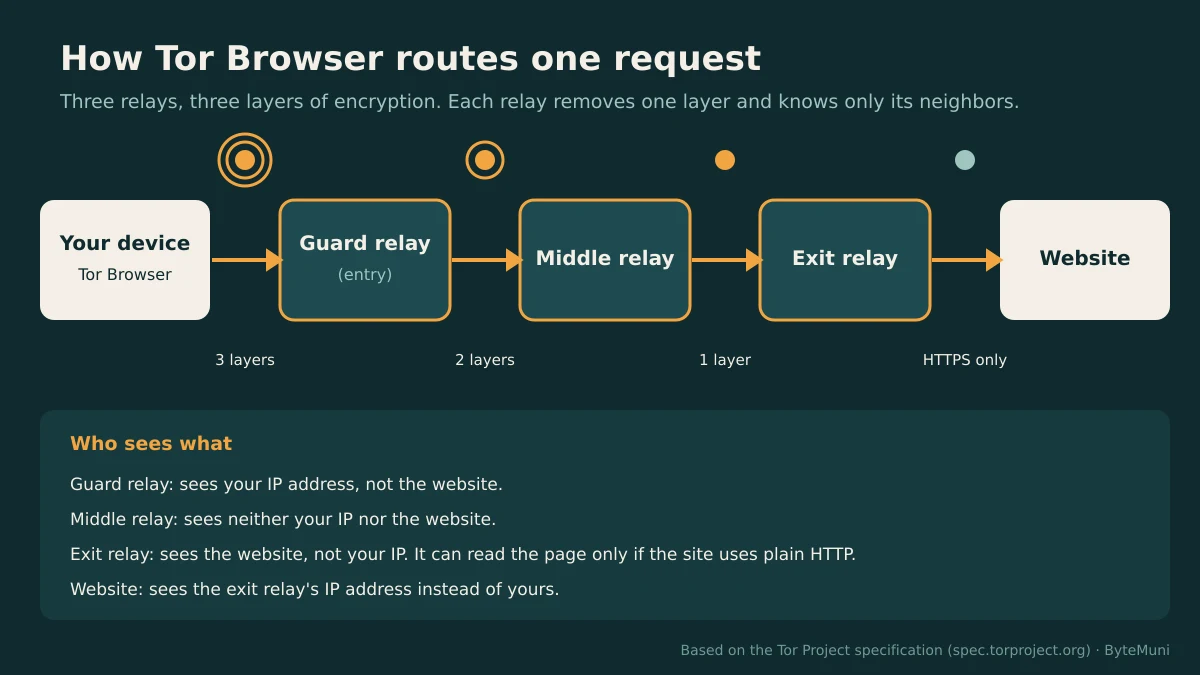
Here is what each hop can see on a normal website visit:
| Hop | Knows your IP address? | Knows the website you visit? |
|---|---|---|
| Guard (entry) relay | Yes | No |
| Middle relay | No | No |
| Exit relay | No | Yes (and the content too, if the site uses plain HTTP) |
| The website | No, it sees the exit relay's IP | Yes |
Two design details matter here. First, the Tor Project says the software reuses one circuit for connections made within about ten minutes. Later requests get a new circuit, so your earlier and later actions are harder to link.
Second, the first hop changes slowly on purpose. The Tor Browser manual says the guard node changes only after 2–3 months, while the other relays change with every new domain. A stable guard makes it harder for an attacker running many relays to sit at your entry point by chance.
Relays are ordinary servers, and they get attacked like any other public service. ByteMuni's report on the Tor DDoS attack and the emergency 0.4.9.17 relay update shows what that looks like for operators.
What Tor Browser protects and what it does not
Tor Browser protects one thing very well: who is making a request. It does much less to protect what you reveal once you are connected.
What it protects
Your IP address from websites. Sites see the exit relay, not you.
Your destinations from your ISP or office network. They can see that you use Tor, not which sites you open.
Linking across sites. According to the Tor Project's own app description, the browser isolates each website, so third-party trackers and ads can't follow you from one site to the next.
Onion services. According to the Tor Project, traffic to a .onion site is end-to-end encrypted, and the site's own location and IP stay hidden.
What it does not protect
Plain HTTP pages at the exit relay. The Whonix documentation notes that an exit relay can read plain HTTP traffic. With HTTPS, it sees only the destination address. This risk is not theoretical. Privacy Guides reports that in 2020, many exit nodes were found downgrading HTTPS to HTTP to hijack cryptocurrency transactions.
Your identity once you log in. If you sign in to Gmail or Instagram, that site knows exactly who you are, Tor or not.
Other apps on your computer. Tor Browser sends only its own traffic through Tor. Your email client, Telegram or Windows updates keep using your normal connection.
Files you open later. The Tor Project's FAQ warns against opening documents downloaded through Tor while you are online. DOC and PDF files can pull in internet resources outside Tor, which reveals your real IP address. The PDF viewer built into Tor Browser is the exception.
Malware and phishing. Tor hides where you come from. It does not make a malicious site safe.
Someone watching both ends. An observer who can see traffic entering and leaving the network may be able to match the two by timing. That is the reason for the guard design described above.
Is Tor legal in India? What official sources say
This section is general information, not legal advice. Laws change, and your situation may differ. Speak to a qualified lawyer about anything specific.
India
India's main cyber law is the Information Technology Act, 2000 (Act No. 21 of 2000), which came into force on October 17, 2000. We found no Indian statute, CERT-In direction or government notification that names Tor or bans its use.
What the IT Act does give the government is power over activity carried out through any computer resource. It has a section on interception, monitoring and decryption (Section 69) and a section on blocking public access to information (Section 69A). It also has penalties for offences such as publishing child sexual abuse material (Section 67B). These apply whatever browser you use. Using Tor does not turn an illegal act into a legal one.
The closest official rule is the CERT-In direction of April 28, 2022. CERT-In is India's national computer emergency response team. Its Cyber Security Directions were issued under Section 70B(6) of the IT Act and took effect on June 27, 2022. They require VPN providers, cloud providers, VPS providers and data centers to keep subscriber details, such as names, IP addresses and contact numbers, for at least five years. CERT-In's FAQ of May 18, 2022 narrows this to providers offering "Internet proxy like services" to general internet users, and excludes corporate VPNs, as law firm Khaitan & Co summarized.
Tor has no company that sells subscriptions and no customer list. CERT-In has not said publicly whether, or how, its directions apply to individuals in India who run Tor relays. That question is open.
Indian legal commentary goes further than the official texts. Law portal iPleaders, for example, states that accessing the dark web is legal in India. Treat these as secondary opinions, not rulings.
United States
The Electronic Frontier Foundation (EFF), a US digital-rights group, maintains a Legal FAQ for Tor Relay Operators, last reviewed in March 2023. EFF writes that it believes running a Tor relay, including an exit relay, "is legal under U.S. law." It also says plainly that it cannot guarantee relay operators will never face legal liability. The same FAQ notes that in 2016, Seattle police mistakenly raided the home of a privacy activist who ran an exit relay. The FAQ covers US law only.
The Tor Project itself does not give legal advice. It points people to the EFF FAQ instead.
Countries that block Tor
Blocking is a technical measure. It is not the same as a law that makes use a crime, and we did not review each country's statutes. With that caveat, these blocks are documented:
Russia: OONI, a censorship-measurement project that grew out of Tor, reported that several Russian ISPs started blocking the Tor network from December 1, 2021. Some had been blocking torproject.org since September 2021.
Iran: Tor Metrics lists an internet shutdown in Iran from February 28, 2026, still marked as ongoing.
Turkmenistan: Tor Metrics records a jump in bridge users from near zero to over 5,000 in April 2025. Snowflake became the main transport in Tor's Connection Assist there in June 2025.
China: OONI names China, along with Iran, as a country whose government targets and blocks access to Tor.
Legal and illegal uses of Tor
Lawful uses are common and ordinary. Journalists protect sources. Researchers study phishing kits without revealing their company network. People in families or workplaces that monitor them keep their reading private. Developers test their own .onion services, and some well-known sites offer .onion mirrors. Students, too, may want to see how anonymity networks work. For anyone preparing for security roles, onion routing comes up often in cybersecurity interview questions.
Illegal uses stay illegal. Buying drugs or weapons, sharing child sexual abuse material, sending threats, and fraud are crimes in India whether done in Chrome or in Tor Browser.
A recent Indian case shows why the tool draws attention. On October 30, 2025, Devdiscourse reported that a group calling itself "Terrorizers 111" used Tor to send bomb threats anonymously. Indian officials struggled to trace them. The report, which carries agency inputs, added that some of the senders were suspected of combining Tor with VPNs. It named no specific police force and made no claim about Tor's legality.
Anonymity also has limits. A lawyer answering a question on LawRato warned that Tor users who commit crimes can still be traced by other means. Logins, payment trails and mistakes in operational security are typical routes.
How to install and set up Tor Browser safely
Download only from torproject.org. Unofficial copies on third-party sites may be tampered with. On Android, the Tor Project calls its Play Store app, "Tor Browser," the only official mobile browser it supports.
Verify the signature (desktop). The Tor Project signs every release. The steps below follow its signature verification guide, with GnuPG installed. Download the matching
.ascsignature file from the same download page.Connect. Open the browser and click Connect. If Tor is blocked on your network, open the connection settings and choose a bridge. A bridge is an unlisted relay. Snowflake and obfs4 are the common types.
Pick a Security Level. Click the shield icon, then Settings. Standard is the default and leaves all features on. Safer disables JavaScript on non-HTTPS sites and makes audio and video click-to-play. Safest disables JavaScript on all sites, as described in the Tor Browser manual.
Keep it stock. The Tor Project says installing new add-ons is "strongly discouraged," because they can compromise privacy and security and may make your browser fingerprint unique. Leave the window at its default size for the same reason.
Use New Identity between unrelated tasks. According to the Tor Project, New Identity stops linking later activity to what you did before. It closes all tabs and stops downloads. New Tor Circuit for this Site only reloads the current site through a new path and does not clear private data.
Don't choose exit countries. The Tor Project says changing how Tor builds circuits is "strongly discouraged," because overriding entry or exit nodes can weaken your anonymity.
Update promptly. Tor Browser releases often carry Firefox security fixes. 16.0.1, for example, backported security fixes from Firefox 160.
Verification on Linux or macOS looks like this. Replace the file names with the exact version you downloaded:
# 1. Fetch the Tor Browser Developers signing key
gpg --auto-key-locate nodefault,wkd --locate-keys torbrowser@torproject.org

# 2. Export it to a keyring file
gpg --output ./tor.keyring --export 0xEF6E286DDA85EA2A4BA7DE684E2C6E8793298290

# 3. Verify the download against its .asc signature
gpgv --keyring ./tor.keyring ~/Downloads/tor-browser-linux-x86_64-16.0.1.tar.xz.asc ~/Downloads/tor-browser-linux-x86_64-16.0.1.tar.xz
The output should include Good signature from "Tor Browser Developers (signing key) <torbrowser@torproject.org>". On Windows, the Tor Project's guide uses the same gpgv --keyring .\tor.keyring pattern with the .exe and its .exe.asc file.
Tor vs VPN: which one fits your need?
A VPN (virtual private network) sends all your device's traffic through one company's server. Tor sends browser traffic through three independent relays. The difference comes down to whom you trust.
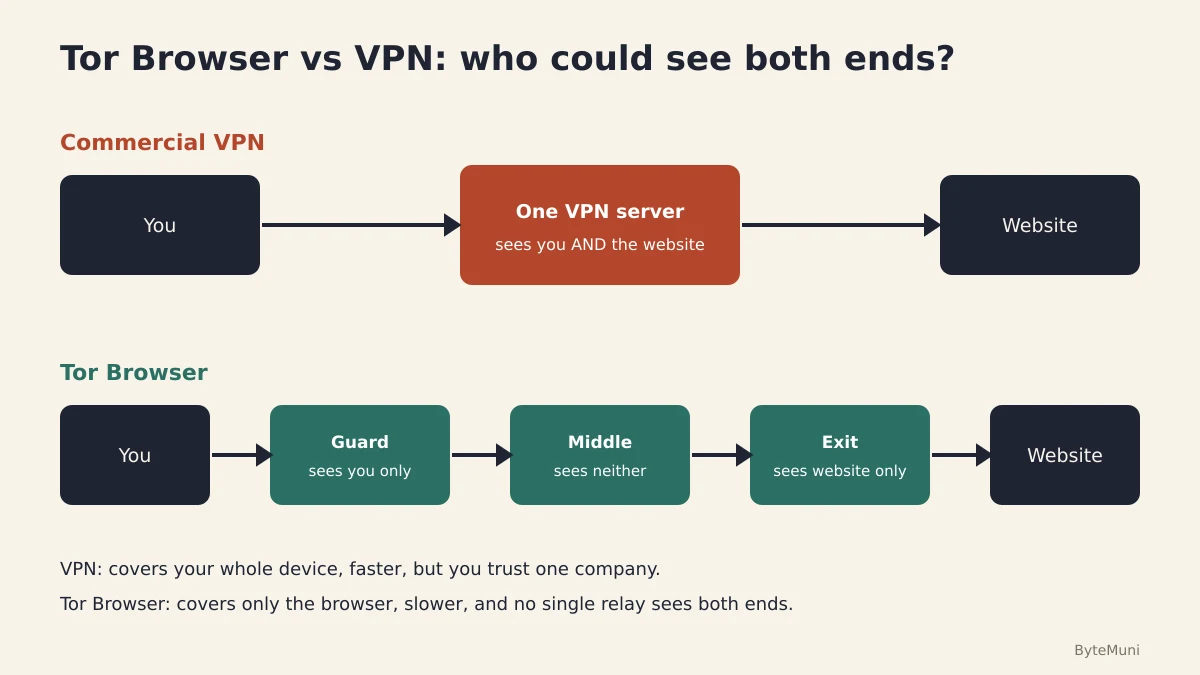
| Point | Tor Browser | Commercial VPN |
|---|---|---|
| Who could see both you and your destination | No single relay, by design | The VPN provider |
| Traffic covered | Only Tor Browser's own traffic | Usually your whole device |
| Cost | Free, open source | Mostly paid subscriptions |
| Speed | Slower: three hops on volunteer relays | Usually faster: one hop |
| Account needed | No | Usually an email and payment |
| Indian logging rules | No provider holds a customer list | Providers serving Indian users must keep subscriber records for five years under the CERT-In directions |
| Websites blocking you | Some sites block or challenge Tor exit IPs | Less common |
| Best fit | Hiding who you are from the sites you visit | Securing public Wi-Fi, reaching an office network, changing apparent location |
Should you combine them? The Tor Project's position is that it generally doesn't recommend using a VPN with Tor "unless you're an advanced user" who knows how to set up both without hurting privacy. VPN vendors often promote the combination, so weigh their advice with that commercial interest in mind.
My take on Tor Browser
My read is that Tor Browser is the best free tool for one narrow job: keeping the sites you visit from learning who and where you are. It is a poor general-purpose browser, and it should not be treated as a privacy cure-all. Most people who get deanonymized on Tor give themselves away by logging in, reusing a username or opening a downloaded file. The onion routing itself is rarely what fails.
For Indian students and developers, I think installing it, verifying the signature and watching the circuit display is a useful afternoon. You learn public-key signing, layered encryption and threat modeling in one go. If you are building that foundation for interviews, the ByteMuni list of top cybersecurity interview questions for 2026 is a good next read.
The bottom line on Tor Browser
Use Tor Browser when the thing you need to hide is your identity or location from the sites you visit, or when a network blocks what you need to reach. Download it only from torproject.org, verify the signature, stay on HTTPS, and never log in to personal accounts if anonymity is the goal. Use a reputable VPN or no tool at all when you need speed or whole-device coverage. In India, none of the official sources reviewed for this article bans lawful use of Tor. If you plan to run a relay or have a specific legal concern, get advice from a lawyer first.
Frequently asked questions
Is Tor Browser free?
Yes. Tor Browser is free and open-source software from the Tor Project, a US 501(c)(3) nonprofit. You need no account and no payment to use it.
Can the police in India track someone who uses Tor?
Tor hides your IP address from the websites you visit. It does not hide what you reveal yourself, such as logins, payments or reused usernames. Indian legal commentators note that users who commit crimes can still be traced by these other means.
Does Tor Browser hide my activity from my ISP or college Wi-Fi?
Your ISP or network admin can see that you are connecting to Tor. They cannot see which websites you open through it. If that fact alone is a problem, Tor bridges such as Snowflake or obfs4 make the connection harder to recognize.
Is Tor Browser the same as the dark web?
No. Tor Browser opens ordinary websites, such as news or search sites, through the Tor network. ".onion" sites, sometimes called the dark web, are just one kind of site it can reach, and many of them are legitimate, including the Tor Project's own.
Should I use a VPN with Tor Browser?
The Tor Project generally doesn't recommend it unless you are an advanced user who can set up both without weakening your privacy. Many VPN companies recommend the combination, but they also sell VPNs.
Is it safe to run a Tor relay in India?
No Indian official source found for this article addresses relay operators directly. EFF believes running a relay is legal under US law but says it cannot guarantee operators will avoid legal trouble. Its FAQ covers the US only. Talk to a lawyer before running an exit relay in India.
Concepts in this article
- Tor
- An anonymity network that routes traffic through volunteer relays.
- Cybersecurity
- Protecting systems, networks and data from attack.
- HTTP
- The request–response protocol of the web: methods, status codes and headers.
- JavaScript
- The programming language of the web, also run on servers through Node.js.
- Phishing
- Fake messages that trick people into giving credentials or running malware.
- Threat modelling
- Working out what can go wrong in a design before it is built, and what to do about it.
- Windows
- Microsoft's desktop and server operating system.
How we research, write and check articles